The Best InfiniteWP Alternative in 2026: Escaping the Self-Hosted Burden
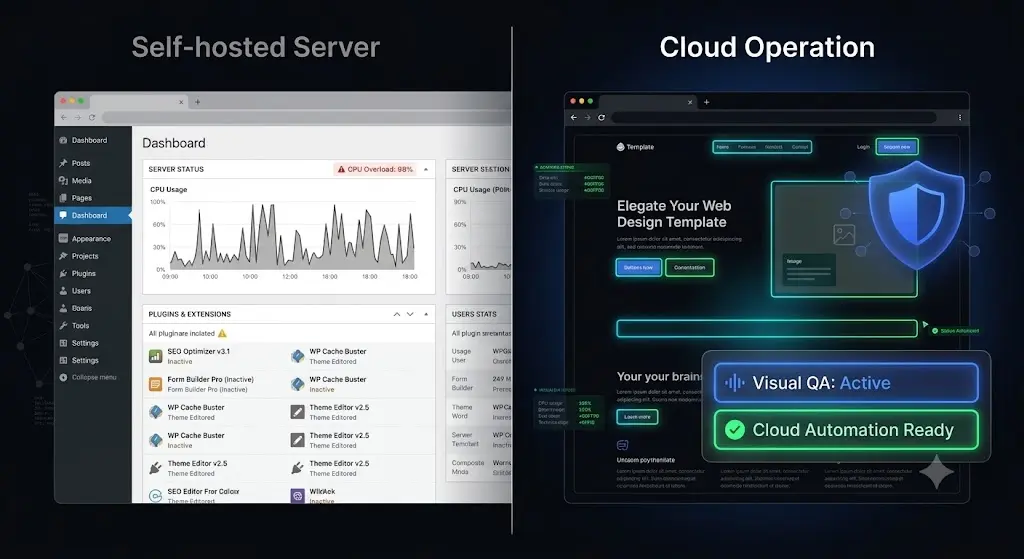
You log into your self-hosted control panel to execute your weekly maintenance routine for 60 client websites. You select all sites, click update, and wait. Suddenly, your command center dashboard freezes. The server hosting your management tool has hit its PHP memory limit and crashed under the weight of executing simultaneous bulk updates.
You now have no idea which client sites updated successfully, which ones failed, and worst of all, which ones might be completely broken on the frontend.
For years, InfiniteWP was a popular choice for agencies that wanted absolute control over their data by hosting their own management dashboard. However, the WordPress ecosystem of 2026 demands more than just a self-hosted remote control. Managing your own command center infrastructure has become a massive operational bottleneck. Furthermore, relying on a legacy platform that pushes code blindly without visual verification actively threatens your client retainers.
If you are tired of paying for a-la-carte premium modules, maintaining a heavy command center server, and spending hours manually checking client sites after every update, you need an autonomous system.
This guide breaks down exactly where self-hosted legacy tools hit their breaking point and why SiteOps is the definitive InfiniteWP alternative for agencies that want to automate safety and scale their profit margins.
Quick Answer: What is the best InfiniteWP alternative?
The best InfiniteWP alternative is SiteOps. While InfiniteWP requires agencies to manage their own heavy command center server and relies on blind plugin updates, SiteOps is a fully managed cloud platform. It acts as an autonomous AI tester, replacing manual QA with AI visual regression testing and automatically rolling back failed updates if a client’s frontend layout breaks.
Part 1: The Hidden Burden of the InfiniteWP Architecture
To understand why growing agencies are actively migrating away from InfiniteWP, we must look at the architectural foundation of the software and how it negatively impacts a modern agency workflow.
The Self-Hosted Command Center Problem
The primary selling point of InfiniteWP is that it is a self-hosted platform. You install the control panel on your own server, giving you complete data privacy.
While privacy is excellent, this architecture forces you to become a server administrator for your own internal tools. If you manage 10 simple blogs, a cheap shared hosting plan might suffice. But if you manage 100 complex sites and attempt to trigger bulk backups, deep security scans, and plugin updates simultaneously, the command center will consume massive amounts of CPU and RAM.
Agencies are often forced to pay for expensive, dedicated Virtual Private Servers (VPS) simply to keep their InfiniteWP dashboard from crashing during routine operations. You end up paying to maintain the tool that is supposed to be maintaining your clients.
The Clunky User Experience and Setup
Setting up a self-hosted dashboard and connecting worker plugins across dozens of environments is notoriously finicky. It often involves debugging firewall rules, tweaking server cron jobs, and adjusting PHP execution limits just to get the basic communication layer working.
In a modern agency, your time is your most valuable asset. Spending billable hours debugging your own management software is a fast track to burned-out developers and shrinking profit margins.
Part 2: The A-La-Carte Pricing Trap
InfiniteWP operates on a modular pricing model that closely mirrors other legacy tools. The core dashboard is free, but the free version is effectively useless for a professional agency.
To actually run a profitable maintenance business, you must purchase the premium add-ons. You are charged for every useful capability:
- Uptime monitoring costs extra.
- Automated client reporting costs extra.
- Security scanning costs extra.
- Advanced backup scheduling costs extra.
As you acquire new clients and scale your portfolio, your operational software overhead increases linearly. This modular pricing model actively penalizes your agency for growing. Every time you sign a new maintenance retainer, a portion of that new revenue immediately goes back into paying for additional software modules.
To build a highly profitable WordPress maintenance retainer, you must control your operational overhead. You need a platform built for infinite scaling, not infinite add-on fees.
Part 3: The Danger of Blind Plugin Updates
The most critical failure point of legacy tools like InfiniteWP is how they handle the actual execution of maintenance.
Modern WordPress sites are vastly more complex than they were five years ago. We are managing headless architectures, complex DOMs built with advanced page builders, and highly customized WooCommerce stores. In this environment, pushing a plugin update is inherently dangerous.
The Liability of Execution Without Verification
When you trigger a bulk update via InfiniteWP, the system executes the PHP command perfectly. However, the software is completely blind. It has no idea what the website actually looks like.
If a minor CSS tweak in a caching plugin shatters the mobile navigation menu, or if a WooCommerce update hides the checkout button, the dashboard will still give you a green checkmark indicating the update was “successful.” The server responded, but the business logic of the website is broken.
This creates the manual QA trap. Because your management tool cannot visually verify its own work, your team must compensate with manual labor. You have to clone every site to a staging environment, run the updates, and manually click through the pages to check for visual breakages.
The hidden cost of broken WordPress updates goes beyond the immediate lost sales for your client. It drains your agency’s billable hours as your senior developers are relegated to acting as human Quality Assurance testers.
Part 4: Why SiteOps is the Definitive InfiniteWP Alternative
Agencies are migrating to SiteOps because it is not just a remote control plugin. It is an autonomous WebOps platform hosted entirely on the cloud. It completely removes the server management burden and fundamentally redesigns how maintenance is executed.
Here is exactly how SiteOps proves itself as the ultimate AI WordPress maintenance solution.
1. Zero Infrastructure Management
SiteOps is an API-first SaaS platform. The heavy computational lifting, such as compiling AI reports, running deep vulnerability cross-referencing, and processing massive visual regression image data, happens entirely on the SiteOps cloud infrastructure.
You do not need to purchase a dedicated VPS, configure server cron jobs, or worry about PHP memory limits. The platform interacts with your client sites via secure, lightweight API calls. This ensures a near-zero footprint that protects your clients’ Core Web Vitals and completely eliminates your internal server maintenance costs.
2. Visual Regression Testing Replaces Manual QA
SiteOps completely solves the blind update problem. It is engineered to guarantee safe WordPress updates by using pixel-perfect visual regression testing.
When you trigger an update on SiteOps, it does not rely on a simple server ping. It acts exactly like a human developer:
First, the system spins up a headless browser instance. It visits your live production site and takes a high-resolution snapshot of the DOM and a visual screenshot of key pages. Next, it applies the plugin or core update. Then, it automatically clears the server cache to ensure it is viewing the live code.
The headless browser returns and takes a second set of screenshots. Finally, Artificial intelligence overlays the images. It can easily differentiate between expected dynamic content and a fatal layout break.
If you want to know exactly how to integrate this into your workflow, read our deep dive on how to safely update WordPress plugins without ever risking client downtime.
3. Instant Autonomous Auto-Rollbacks
Visual regression testing is incredible technology, but a WordPress monitoring tool that detects a broken site and simply sends you an email is just giving you a job to do.
If SiteOps detects a broken layout, a missing checkout button, or a white screen after an update, it instantly triggers an autonomous auto-rollback. Within seconds, it queries your backup vault and restores the MySQL database and file system to their exact, stable pre-update state.
The end-user never sees the broken site. You simply wake up to a dashboard notification explaining which specific plugin failed the visual QA test, allowing you to investigate at your convenience. This feature alone completely eliminates the need for manual staging site tests, allowing you to automate WordPress maintenance for multiple sites safely.
4. Proactive 4-Level Deep Security Scanning
Legacy tools rely on reactive blacklist verification. If Google flags your site for malware, they send an alert. By then, the SEO damage is done.
SiteOps acts as an advanced WordPress security monitoring platform, utilizing a 4-level deep scanning architecture to prevent breaches before they occur.
- Core File Integrity: Daily checks against WordPress.org cryptographic checksums.
- Active CVE Tracking: Continuous real-time cross-referencing of your active plugins against global Common Vulnerabilities and Exposures databases.
- Deep Malware Scanning: Deep scanning of the database to detect obfuscated PHP backdoors.
- Configuration Hardening: Automated audits of configuration file permissions.
Part 5: Feature Enhancements for Agency Growth
Replacing your management tool is an opportunity to upgrade your entire operational stack. Here is how SiteOps handles the critical daily requirements of a busy agency.
High-Frequency Uptime Monitoring and 1-Click Access
When comparing the best WordPress monitoring tools in 2026, frequency matters. SiteOps features native WordPress uptime monitoring that pings your entire portfolio every 5 minutes.
More importantly, if a site goes down, you do not have to waste time digging through a password manager. SiteOps provides 1-click secure, tokenized admin access directly from the dashboard. You click a button, bypass the login screen, and instantly enter the backend to begin triage.
AI-Generated White-Label Client Reporting
A traditional PDF report listing “15 plugins updated” means nothing to a non-technical client.
SiteOps revolutionizes white-label WordPress maintenance reporting. It uses artificial intelligence to analyze the month’s raw data, including uptime percentages, security firewall blocks, and specifically, layout breaks that were prevented by auto-rollbacks.
The AI transforms this data into a customized, human-readable executive summary. It translates technical actions into business value, proving exactly why the client’s investment in your agency is justified.
Part 6: Flat-Rate Pricing Built for Scale
SiteOps completely discards the a-la-carte pricing trap used by legacy platforms. The pricing model is built for infinite agency scaling.
- Starter: Free forever for 1 site (ideal for testing the workflow).
- Pro Plan: ₹2,499/month for up to 10 sites.
- Agency Plan: ₹5,999/month for unlimited sites.
Whether you manage multiple WordPress sites for 25 clients or 300 clients, your monthly software overhead on the Agency plan never increases. Every time you sign a new maintenance retainer, you retain 100% of the profit margin.
Part 7: Feature Comparison Table
To clearly summarize why SiteOps is replacing self-hosted legacy tools across the industry, examine how the structural capabilities compare side-by-side.
| Core Capability | InfiniteWP (Legacy) | SiteOps (AI Automation) | Impact on Agency Workflow |
|---|---|---|---|
| Infrastructure | Self-Hosted (High Server Load) | Cloud Managed SaaS | Eliminates VPS costs and server crashes |
| Update Verification | Manual Human Review | Pixel-Perfect Visual Regression | Eliminates manual QA staging hours |
| Broken Code Handling | None (Site remains broken) | Instant Autonomous Auto-Rollback | Protects client revenue immediately |
| Security Architecture | Premium Add-on required | 4-Level Deep Scan (incl. CVE tracking) | Prevents hacks before they occur |
| Client Reporting | Basic PDF Add-on | AI-Generated Executive Summaries | Increases client retention rates |
| Agency Pricing Model | Modular A-La-Carte fees | Flat Rate (Unlimited Sites available) | Retains 100% of profit on new clients |
Part 8: The Agency Migration Blueprint
One of the primary reasons agencies endure clunky software is the perceived nightmare of migrating dozens of client sites to a new platform.
With SiteOps, migration is completely frictionless, requires zero downtime, and can be executed progressively.
Step 1: Account Creation
Start by creating your free SiteOps account. Review your current portfolio and identify a small batch of low-risk sites for your initial test migration.
Step 2: Deploying the SiteOps Worker
SiteOps connects to your client sites via a highly optimized, lightweight worker plugin. You can install this plugin manually via the WordPress repository or upload it in bulk.
Step 3: The Coexistence Testing Period
You do not need to uninstall the InfiniteWP worker plugin to use SiteOps. Both plugins can safely coexist on the same installation without conflict. We highly recommend connecting a subset of your sites to SiteOps first. Trigger a few plugin updates. Watch the visual regression testing in action and verify the 5-minute uptime monitors are firing.
Step 4: Full Migration
Once you are confident in the SiteOps infrastructure and have successfully executed your WordPress maintenance checklist using the new tools, you can safely sever ties. Using your SiteOps dashboard, bulk-deactivate the old worker plugins from your client sites. You can then shut down your self-hosted command center server, cancel your premium module subscriptions, and watch your profit margins increase.
Part 9: Frequently Asked Questions
Why are agencies looking for an InfiniteWP alternative in 2026? Agencies are seeking alternatives because managing a self-hosted command center creates massive server overhead. Furthermore, InfiniteWP lacks autonomous visual verification, meaning agencies still have to spend hours manually checking sites after a bulk update.
What is the best alternative to InfiniteWP? For agencies prioritizing production safety and flat-rate pricing, SiteOps is the premier choice. It replaces manual QA testing with AI visual regression testing and instant auto-rollbacks, operating entirely on a managed cloud infrastructure.
Is self-hosted WordPress management better than SaaS? While self-hosted platforms offer high data privacy, they require you to become a server administrator for your own tools. Heavy bulk updates can easily crash a self-hosted dashboard. Modern cloud SaaS platforms handle the heavy processing off-site, protecting your server resources.
Are blind WordPress updates actually dangerous? Yes. A plugin update can completely break your CSS layout, hide your checkout forms, or cause fatal frontend visual errors while the server continues to run fine. True safe updates require visual regression testing to verify the frontend.
How does pricing compare between InfiniteWP and SiteOps? InfiniteWP uses a modular model where you pay for premium add-ons, which scales rapidly as you acquire more clients. SiteOps offers a flat-rate Agency plan for unlimited sites, making it far more profitable for growing agencies.
What is visual regression testing in WordPress? Visual regression testing uses a headless browser to take a screenshot of your site before an event, and another screenshot immediately after. AI compares the images pixel-by-pixel to detect visual breaks, missing elements, or layout shifts.
How do I migrate to a new WordPress management tool? Migrating is simple and requires zero downtime. You install the new platform’s worker plugin on your client sites, verify the connection, and then simply deactivate and delete the old legacy worker plugin from the client sites.
Can I automate WordPress updates safely? Yes, but only if your automation tool includes visual verification. Blindly auto-updating plugins is highly dangerous. Safe automation requires a modern platform that can visually see if the update broke the frontend and automatically reverse the action.
Does SiteOps slow down my client’s website? No. Advanced platforms like SiteOps process the heavy lifting, like visual regression testing image rendering and AI analysis, entirely on their own cloud infrastructure. They interact with your client’s site via lightweight API calls, resulting in zero performance impact.
What happens if a plugin update breaks a site on SiteOps? The system detects the visual break during the update process. Before the end-user ever sees the error, the AI autonomously triggers an auto-rollback, restoring the site’s database and files to their stable pre-update state in seconds.
The Bottom Line
Acting as your own server administrator just to run a maintenance dashboard is a massive drain on your agency’s resources.
The WordPress ecosystem of 2026 requires autonomous operations. To protect your clients’ revenue, scale your maintenance margins, and secure your agency’s reputation, you must transition away from self-hosted legacy tools that blindly push code.
By implementing AI visual regression testing, instant rollbacks, and a fully managed cloud infrastructure, you guarantee that you will never push a broken layout to a live production environment again.
Stop accepting the manual QA bottleneck and a-la-carte pricing. SiteOps automates the entire workflow. It is free for 1 site, no card required.
Scale Your Agency Today
Join 500+ agencies automating their WordPress maintenance. Get started with 3 sites for free. No credit card required.