The Silent Business Killer: Broken Lead Generation Forms After Core Updates
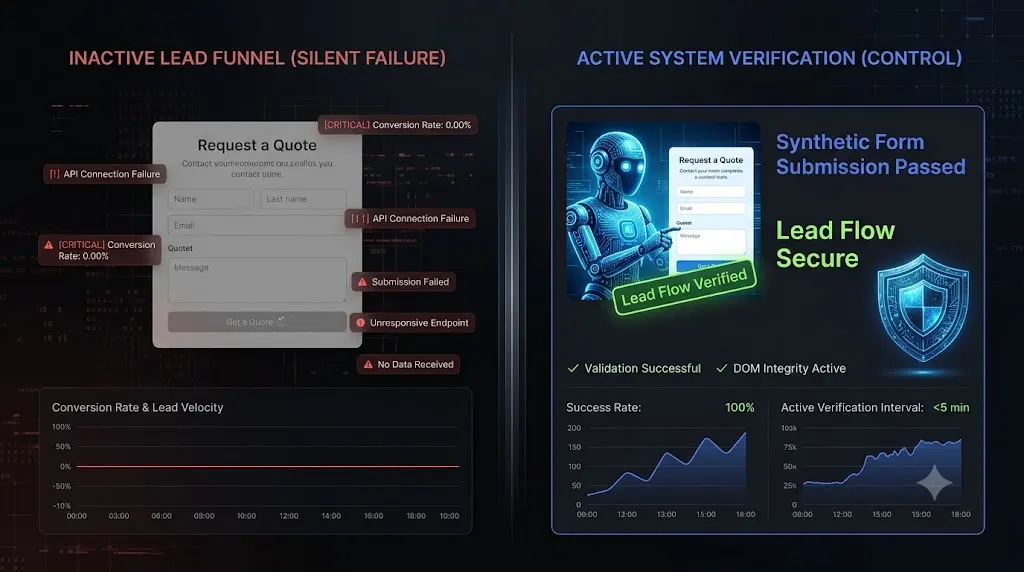
This guide breaks down exactly why routine core updates create broken lead generation forms, the immense financial liability of the lag time, and how top tier web agencies use AI synthetic bots to guarantee their clients never miss an inquiry again.
Your client runs a specialized B2B consulting firm. They spend $2,000 a week on LinkedIn and Google Ads, driving highly targeted traffic directly to a custom landing page.
On Thursday afternoon, WordPress releases a major core update. You log into your agency dashboard, execute the update across your portfolio, and confirm that every server is online. Your dashboard shows 100 percent uptime.
On Wednesday of the following week, your client calls you in an absolute panic. They have spent almost $1,500 on ads over the last six days, generating hundreds of clicks, but their CRM is empty. They have not received a single email inquiry.
You visit the site. It loads in under a second. You type your name into the contact form and click submit. The button spins, and spins, and spins. Nothing happens.
The website is technically online. The server is healthy. But the business is functionally paralyzed.
For agencies offering white-label WordPress maintenance, a silent form failure is a catastrophic event. You are responsible for protecting the client’s digital revenue engine. The most damaging aspect of this failure is not the bug itself; it is the lag time.
Quick Answer: Why did my lead generation form stop working?
Broken lead generation forms usually occur after a WordPress core or plugin update due to JavaScript conflicts or caching errors. If a core update changes how scripts load, or an optimization plugin defers the script required by Gravity Forms or WPForms, the submit button will fail silently. To prevent this, agencies use automated platforms like SiteOps to execute synthetic transaction tests, deploying a bot to physically fill out and verify the form after every single update.
The Lag Time Liability: Why “Silent” Failures Destroy Agencies
When a website completely crashes and throws a 500 Internal Server Error, it is a loud failure. You get a server alert, your team fixes it in twenty minutes, and the client barely notices.
A broken contact form is a silent failure. There are no server alarms. The client continues to burn their marketing budget, funneling high intent buyers into a dead end.
The true damage of a broken form is measured by the “Lag Time” (the window between the moment the update broke the form and the moment someone finally notices).
If you push an update on Thursday and the client discovers the failure on Wednesday, you have a six day Lag Time. During that window, the client lost their advertising budget and permanently lost those potential buyers to competitors. When they realize your agency missed this failure for almost a week, the trust evaporates. You will likely lose the maintenance retainer immediately.
To eliminate this Lag Time, you must understand the fragility of modern form plugins. They are not simple HTML inputs; they rely on complex, dynamic operations that break easily.
3 Ways Core Updates Kill Lead Funnels
When you click “Bulk Update” to apply a new WordPress core version or update active plugins, you introduce volatility into a delicate software ecosystem. Here are the three most common reasons your lead forms die silently.
1. JavaScript Deferral and AJAX Failures
Lead capture forms require specific JavaScript libraries (often jQuery) to validate the input fields and trigger the AJAX submission without reloading the page.
When WordPress pushes a core update, it frequently updates the bundled versions of these JavaScript libraries. If your client’s site uses a performance optimization plugin (like WP Rocket) to defer JavaScript for better Core Web Vitals, a massive conflict can occur. The optimization tool may improperly defer the newly updated core scripts.
The frontend user clicks submit, but the browser does not know how to process the request. The submit button simply becomes unresponsive.
2. The Caching and Nonce Expiration Trap
To secure dynamic requests and block spam, WordPress generates a “nonce” (a temporary, unique security token). Forms validate this nonce upon submission.
If an update alters your server’s caching headers, or if a caching plugin is misconfigured, it might cache the HTML of the page containing a specific nonce. Nonces naturally expire after 12 to 24 hours. When a real user tries to submit the form the next day, WordPress rejects the submission because the cached security token is invalid.
The frontend user clicks submit, but the server silently rejects it. The lead vanishes.
3. Visual Layout Shifts (The Z Index Conflict)
Sometimes the backend PHP and AJAX are working perfectly, but a theme or page builder update destroys the frontend user experience.
If an update alters the CSS properties of a background container, it might change the Z index. The form container shifts entirely behind a background image or a column block. The text fields are physically present in the code, but they are visually hidden or impossible to click.
Why Your Uptime Monitor Is Lying To You
If the form was broken for six days, why didn’t your legacy ManageWP alternative or your dedicated WordPress uptime monitoring tool send you a warning?
Because legacy tools rely on the HTTP 200 Fallacy.
Standard monitoring bots are incredibly basic. They send a ping to your client’s server every five minutes. If the server replies with an HTTP 200 OK status code, the bot logs the site as 100 percent healthy.
An HTTP 200 code only verifies that the server is turned on. It does not verify if an AJAX nonce has expired. It does not check if your CSS layout is shattered. Your client’s lead generation funnel can be completely dead, and your basic dashboard will still give you a bright green checkmark.
You cannot secure a modern business relying on basic server pings.
The Unbillable Trap of Manual Form Testing
To achieve safe WordPress updates without specialized software, agencies force their developers to perform intense manual Quality Assurance (QA).
After pushing updates to 30 client sites on a Friday, a developer must manually visit all 30 sites. They must navigate to the contact page, type in fake names and emails, click submit, and check a shared inbox to verify the message actually arrived.
This protocol works, but it is financially devastating.
If you manage multiple WordPress sites, you cannot burn 15 hours a week acting as a human click tester. If your agency bills at $150 an hour, you are destroying your profit margins just to verify basic business logic. You cannot build a profitable WordPress maintenance retainer if your team is trapped doing manual data entry.
Furthermore, manual testing only happens on update days. If a form breaks on a Tuesday due to a delayed caching conflict, you will not find it until Friday. The Lag Time still exists.
Automating Lead Verification with SiteOps
To scale a maintenance portfolio profitably, you must reduce your Lag Time to zero. You must replace human QA testers with autonomous AI.
This specific operational gap is exactly why we engineered SiteOps. SiteOps does not just push plugin updates; it acts as an autonomous WebOps agent, completely eliminating the risk of missed client inquiries.
Here is how top tier agencies guarantee their lead funnels never die.
1. Synthetic Transaction Testing (Form Submissions)
SiteOps goes beyond checking uptime. It utilizes synthetic transaction bots.
When you connect a site to your dashboard, you can configure the platform to test your critical conversion paths autonomously. The system spins up a headless Chromium browser in the cloud. It navigates to the client’s contact page. It actually types test data into the name and email fields, and it clicks the submit button.
Finally, it visually verifies that the specific Document Object Model (DOM) success message (e.g., “Thank you for your message”) rendered correctly on the screen. It mathematically proves that a customer can contact the business, catching AJAX failures and JS conflicts instantly.
2. AI Visual Regression During Updates
Before any core or plugin update executes, SiteOps takes a high resolution snapshot of your client’s live site. It applies the updates, flushes the caching layers, and takes a second screenshot.
Artificial intelligence overlays the images. It easily detects a fatal layout break, such as a missing “Submit” button or a shattered CSS grid around the form container that would prevent a user from typing. This completely automates the visual verification required in the ultimate WordPress maintenance checklist.
3. Instant Autonomous Auto Rollbacks
If the SiteOps AI detects that a core update broke the visual form layout, or if the synthetic bot fails to submit the form successfully, it halts immediately.
Within seconds, the platform triggers an autonomous auto rollback. The MySQL database and file system are restored to their exact stable pre update state.
The client never experiences a broken lead funnel. Their ad spend is protected. You simply wake up to a dashboard notification explaining exactly which plugin or core file failed the business logic test, allowing you to investigate safely on a staging server.
Stop Guessing If Your Forms Work
Understanding why you have broken lead generation forms is the first step in taking control of your agency’s liability.
If you manage client retainers using basic tools that rely on simple server pings, you are actively deploying risk. When evaluating a MainWP alternative or exploring how to automate WordPress maintenance for multiple sites, you must demand a platform that verifies its own work visually and functionally.
By upgrading to an autonomous WordPress maintenance tool equipped with synthetic transaction testing and deep WordPress security monitoring, you eliminate the Lag Time. You protect your clients’ revenue and secure your profit margins permanently.
Stop manually filling out contact forms every Friday. Let the AI handle the verification.
Test the synthetic transaction engine today. SiteOps is free for 3 sites, no credit card required.
Frequently Asked Questions
Why did my WordPress contact form stop working after an update? Forms usually fail silently after updates due to aggressive caching plugins stripping required AJAX security nonces, deferred JavaScript breaking the submit button functionality, or CSS updates that visually hide the form fields from the user.
How do I test a WordPress contact form safely? You can manually fill out the form and check the destination inbox. However, for agencies managing multiple sites, this is highly inefficient. Top agencies use automated platforms like SiteOps to deploy synthetic bots that autonomously fill out and submit the form to verify functionality daily.
Why does my form button spin endlessly when I click submit? A continuously spinning submit button indicates a JavaScript conflict or an expired caching nonce. Clear all WordPress and server level caches. If the issue persists, temporarily disable your optimization plugins to see if deferred JavaScript is breaking the AJAX submission.
Does a 100 percent uptime score mean my contact form works? Absolutely not. Uptime monitoring tools only check for an HTTP 200 OK status code. This simply means your server is turned on. Your site could have a broken CSS layout or a failing form, and basic uptime monitors will still falsely report the site as perfectly healthy.
What is a synthetic transaction in WordPress testing? A synthetic transaction is an automated test where a headless browser acts like a real user. It navigates to a page, types data into a form, clicks submit, and visually verifies the success message, proving the business logic of the site is intact without requiring human labor.
Can SiteOps detect if a core update breaks my forms? Yes. SiteOps uses AI visual regression testing and synthetic transaction bots. It takes screenshots before and after every update and actively tests the form. If it detects a layout break or a submission failure, it instantly triggers an autonomous auto rollback to restore the site.
How do agencies manage updates without breaking client sites? Professional agencies no longer use manual staging tests for every update because they are highly unprofitable. They use AI WordPress maintenance platforms that combine bulk execution capabilities with visual testing to verify frontend layouts autonomously.
How do I fix a contact form that is not sending emails? If the form submits successfully on the frontend but the email never arrives, you likely have an SMTP failure. Ensure you are using a dedicated transactional email plugin (like WP Mail SMTP) connected to an external provider (like SendGrid or Mailgun), as standard PHP mail is often blocked by spam filters.
How do you prove the value of maintenance to clients? Do not just send a raw PDF listing updated plugins. Use an automated reporting tool that translates technical data into a clear executive summary. The report should highlight exactly how many silent layout breaks or form failures were prevented by your proactive visual testing systems.
What is the hidden cost of a broken WordPress update?
The hidden cost of broken WordPress updates includes the immediate loss of retail revenue or lead generation during the downtime window, the wasted advertising spend driving traffic to a dead page, and the unbillable developer hours the agency must spend in emergency triage.
Scale Your Agency Today
Join 500+ agencies automating their WordPress maintenance. Get started with 3 sites for free. No credit card required.