How to Automatically Verify Your WordPress Forms Work After a Plugin Update
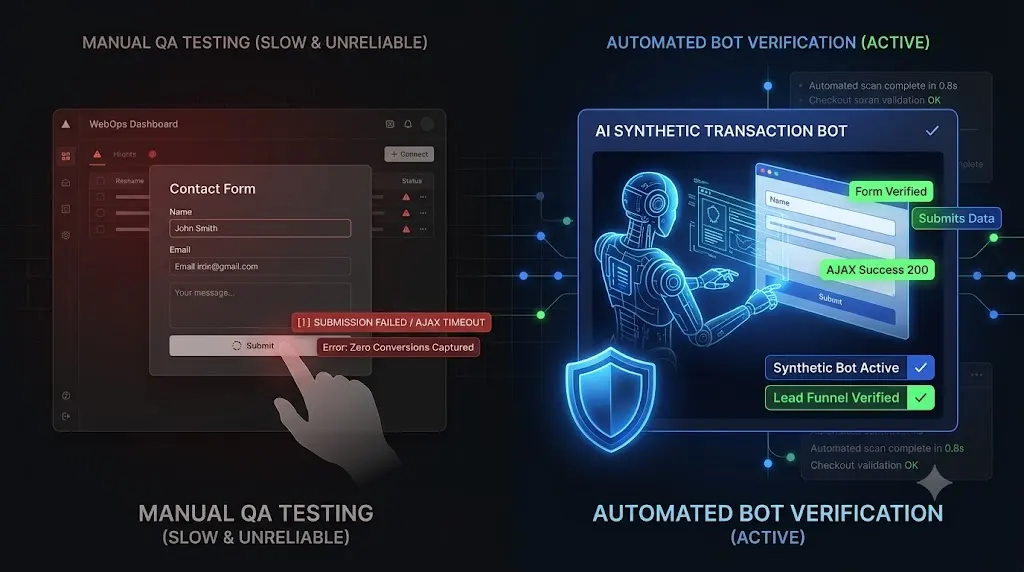
This technical guide explains the mechanics of silent form failures, why legacy ping monitors ignore them, and exactly how top tier agencies automatically verify wordpress forms using autonomous synthetic transaction bots.
You manage a high volume lead generation website for a B2B client. They rely heavily on a complex Gravity Forms setup to capture quote requests.
It is Friday afternoon. You push a routine update to WP Rocket and your security plugin. Your dashboard gives you a green checkmark, indicating the plugins updated successfully. The server uptime is 100 percent. You close your laptop.
On Wednesday, the client calls you. They have not received a single email lead since Friday. They have burned a thousand dollars in Google Ad spend routing traffic to a dead page. You visit the site, type in your name, and click submit. The button just spins endlessly.
A caching misconfiguration caused the WordPress AJAX security nonce to expire, breaking the form submission script entirely. The server was perfectly healthy, but the business logic was dead.
If you manage client retainers, a silent form failure is a catastrophic operational liability. You cannot push WordPress updates blindly, but you also cannot afford to manually fill out 50 contact forms every Friday.
Quick Answer: How do you automatically test WordPress forms?
To automatically verify WordPress forms after a plugin update, agencies use WebOps platforms like SiteOps that deploy synthetic transaction bots. During the update cycle, a cloud based headless browser visits the client’s contact page. It locates the Document Object Model (DOM) input fields, physically types test data (name, email, message), clicks the submit button, and visually verifies that the AJAX success message renders correctly. If the form fails to submit, the platform triggers an instant auto rollback to restore the site.
The Mechanics of a Silent Form Failure
To understand why verification is necessary, you must understand why forms break. WordPress lead capture forms (like WPForms, Contact Form 7, or Ninja Forms) are highly volatile integrations.
When you update plugins, you introduce risk. Forms typically fail for three distinct reasons that basic server monitors cannot detect.
1. The Expired Caching Nonce
Modern forms use AJAX to submit data without refreshing the page. To secure this process, WordPress generates a “nonce” (a temporary security token). If an optimization plugin caches the HTML of the page, it caches the nonce. When that nonce expires (usually after 12 to 24 hours), the server rejects any new form submissions. The button spins forever, and the user receives no error message.
2. JavaScript Deferral Conflicts
To pass Google Core Web Vitals, optimization plugins aggressively defer JavaScript execution. If a plugin update changes how scripts are minified, it might accidentally defer the specific jQuery library required by Gravity Forms to validate the input fields. The form renders visually, but the submit button becomes entirely unresponsive.
3. Z Index and CSS Shifts
A page builder update (like Elementor or Divi) can alter the global CSS structure. A background column might shift its Z index, overlaying the contact form. The form exists in the code, but it is physically impossible for a human visitor to click their mouse inside the text input fields.
Relying on basic WordPress uptime monitoring to catch these errors is a massive mistake. A ping bot only verifies that the server is awake; it cannot verify if your lead funnel works.
The Unbillable Nightmare of Manual QA
If you do not have automation, the only way to achieve safe WordPress updates is through manual Quality Assurance (QA) testing.
If you manage multiple WordPress sites, let us look at the actual cost of this process.
After updating plugins on a staging server, your developer must manually navigate to the contact page, type in a fake name, enter a test email, write a message, pass the reCAPTCHA, click submit, and then check a shared agency inbox to ensure the email was successfully routed via SMTP.
This takes approximately 5 minutes per site. If you have 40 clients on retainer, your team is burning over 3 hours of highly focused, unbillable labor every single week acting as human click testers.
You cannot build a highly profitable maintenance agency if your model requires intense manual data entry every single Friday. You must eliminate the human bottleneck.
How to Automatically Verify Forms with SiteOps
Top tier agencies have decoupled the execution of updates from human verification. They use advanced WebOps platforms to automate their QA processes entirely.
This operational shift is the core reason why agencies are leaving legacy tools.
We engineered SiteOps specifically to act as your autonomous WebOps engineer. It natively integrates Synthetic Transaction Testing directly into your update workflow.
Here is the exact technical sequence SiteOps uses to verify your lead funnels automatically.
Step 1: The Headless Bot Deployment
When you initiate a plugin update, SiteOps does not just push the code. It spins up a headless Chromium browser instance in the cloud. This browser acts exactly like a human prospect visiting your client’s website.
Step 2: DOM Interaction and Data Injection
The synthetic bot navigates to the specific URL containing the client’s primary lead generation form. It analyzes the Document Object Model (DOM) to locate the specific HTML input fields based on your configuration.
It does not bypass the frontend. The bot physically types predefined test data (e.g., “SiteOps Automated Test”) into the Name, Email, and Message boxes. It interacts with the site exactly as a standard user would.
Step 3: Visual Success Verification
The bot clicks the submit button. It does not just assume the click worked. It waits and visually verifies the response.
It checks the DOM to ensure that the specific AJAX success message (e.g., “Thank you for your message, we will be in touch shortly”) successfully rendered on the screen. It mathematically proves that a customer can contact the business, catching expired caching nonces and deferred JavaScript conflicts instantly.
Step 4: The Auto Rollback Protocol
Detecting a broken form is powerful, but true automation requires active remediation.
If SiteOps updates a caching plugin and the synthetic bot subsequently fails to submit the form, the platform halts the update process immediately. Within seconds, it triggers an autonomous auto rollback.
The MySQL database and file system are restored to their exact stable pre update state. The client never experiences a broken lead funnel. Their advertising budget is protected. You simply wake up to a dashboard notification explaining exactly which plugin broke the form logic, allowing you to investigate safely on a staging server.
Managing the CRM Data (Test Lead Filtering)
A common concern agencies have when they automatically verify wordpress forms is flooding their client’s CRM or inbox with fake test leads.
This is easily managed through simple filtering.
When configuring your synthetic tests in SiteOps, you set a specific, dedicated email address for the bot to use (e.g., automated-qa@youragency.com). You then log into the client’s CRM (like HubSpot or Salesforce) or their email provider (Google Workspace) and create a simple routing rule:
If sender email equals automated-qa@youragency.com, automatically archive and mark as read.
The client never sees the test emails, but you retain the absolute mathematical certainty that their forms are functioning perfectly every single day.
Scale Your Agency Operations
Understanding how to verify business logic automatically is the foundation of modern agency survival.
If you offer white-label WordPress maintenance using a basic ManageWP alternative or MainWP alternative that relies on simple server pings, you are actively deploying risk. You will eventually push an update that breaks a lead generation form, and you will eventually lose a high paying client because of it.
Conversely, if you manually execute QA checklists on staging environments, you are artificially capping your agency’s growth potential by burning billable hours.
By upgrading to an autonomous WordPress maintenance tool equipped with synthetic transaction testing, visual regression, and proactive WordPress security monitoring, you completely eliminate the manual QA bottleneck.
Stop filling out contact forms manually. Let the AI handle the verification.
Test the synthetic transaction engine today. Claim your free sites, execute your first deterministic update, and guarantee your clients never miss another lead.
Frequently Asked Questions
How do I automatically verify WordPress forms? You must use an advanced maintenance platform like SiteOps that utilizes synthetic transaction bots. These headless browsers autonomously navigate your site, type test data into your forms, click submit, and visually verify that the AJAX success message renders correctly after any plugin updates.
Why do WordPress forms stop working after updates? Forms usually fail silently after updates due to aggressive caching plugins stripping required AJAX security nonces, optimization plugins deferring the JavaScript needed to process the submission, or page builder updates altering the CSS and hiding the input fields.
What is a synthetic transaction in WordPress testing? A synthetic transaction is an automated process where a headless browser acts like a real user. It navigates to a page, fills out a contact form or adds an item to a cart, and visually verifies that the business logic of the site is intact without requiring human labor.
Why did my uptime monitor miss my broken contact form? Basic WordPress monitoring tools only check if your server responds with an HTTP 200 OK code. A server can be perfectly online and healthy while serving a broken JavaScript file that prevents a form from submitting. You need synthetic testing to verify frontend functionality.
Does automated form testing mess up my client’s CRM data? Professional testing tools allow you to configure specific test email addresses. You can set up simple filtering rules in your client’s inbox or CRM to automatically archive or delete leads coming from that specific test address, keeping their data clean.
What happens if a plugin update breaks a form on SiteOps? If a plugin update causes the synthetic form test to fail, the SiteOps AI detects the failure instantly. Before the client ever misses a real lead, the system autonomously triggers an auto rollback, restoring the site’s database and files to their stable pre update state in seconds.
Can WordPress automatically update plugins safely? Native WordPress auto updates are highly risky for lead generation sites because they execute blindly. They push the new code without verifying if it broke the frontend layout or the form submission script. Safe automation requires a dedicated third party tool with visual verification capabilities.
How do agencies test forms at scale without losing money? Top tier agencies eliminate manual QA testing by using automated maintenance platforms. These platforms natively integrate synthetic transaction testing, automatically verifying that forms work across dozens of client sites every single day without requiring unbillable human labor.
Can automated form testing bypass reCAPTCHA? While synthetic testing is designed to verify functionality, you must ensure your testing bot is whitelisted in your spam protection settings (like Google reCAPTCHA v3 or Akismet). The testing tool ensures legitimate users can get through; it is up to your form’s configuration to block the actual spam.
How do you prove the value of form testing to a client? Use an automated reporting tool that translates this data into business value. Your monthly executive summary should highlight exactly how many times the lead funnel was verified as healthy, proving to the client that you are actively protecting their sales pipeline.
Scale Your Agency Today
Join 500+ agencies automating their WordPress maintenance. Get started with 3 sites for free. No credit card required.