How to Run Emergency PHP ‘Panic Scans’ on Compromised WordPress Sites
It is 3:00 AM. Your PagerDuty alert fires. A high-traffic enterprise client reports that their WooCommerce checkout is redirecting users to a malicious phishing domain. An emergency wordpress malware scan is critical to identify the compromise, locate malicious code, and begin securing the site immediately. You log into their server. The site is actively compromised. […]
- Always capture a pre-update snapshot of both the database and files before updates.
- Run pixel-by-pixel visual diffing: changes above 5% indicate critical layout breaking.
- Automate rollbacks without human delays to prevent lost revenue on client stores.
- Quarantine suspect files instead of deleting so post-mortem analysis remains possible.
It is 3:00 AM. Your PagerDuty alert fires. A high-traffic enterprise client reports that their WooCommerce checkout is redirecting users to a malicious phishing domain. An emergency wordpress malware scan is critical to identify the compromise, locate malicious code, and begin securing the site immediately.
You log into their server. The site is actively compromised. Every second that ticks by costs the client thousands of dollars in lost revenue and causes immeasurable damage to their brand reputation.
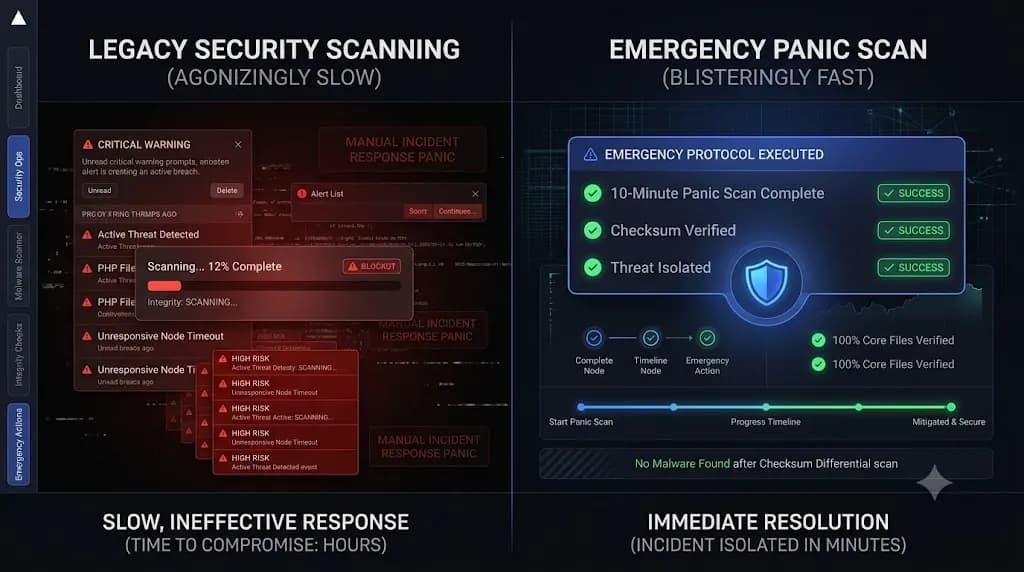
You install a standard WordPress security monitoring plugin and initiate a full site scan. The progress bar begins to crawl. It estimates a completion time of 4 hours because the client has a massive media library and a bloated database.
You do not have 4 hours. You need answers in 4 minutes.
When a production environment is breached, relying on traditional, resource heavy security scanners is an operational failure. Traditional scanners are designed for routine weekly maintenance, not active Incident Response (IR). During a live zero day exploitation event, DevOps engineers must deploy an entirely different protocol.
This technical guide breaks down the architecture of a rapid triage event. We will explore why standard tools fail under pressure, the exact mechanics of cryptographic file checksum comparisons, and how elite WebOps teams execute a 10 minute emergency wordpress malware scan to isolate threats instantly.
Quick Answer: How do you run an emergency WordPress malware scan?
To run an emergency wordpress malware scan, you must bypass traditional plugins that scan every single image file slowly. Instead, execute a “Panic Scan” protocol using a specialized WebOps platform like SiteOps. A panic scan takes under 10 minutes by skipping media folders and strictly verifying the cryptographic checksums of core WordPress files against official repositories. It cross references active plugins directly against live CVE databases and sweeps the raw database for hidden payloads, allowing DevOps engineers to isolate the breach immediately.
The Problem With Traditional Incident Response
When you manage multiple WordPress sites for high value retainers, your Incident Response time dictates your profit margins. If a client gets hacked, unbillable emergency triage can destroy your agency’s monthly revenue.
Traditional security plugins exacerbate this problem due to three fundamental architectural flaws.
1. The Speed Bottleneck
Standard plugins scan everything. They read every single high resolution image in the wp-content/uploads/ directory, looking for embedded PHP. While this is thorough for a weekly audit, it is useless during a live breach. Scanning 50 gigabytes of media files takes hours. You need to find the active backdoor right now, not audit an image from 2021.
2. The API Blind Spot
Standard scanners run inside the WordPress environment. If the attacker injected a highly sophisticated payload, they likely hooked into the WordPress API to hide their tracks. They create Ghost Admin accounts that are completely invisible to standard plugins. You cannot trust a compromised server to accurately report its own health status.
3. Server Resource Exhaustion
If the site is under active attack by a botnet, CPU and RAM are already maxed out. Initiating a heavy, server side PHP scan will likely crash the database entirely, turning a security incident into a complete site outage.
What is a PHP Panic Scan?
A PHP Panic Scan (or Emergency Triage Scan) is a highly targeted, stripped down forensic sweep. It is designed to answer one question immediately: Where is the unauthorized code executing right now?
Instead of reading every file on the disk, a panic scan relies on deterministic verification. Here is the exact technical execution of an emergency triage sequence.
Phase 1: Cryptographic Checksum Verification
Hackers frequently inject malicious base64 encoded scripts directly into core WordPress files like wp-load.php or wp-config.php.
Instead of reading the code line by line, a panic scan uses cryptographic hashing. The scanner generates an MD5 or SHA hash of every core file on your server. It then queries the official WordPress.org Checksum API for your specific WordPress version.
If the hashes match perfectly, the core files are clean. If a single byte of code was modified by a hacker, the hash completely changes, and the file is instantly flagged. This mathematical verification takes seconds, completely eliminating the need to read millions of lines of code.
Phase 2: Live CVE Database Cross Referencing
Over 90% of WordPress breaches originate from outdated third party plugins. An attacker exploits a known Common Vulnerabilities and Exposures (CVE) flaw to gain entry.
A panic scan does not look for malware signatures inside plugin files; that takes too long. Instead, it pulls the version numbers of your active plugins and pings global CVE threat databases in real time. If your client is running a form plugin that had a zero day exploit announced three hours ago, the panic scanner flags it as the probable entry point immediately.
Phase 3: Raw Database Sweeping
To ensure a rapid response, the scan bypasses the file system entirely and goes straight to the raw MySQL database.
It queries the wp_options table directly, looking for massive serialized strings containing known ClickFix social engineering campaigns or obfuscated Javascript. It checks the wp_users table directly to verify administrator counts, bypassing the native WordPress API to expose hidden Ghost Admins instantly.
Executing a 10 Minute Panic Scan with SiteOps
When you are fighting an active threat, you cannot afford to write custom SQL queries or manually verify checksum hashes via command line. You need a centralized platform that automates the emergency triage protocol.
This is exactly why we engineered SiteOps. SiteOps provides agencies with an enterprise grade emergency wordpress malware scan capability that executes in minutes.
If a client site is compromised, you do not have to wait 4 hours for a legacy plugin to finish spinning. You deploy the SiteOps Panic Scan.
- Bypass the File Bloat: SiteOps intentionally ignores static media directories during a panic scan to prioritize speed, focusing exclusively on executable paths (like
mu-pluginsand the active theme directory). - External Execution: The heavy lifting of the scan is processed on the SiteOps cloud infrastructure, not your client’s compromised server. This ensures the scan completes rapidly without crashing a server that is already under heavy botnet load.
- 1-Click Forensic Remediation: When SiteOps isolates the modified core file, the outdated vulnerable plugin, or the hidden database user, it presents you with a clear triage report. From the dashboard, you can trigger a 1-click remediation, dropping the malicious database user and quarantining the infected files instantly.
Stop Wasting Hours on Manual Triage
When evaluating the best WordPress monitoring tools in 2026, DevOps engineers must prioritize Incident Response speed.
A detailed MainWP vs ManageWP vs SiteOps analysis proves that relying on basic remote controls or slow, reactive security plugins is a massive operational liability. The hidden cost of broken WordPress updates and security breaches is the unbillable time your senior engineers spend hunting for the entry point.
You must upgrade your tech stack to support rapid, deterministic forensics.
By utilizing autonomous AI visual regression for safe WordPress updates to prevent breaches, and deploying 10 minute panic scans for active incident response, you secure your clients’ revenue and protect your agency’s margins.
Secure your sites using the SiteOps panic security scanner. Connect your first 3 sites free today.
Frequently Asked Questions
What is an emergency wordpress malware scan? An emergency scan (or panic scan) is a rapid forensic sweep designed for active incident response. Unlike standard scans that take hours to read every image file, a panic scan finishes in minutes by focusing strictly on core file checksums, live CVE vulnerability cross referencing, and raw database audits to locate the breach instantly.
How do cryptographic file checksums work in WordPress? WordPress.org maintains a public API listing the exact mathematical hashes (checksums) for every original core file of every WordPress version. A security scanner calculates the hash of the files on your server and compares them. If the hashes do not match, the file has been altered by an attacker.
Why are standard security plugins too slow for active breaches? Standard plugins are designed for thorough weekly audits. They scan every single media file in the wp-content/uploads directory. For a large WooCommerce site, this means scanning gigabytes of data line by line, which can take hours and exhaust server CPU during a critical emergency.
What is a Ghost Admin in WordPress? A Ghost Admin is a malicious administrator account created by a hacker in the raw database. The attacker uses a hidden PHP script to intercept the WordPress API, erasing their username from the standard dashboard user list so the site owner and standard security plugins never see them.
How do I quickly find the entry point of a WordPress hack? The fastest method is cross referencing your installed plugins against a live CVE database. Over 90% of hacks exploit outdated third party plugins. If a panic scan reveals you are running a version of a plugin that had a zero day exploit announced yesterday, you have found your entry point.
Can I run a SiteOps panic scan without migrating my hosting? Yes. SiteOps is a centralized WebOps platform. You simply install the lightweight worker plugin on your client’s existing site. You can execute deep forensic database scans and checksum verifications remotely, regardless of which hosting provider your client uses.
What should I do immediately after finding WordPress malware? You must isolate the site, identify the entry point (the vulnerable plugin), patch or remove that plugin, clean the raw database of any Ghost Admins, replace WordPress core files via FTP, and instantly rotate all administrator passwords and database credentials.
How do agencies manage security across 50+ WordPress sites? Top tier agencies use automated white-label WordPress maintenance platforms. They automate WordPress maintenance for multiple sites by running daily automated forensic sweeps and CVE checks across the entire portfolio, catching vulnerabilities before panic scans are even necessary.
How does SiteOps fix broken WordPress updates? SiteOps utilizes AI visual regression testing. It takes screenshots before and after every plugin update. If the AI detects that an update shattered a CSS layout or broke a WooCommerce checkout, it executes an instant auto rollback to restore the site automatically.
How do you prove the value of a security retainer to a client? Use an automated reporting tool that translates technical data into business value. Your executive summary should highlight exactly how many CVE threats were proactively patched, how many unauthorized login attempts were blocked, and the rapid response times guaranteed by your WebOps stack.
Written by SITEOPS Engineering
We build the WordPress operations platform agencies use to update, secure and monitor client sites. These guides come directly from maintenance incidents and automated workflows we operate.