Automating Broken Link Checks Across Your Entire WordPress Portfolio
When you launch a brand-new website for a client, the ecosystem is perfect. Every internal page routes correctly. Every external link points to an active, authoritative resource. The user experience is flawless. Over time, however, links can break, making an automated wordpress broken link checker essential for maintaining SEO performance and user trust. Fast forward […]
- Always capture a pre-update snapshot of both the database and files before updates.
- Run pixel-by-pixel visual diffing: changes above 5% indicate critical layout breaking.
- Automate rollbacks without human delays to prevent lost revenue on client stores.
- Quarantine suspect files instead of deleting so post-mortem analysis remains possible.
When you launch a brand-new website for a client, the ecosystem is perfect. Every internal page routes correctly. Every external link points to an active, authoritative resource. The user experience is flawless. Over time, however, links can break, making an automated wordpress broken link checker essential for maintaining SEO performance and user trust.
Fast forward twelve months.
The client has published 50 new blog posts, deleted three old service pages, and linked to dozens of external industry articles. Unbeknownst to them, half of those external industry articles have been taken down, returning 404 errors. They forgot to set up 301 redirects for the service pages they deleted.
This phenomenon is known as “link rot.” Over time, the internet changes, and the links on your client’s website decay.
Link rot is a silent killer for digital agencies. It destroys the user experience, spikes bounce rates, and signals to Google that the website is poorly maintained, which plummets their organic SEO rankings. If you manage a profitable WordPress maintenance retainer, allowing a client’s site to rot from the inside out is a failure of quality control.
However, checking thousands of links manually across 50 client websites is mathematically impossible. This guide breaks down the true cost of link rot, the severe performance dangers of using local WordPress plugins to scan for errors, and how elite agencies deploy an automated wordpress broken link checker from the cloud to guarantee portfolio quality control.
Quick Answer: What is the best automated WordPress broken link checker?
The best automated WordPress broken link checker for agencies is a cloud based platform, rather than a local WordPress plugin. Local plugins force the client’s server to do the heavy lifting, often causing CPU spikes and site slowdowns. Advanced WebOps platforms like SiteOps crawl the website from external cloud servers, identifying 404 errors, dead images, and broken redirects without impacting the client’s live production server performance.
The Silent Threat of Link Rot
Before addressing the technical solution, you must understand the business liability of broken links. Clients pay agencies for digital growth. A rotting link profile actively reverses that growth through two primary vectors.
1. The SEO Penalty (Crawl Budget Waste)
Google uses automated bots to crawl your client’s website. They have a limited “crawl budget” for every domain.
If Googlebot lands on your client’s site and continually hits 404 dead ends, it assumes the site architecture is broken and unmaintained. Google will stop crawling the site as deeply or as frequently. Furthermore, passing link equity (PageRank) to a dead external URL completely wastes the SEO authority of your client’s page. The resulting drop in search engine visibility directly impacts their bottom line.
2. The Conversion Rate Drop
If a high intent buyer clicks a “Read More About Our Process” button and is met with a 404 error page, the transaction is over. They immediately lose trust in the brand, assume the business is defunct, and bounce to a competitor.
If you offer white-label WordPress maintenance, you cannot allow these user experience failures to persist. You must find them before the user does.
The Problem with Local Broken Link Plugins
When an agency first decides to tackle quality control, they usually go to the WordPress repository and install a free broken link checker plugin directly onto the client’s dashboard.
This is a massive operational mistake.
The Server Resource Drain
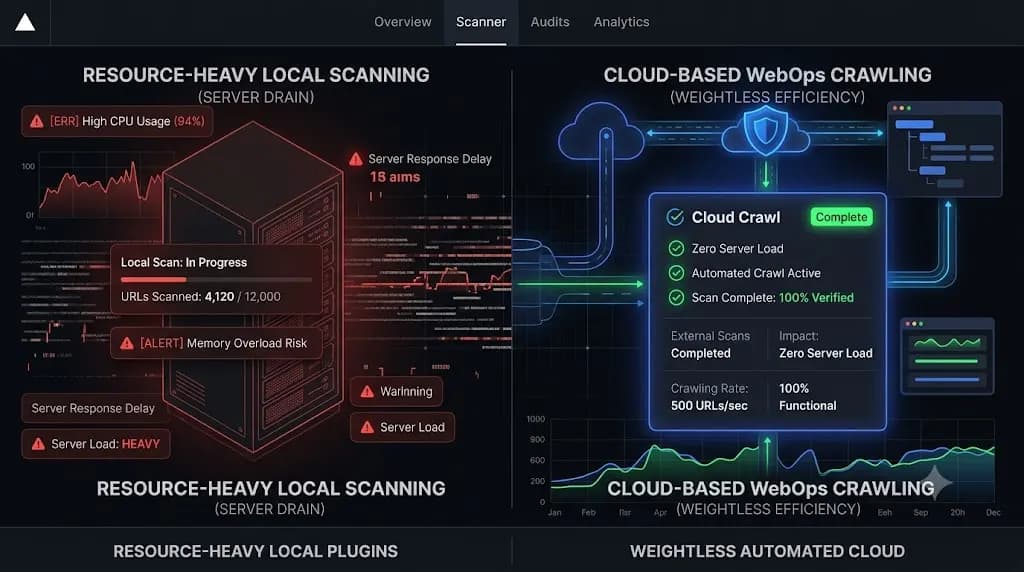
Scanning a website for broken links is an incredibly resource intensive process. The software must read every single post, extract every URL, and send an HTTP request to that URL to see if it responds.
If you install a local plugin to do this, you are forcing your client’s web server to do all the heavy lifting. On a site with a large database, a continuous background link scan can consume massive amounts of PHP memory and max out the server’s CPU.
This causes the live website to slow to a crawl for actual human visitors. In many cases, cheap shared hosting providers will actually suspend your client’s account for excessive CPU usage caused by these scanning plugins.
The IP Blacklisting Risk
If a local plugin aggressively pings external websites to check if their links are active, those external firewalls may interpret the rapid requests as a Denial of Service (DDoS) attack or aggressive scraping. They will block your client’s server IP address.
To manage multiple WordPress sites efficiently, you cannot bloat their local databases or risk their server IP reputations. You must offload the work.
The Agency Solution: Cloud Based Automated Crawling
To scale quality control across a massive portfolio, top tier agencies have abandoned local plugins entirely. They use centralized WebOps platforms to perform the scanning from the outside looking in.
This is exactly how AI WordPress maintenance is changing agencies. You decouple the heavy processing tasks from the fragile WordPress environment.
Here is how an external, automated wordpress broken link checker transforms agency operations.
1. Zero Server Performance Impact
Cloud based platforms deploy their own crawler bots (similar to Googlebot). These bots visit your client’s website, read the HTML, and follow the links.
Because the entire scanning process happens on the platform’s cloud infrastructure, your client’s server CPU and PHP memory are completely untouched. The live website remains lightning fast, even while thousands of links are being verified in the background.
2. Centralized Portfolio Detection
If you manage 50 clients using local plugins, you have to log into 50 different dashboards to see if they have broken links.
A centralized platform aggregates the data. From a single command center, you can view a consolidated list of every 404 error, missing image asset, and broken redirect across your entire agency portfolio. This allows a junior developer to spend one hour a week fixing links across dozens of sites, rather than hunting for them manually.
3. Automated Client Reporting and Proof of Value
Fixing a broken link is invisible labor. If you fix it before the client notices, they do not know you did anything.
Modern platforms automate the communication of this value. They generate branded executive summaries that highlight exactly how many dead links were detected and resolved during the billing cycle. This proves to the client that you are actively protecting their SEO equity and user experience, completely justifying your monthly retainer fee.
How SiteOps Automates Quality Control
When comparing the best WordPress monitoring tools in 2026, you must look for platforms that unify all aspects of site health.
If you are using a legacy ManageWP alternative, you are likely only getting uptime pings and bulk updates. You are missing the critical quality control layer.
We engineered SiteOps to act as a complete, autonomous WebOps engineer for your agency. SiteOps integrates an advanced, cloud based broken link crawler directly into your maintenance workflow.
- Autonomous Weekly Sweeps: SiteOps automatically crawls your connected client sites in the background, identifying 404s and broken assets without requiring any manual initiation.
- Zero Local Bloat: Because the crawler operates from the SiteOps cloud infrastructure, you do not need to install heavy, database bloating plugins on your client’s server.
- Unified Verification Stack: SiteOps pairs this broken link detection with AI visual regression testing for safe WordPress updates and deep WordPress security monitoring. You get total operational control from a single dashboard.
Stop Letting Client Sites Rot
A beautiful website on launch day is meaningless if the infrastructure slowly decays over the next twelve months.
If you rely on clients to report broken links, or if you use heavy local plugins that drag down server performance, you are creating a massive liability for your agency. A detailed MainWP vs ManageWP vs SiteOps comparison proves that cloud based, automated verification is the only way to scale profitably.
Integrate comprehensive link scanning into your WordPress maintenance checklist today. You can automate WordPress maintenance for multiple sites and ensure total quality control.
Clean up broken links across client sites with SiteOps. Start your free trial for up to 3 sites today.
Frequently Asked Questions
What is an automated WordPress broken link checker? It is a software tool that automatically scans all the pages, posts, and images on a WordPress website to find URLs that return 404 errors or dead ends. Advanced versions operate from the cloud to avoid slowing down the client’s live web server.
Why are broken links bad for WordPress SEO? Search engines like Google assign a crawl budget to your site. If their bots continuously hit broken links, they assume the site is poorly maintained and stop crawling it deeply. Furthermore, broken links create a terrible user experience, increasing bounce rates, which negatively impacts your rankings.
Why shouldn’t I use a free broken link checker plugin? Free local plugins force the client’s web server to do the heavy lifting. Scanning thousands of links consumes massive amounts of CPU and PHP memory, which slows the live website down for actual users and can even cause cheap shared hosting accounts to be suspended.
How does cloud based link crawling work? Instead of running code inside the WordPress dashboard, a cloud based tool uses its own external servers to visit the website, just like a normal visitor or Googlebot would. It reads the HTML, follows the links, and logs any errors on its own infrastructure, resulting in zero performance impact for the client.
How often should an agency check for broken links? For active business sites, agencies should configure their automated WebOps platforms to crawl the site for broken links and missing assets at least once a week. This ensures link rot is caught quickly before it can impact SEO rankings or active marketing campaigns.
Can broken links affect WooCommerce conversions? Absolutely. If a customer clicks a related product link, a promotional banner, or a sizing guide that returns a 404 error page, their trust in the store drops immediately. They will likely abandon their cart and purchase from a competitor with a fully functional website.
How do I fix a broken link in WordPress? Once your automated crawler identifies a broken link, you must decide the best action. If the external site was taken down, you should remove the link or replace it with a new source. If it is an internal page you deleted, you must set up a 301 Redirect to point that old URL to the most relevant new page.
What is the best way to prove quality control to clients? Use an automated WordPress maintenance tool that generates white label executive reports. The report should explicitly list how many broken links your agency detected and resolved that month, proving your proactive value and justifying the retainer fee.
Does SiteOps replace local SEO plugins? SiteOps replaces heavy diagnostic plugins (like local broken link checkers or security scanners) to keep the database light and fast. However, you still need a dedicated SEO plugin (like Yoast or RankMath) to manage your meta titles, schema markup, and on page optimization.
How do agencies scale maintenance without adding unbillable hours? They adopt autonomous platforms. By using a tool that automatically scans for broken links, visually verifies plugin updates via AI, and generates client reports autonomously, agencies can scale their MRR (Monthly Recurring Revenue) without having to hire a massive team of manual QA testers.
Written by SITEOPS Engineering
We build the WordPress operations platform agencies use to update, secure and monitor client sites. These guides come directly from maintenance incidents and automated workflows we operate.