The Best Free ManageWP Alternatives in 2026 (And The Hidden Costs)
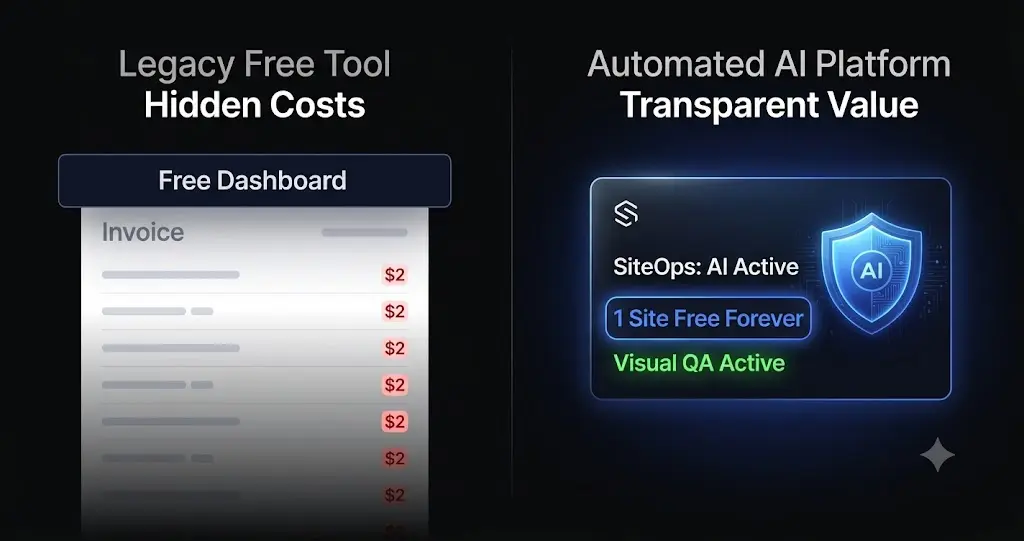
You signed up for ManageWP because the dashboard was advertised as completely free. It solved your immediate problem of logging into a dozen different admin panels.
But as you transitioned from managing a few hobby blogs to running a professional agency with paying clients, you hit a wall. You realized that a monthly backup is useless for a high-traffic WooCommerce store. You realized that basic security scans do not catch zero-day vulnerabilities. To actually protect your clients, you had to start buying premium add-ons.
Suddenly, that “free” dashboard is costing your agency hundreds of dollars every month in per-site a-la-carte fees.
If you are searching for a free managewp alternative, you are likely tired of this bait-and-switch pricing model. However, in the WordPress ecosystem of 2026, you must tread carefully. Truly free software often requires you to pay with your time, your data, or your server resources.
This guide breaks down the true cost of legacy free tiers, evaluates the top free and freemium management platforms on the market, and explains how modern agencies use targeted AI automation to scale their operations without bleeding profit margins.
Quick Answer: What is the best free ManageWP alternative?
The best free ManageWP alternative depends on your infrastructure. If you want absolute zero software costs and are willing to pay for your own VPS server, MainWP offers a free self-hosted core plugin. However, for agencies that want modern cloud infrastructure and AI visual regression testing without the server maintenance, SiteOps is the top choice. SiteOps offers a fully featured “Free Forever” tier for 1 site, allowing you to test autonomous updates before upgrading to their flat-rate unlimited agency plan.
Part 1: The Trap of the ManageWP Free Tier
To find a suitable replacement, we first have to deconstruct why the GoDaddy Pro ManageWP free tier is fundamentally inadequate for professional web agencies.
The Inadequate Backup Schedule
The free version of ManageWP gives you one cloud backup per month.
If you manage a brochure website that changes once a year, this might suffice. But if you manage multiple WordPress sites that process daily e-commerce transactions, publish weekly blogs, or capture lead forms, a monthly backup is an unacceptable liability. If a site crashes on the 28th of the month, you lose nearly four weeks of client data. Upgrading to the necessary daily backups costs $2 per site, per month.
The Illusion of Safe Updates
The free tier allows you to click “Update All.” However, pushing updates blindly is incredibly dangerous in 2026. Complex Document Object Models (DOMs) and heavy JavaScript frameworks can shatter instantly if a minor plugin update conflicts with your theme.
ManageWP locks its “Safe Updates” feature behind a $2 per site premium fee. Worse, this premium feature only executes a basic HTTP 200 server ping to verify the update. It cannot visually confirm if a CSS layout broke or if a checkout button disappeared. You are paying a premium for a tool that still requires your team to perform manual Quality Assurance (QA) testing.
The hidden cost of broken WordPress updates actively destroys your billable hours as your senior developers are forced to act as human click-testers.
Part 2: Evaluating the Top Free ManageWP Alternatives
If you want to leave the GoDaddy ecosystem, you have a few distinct paths. Here is an honest evaluation of the top free and freemium management tools available today.
1. SiteOps (The Autonomous AI Choice)
If your goal is to completely eliminate manual QA testing, SiteOps is the most advanced platform on the market. It is an AI-powered autonomous operations platform that verifies its own work.
SiteOps offers a Free Forever plan for 1 site. This is not a crippled version of the software. It is the full, enterprise-grade platform designed to let agencies test the visual regression engine on a staging or low-risk site before committing their portfolio.
SiteOps solves the blind update problem entirely. It is engineered to guarantee safe WordPress updates using pixel-perfect visual regression testing. When you trigger an update, the AI takes a screenshot of the live site, runs the update, clears the cache, and takes a second screenshot. If it detects a broken layout, it instantly triggers an autonomous auto-rollback.
Key Free Tier Features (1 Site):
- AI visual regression testing and instant auto-rollbacks.
- Native WordPress uptime monitoring running every 5 minutes.
- Proactive 4-level deep security scanning (including CVE vulnerability tracking).
- 1-click secure admin access to the connected site.
- AI-generated executive summaries.
The Scaling Path: When you are ready to automate WordPress maintenance for multiple sites, SiteOps does not use a-la-carte fees. The Agency Plan provides unlimited sites for a flat ₹5,999 a month, allowing you to retain 100% of the profit margin on every new client you sign.
2. MainWP (The Free Self-Hosted Command Center)
When searching for a ManageWP alternative, MainWP is the most commonly recommended free option.
MainWP is open-source and entirely self-hosted. You install the MainWP Dashboard plugin on a blank WordPress installation on your own server. You then connect your client sites. The core dashboard is 100% free for unlimited sites.
The philosophy here is complete data ownership, making it popular for agencies bound by strict GDPR compliance.
The Hidden Cost of MainWP: While the software is free, the infrastructure is not. You are the hosting provider for your own internal tools. Executing heavy bulk updates, pulling backup archives, and running security scans across 50 sites will quickly crash a cheap shared hosting environment.
Agencies using MainWP are forced to pay for expensive, dedicated Virtual Private Servers (VPS) just to keep their dashboard stable. Furthermore, a deep dive into MainWP vs ManageWP vs SiteOps reveals that MainWP still pushes blind updates. It lacks native visual verification, meaning your team must still manually check client sites after updating plugins.
3. InfiniteWP (The Freemium Self-Hosted Option)
InfiniteWP is similar in architecture to MainWP. You install a control panel on your own server and connect your client sites via worker plugins.
The core control panel is free to use for unlimited sites and allows you to execute basic 1-click bulk updates and backups.
The Hidden Cost of InfiniteWP: InfiniteWP utilizes the exact same a-la-carte premium module pricing as ManageWP. If you want uptime monitoring, malware scanning, or automated client reporting, you have to buy premium add-ons. Coupled with the heavy server resources required to run the self-hosted dashboard, it is difficult to justify as a true free alternative for a growing agency.
4. The “DIY Stack” (UptimeRobot + Wordfence)
If you have absolutely zero budget and only manage a handful of sites, you can stitch together a free maintenance stack using disconnected tools.
You can use the free tier of UptimeRobot to ping your sites every 5 minutes. You can use the free tier of Wordfence Central as your WordPress security monitoring dashboard to deploy firewall rules. You can use a free backup plugin like UpdraftPlus to push archives to a Google Drive account.
The Hidden Cost of the DIY Stack: This method is incredibly fragmented. You do not have a centralized WordPress maintenance tool to execute plugin updates. You must log into every site individually to run updates, completely destroying your operational efficiency. This stack is fine for a hobbyist, but impossible for an agency running white-label WordPress maintenance retainers.
Part 3: The Business Case Against “Free” Management Tools
Building a profitable WordPress maintenance retainer requires strict control over your operational overhead. However, your software subscription cost is only a fraction of that overhead. Your largest expense is payroll.
If you use a free management tool that relies on blind updates, you must compensate for the software’s blindness with human labor.
The Math of Manual QA Testing
Let us assume you manage 30 client websites. You use a free bulk updater to push plugin updates every Friday. Because the tool cannot visually verify the frontend layouts, your junior developer must manually clone each site to a staging environment, run the updates, and click through the homepages and contact forms to ensure nothing broke.
- Time spent per site: 15 minutes.
- Total sites: 30.
- Total time spent: 7.5 hours per week.
- Total time per month: 30 hours.
If your agency bills at $100 an hour, you are burning $3,000 in unbillable time every single month just to manually verify plugin updates.
Using a “free” tool is actively costing your business thousands of dollars in lost productivity. This is why top agencies consider AI WordPress maintenance platforms to be an investment rather than an expense.
Part 4: Why Flat-Rate AI Automation is the Ultimate Solution
You do not need a free tool. You need a tool that eliminates manual labor and allows you to scale your Monthly Recurring Revenue (MRR) without penalties.
When comparing a MainWP alternative or a ManageWP replacement, you must look for an autonomous operational layer.
SiteOps completely removes the human element from routine maintenance verification. Here is exactly how it protects your agency margins.
1. Visual Regression Testing Replaces Manual QA
SiteOps solves the blind update problem entirely. When you trigger an update on SiteOps, it spins up a headless Chromium browser instance. It visits your live production site and takes a high-resolution snapshot of the Document Object Model (DOM). It applies the plugin update, clears the server cache, and takes a second snapshot.
Artificial intelligence overlays the images. It can easily differentiate between expected dynamic content and a fatal layout break. To understand the exact mechanics, read our deep dive on how to safely update WordPress plugins without risking client downtime.
2. Instant Autonomous Auto-Rollbacks
If a WordPress monitoring tool detects a broken site and simply sends you an email at 2:00 AM, it is just giving you a job to do.
If SiteOps detects a broken layout, a missing checkout button, or a white screen after an update, it instantly triggers an autonomous auto-rollback. Within seconds, it queries your backup vault and restores the MySQL database and file system to their exact stable pre-update state.
The client never sees the broken site. Their customers can still process orders. You simply wake up to a dashboard notification explaining which specific plugin failed the visual QA test.
3. Flat-Rate Agency Pricing Built for Scale
Legacy tools like ManageWP use a-la-carte pricing, actively penalizing you for acquiring new clients.
SiteOps completely discards this model. The SiteOps Agency Plan operates on a flat monthly rate for unlimited sites. Whether you manage 40 sites or 400 sites, your software overhead remains exactly the same. Every time you close a deal and sign a new maintenance retainer, you retain 100% of the profit margin on that new contract.
Part 5: Feature Comparison Breakdown
To clearly summarize why agencies are rapidly migrating away from legacy free tiers toward autonomous AI operations, examine how the structural capabilities compare side-by-side.
| Core Capability | ManageWP (Free Tier) | MainWP (Free Core) | SiteOps (AI Automation) |
|---|---|---|---|
| Update Verification | Manual Human Review | Manual Human Review | Pixel-Perfect Visual Regression |
| Broken Code Handling | Sends an email alert | None (Site stays broken) | Instant Autonomous Auto-Rollback |
| Security Scanning | Reactive Blacklists | Requires 3rd Party Add-on | Proactive 4-Level Deep Scanning |
| Client Reporting | Basic PDF | Requires Paid Extension | AI-Generated Executive Summaries |
| Agency Scalability | Low (A-la-carte fees) | Medium (VPS required) | Infinite (Flat-rate unlimited) |
Part 6: The Frictionless Migration Blueprint
One of the primary reasons agencies endure flawed free tools is the perceived nightmare of migrating dozens of client sites to a new platform.
With SiteOps, the migration process is completely frictionless. It requires zero downtime and can be executed progressively.
Start by reviewing your WordPress maintenance checklist. Then, create your free SiteOps account.
You do not need to uninstall ManageWP or MainWP immediately. Both worker plugins can safely coexist on the same WordPress installation during a testing phase. Connect your most important site to SiteOps. Trigger an update. Watch the visual regression testing in action and experience an auto-rollback.
Once your test is verified, connect the rest of your portfolio. Log into your client sites and bulk-deactivate the legacy worker plugins. You can then shut down your expensive MainWP VPS server or cancel your ManageWP a-la-carte billing subscriptions.
Part 7: Frequently Asked Questions
What is the best free ManageWP alternative? If you want absolutely zero software costs and can maintain your own VPS server, MainWP is a popular self-hosted alternative. However, if you want modern cloud infrastructure and automated visual regression testing, SiteOps offers a full-featured free tier for 1 site.
Is ManageWP completely free? No. ManageWP offers a free dashboard for basic updates, but critical agency features like daily automated backups, safe visual updates, advanced security scanning, and white-label reporting require paid per-site add-ons.
Are free WordPress management tools safe? Tools like MainWP and ManageWP use secure connection protocols. However, they are operationally risky because they execute “blind updates.” They push new code without visually verifying if it broke the client’s frontend layout, requiring you to manually check the sites yourself.
How does pricing compare between ManageWP and SiteOps? A ManageWP vs SiteOps comparison shows that ManageWP charges per-site for premium features, which scales linearly and hurts profit margins. SiteOps offers a flat-rate Agency plan for unlimited sites, making it much more profitable for growing agencies.
What is visual regression testing in WordPress? Visual regression testing uses a headless browser to take a screenshot of your site before an event, and another screenshot immediately after. AI compares the images pixel-by-pixel to detect visual breaks, missing elements, or layout shifts.
How do I safely update WooCommerce plugins? WooCommerce updates are incredibly fragile. You must either manually test them on a staging environment or use an advanced platform like SiteOps that visually verifies the checkout flow and initiates an auto-rollback if the database schema fails.
Can I automate WordPress updates for free? You can use native WordPress auto-updates for free, but doing so on a live production site is highly dangerous as it lacks visual verification. Safe automation requires a dedicated tool that takes before-and-after screenshots to verify layout integrity.
Why is an HTTP 200 check not enough for WordPress monitoring? An HTTP 200 status code simply means your server is turned on and responded to a request. A website could have a completely shattered CSS layout, a blank white screen from a PHP error, or a missing lead form, and still return a 200 OK status to a basic legacy bot.
What is the best WordPress monitoring tool in 2026? When evaluating the best WordPress monitoring tools in 2026, ensure the platform offers high-frequency checks natively. SiteOps pings sites every 5 minutes and provides instant 1-click admin access for rapid triage.
Does MainWP slow down your server? Yes. If you host the MainWP dashboard on cheap shared hosting and attempt to execute bulk updates across dozens of client sites simultaneously, it will easily exhaust your PHP memory limits and cause massive server CPU spikes.
The Bottom Line
When you build a business on WordPress maintenance retainers, your management software dictates your profit margin and your operational liability.
If you rely on a “free” legacy tool that requires your team to spend hours manually clicking through staging environments to verify updates, you are paying for that software with your unbillable time.
To safely scale your maintenance operations in 2026, you must transition to an autonomous platform that actually verifies its own work. By implementing AI visual regression testing and instant rollbacks, you guarantee that you will never push a broken layout to a live production environment again.
SiteOps automates the entire workflow. Test the visual regression engine today, free for 3 sites, no credit card required.
Scale Your Agency Today
Join 500+ agencies automating their WordPress maintenance. Get started with 3 sites for free. No credit card required.