Managing Multiple WordPress Sites: A Complete Centralized Dashboard Guide for Freelancers
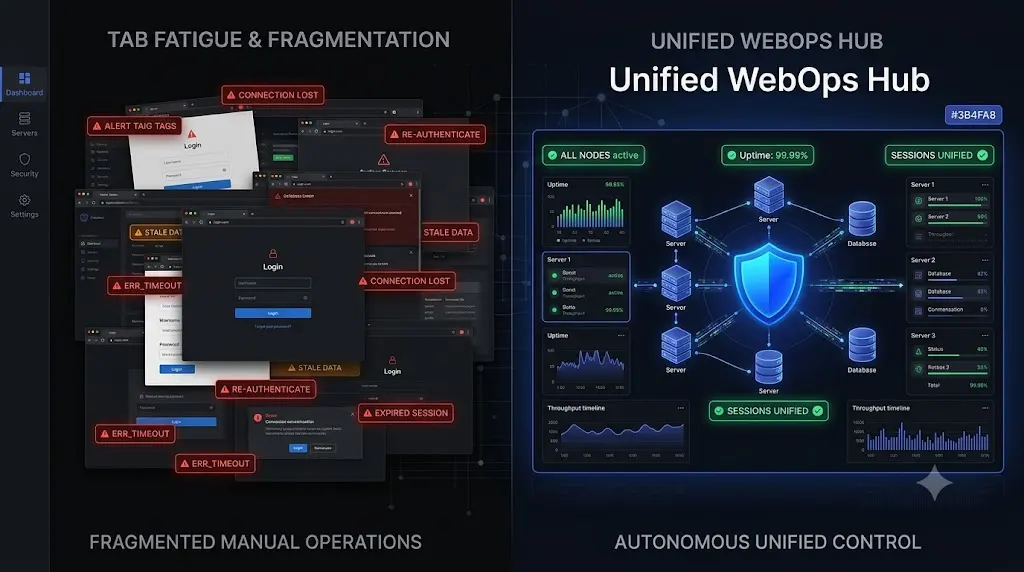
To scale a web design or maintenance business profitably, you must adopt a centralized wordpress management dashboard. However, not all dashboards are created equal. This guide breaks down the financial trap of a fragmented tech stack, the difference between a “dumb remote control” and a modern WebOps hub, and exactly how top tier freelancers orchestrate their entire portfolio from a single screen.
When you launch your freelance web development business, managing maintenance is easy. You have three clients. Every Friday, you log into three separate wp-admin panels, update the plugins, run a backup, and log out. It takes 15 minutes.
Then, you hit your growth phase. You scale to 20 or 30 active client retainers.
Suddenly, Friday is a nightmare. Logging into 30 different websites, managing 30 different admin passwords, and clicking through 30 different dashboards consumes your entire day. You suffer from severe “tab fatigue.” Your unbillable administrative time skyrockets, completely destroying the profit margins of your maintenance retainers.
To break through this operational ceiling, you cannot work harder. You must consolidate.
Quick Answer: What is a centralized WordPress management dashboard?
A centralized WordPress management dashboard is a cloud based platform that connects to multiple WordPress websites via a worker plugin, allowing you to manage them from a single interface. Instead of logging into each site individually, freelancers can use this unified hub to execute bulk plugin updates, trigger cloud backups, monitor 24/7 uptime, and run security scans across their entire portfolio simultaneously, saving dozens of unbillable hours every month.
The Fragmented Tech Stack: A Profitability Trap
Before adopting a unified solution, most freelancers attempt to solve their scaling issues by assembling a fragmented tech stack. They buy different tools for different problems.
- They buy a premium plugin for backups on every site.
- They purchase a third party ping tool for uptime monitoring.
- They install heavy, local security scanner plugins on each individual dashboard.
- They use a legacy remote control tool just to click “Bulk Update.”
This fragmented approach is an operational and financial disaster. First, you are paying a la carte subscription fees for four different services, which cannibalizes your monthly recurring revenue (MRR). Second, you are still logging into multiple different SaaS platforms just to figure out if your clients’ websites are healthy.
When you manage multiple WordPress sites, true scalability requires total consolidation.
What Defines a Modern Centralized WordPress Dashboard?
If you are currently evaluating a ManageWP alternative or a self hosted MainWP alternative, you must understand that the industry has evolved.
Legacy tools were built for execution; they allowed you to push code to 30 sites at once. Modern tools are built for autonomous verification. A 2026 era WebOps hub must unify three distinct pillars of site management into one actionable interface.
Pillar 1: Autonomous Update Verification
Clicking “Update All” from a central dashboard is convenient, but it is incredibly dangerous if the tool pushes code blindly.
A modern centralized wordpress management dashboard does not just push updates. It utilizes AI visual regression testing. When you trigger a bulk update from your hub, the platform takes a headless browser screenshot of every site, executes the updates, and takes a second screenshot.
If a plugin update shatters a CSS layout on one of your 30 sites, the central hub detects the visual variance and instantly auto rolls that specific site back to safety. You manage the execution centrally, and the AI manages the Quality Assurance (QA) autonomously.
Pillar 2: Deep Forensic Security Control
Managing security across 30 sites by logging into 30 different Wordfence panels is impossible.
A true centralized hub removes the security burden from the individual WordPress installations. The central platform operates from the outside looking in. It performs daily, deep forensic scans across your entire portfolio, bypassing the WordPress API to read raw database tables.
From your single dashboard, you can see if any site has a hidden Ghost Admin, and you can track global CVE (Common Vulnerabilities and Exposures) threats. If a zero day vulnerability is announced, your dashboard instantly flags which of your 30 clients are running the exposed plugin, allowing you to patch them with one click.
Pillar 3: Unified Uptime and Performance Tracking
You should not need a separate app to know if a client’s site went offline.
Your management dashboard must feature native, high frequency WordPress uptime monitoring. If a server crashes due to a traffic spike, the central hub alerts you instantly. Crucially, a modern dashboard provides 1 click secure admin access, allowing you to bypass the standard WordPress login screen and jump straight into the affected site to begin emergency triage.
How SiteOps Replaces the Fragmented Tech Stack
We recognized that freelancers and growing agencies were drowning in SaaS subscriptions and unbillable manual labor. This is exactly why we engineered SiteOps.
SiteOps is not just a remote control. It is a complete, autonomous WebOps command center designed to replace your fragmented tech stack entirely.
When you connect your clients to the SiteOps dashboard, you consolidate your operations:
- Eliminate Manual QA: SiteOps handles your safe WordPress updates using AI visual regression testing, ending the need to manually verify staging sites.
- Eliminate Third Party Security Plugins: The SiteOps deep forensic scanner and real time CVE tracker provide superior WordPress security monitoring directly from the cloud, without bloating your client’s local database.
- Eliminate Manual Reporting: SiteOps translates your uptime, security, and update data into beautiful, automated white-label WordPress maintenance executive summaries, proving your value to your clients every month with zero data entry.
Flat Rate Pricing: Scaling Without Penalty
The final, and perhaps most critical, element of choosing a centralized dashboard is the economic model.
Legacy platforms penalize you for growing. They charge modular, a la carte fees per site. You pay a fee for basic updates, an extra fee to add automated backups, and another fee to run security scans. As you scale from 10 to 50 clients, your software overhead explodes, crushing your gross profit margins.
A detailed MainWP vs ManageWP vs SiteOps financial teardown reveals the power of flat rate pricing.
SiteOps offers an Agency Plan built on a flat monthly rate for unlimited sites. Whether you manage 5 client sites or 500, your software cost remains exactly the same. You receive full access to AI visual regression, synthetic transaction testing, 5 minute uptime monitoring, and forensic security across your entire portfolio for one fixed price.
Every time you sign a new profitable WordPress maintenance retainer, your profit margin actually increases.
Stop Juggling Tabs. Start Managing Operations.
If you are still logging into wp-admin panels manually, or relying on blind bulk updaters that force you to perform manual QA testing on Friday afternoons, you are capping your freelance revenue potential.
You cannot scale a high volume portfolio without a unified operational hub.
Upgrade your tech stack to match modern web development standards. Review the ultimate WordPress maintenance checklist and see how completely you can automate it.
You can automate WordPress maintenance for multiple sites securely today.
Stop managing tasks. Start managing operations.

Sign up for the SiteOps central dashboard today. Connect your first 3 sites free and experience absolute portfolio control.
Frequently Asked Questions
What is a centralized WordPress management dashboard? It is a cloud based SaaS platform that connects to multiple WordPress websites via a worker plugin, allowing freelancers and agencies to manage backups, security, updates, and uptime for their entire portfolio from a single, unified interface.
Why should I use a management dashboard instead of logging in manually? Logging into 20 different websites manually consumes hours of unbillable administrative time. A central dashboard allows you to execute bulk actions (like updating a specific plugin across all 20 sites simultaneously) in seconds, drastically increasing your agency’s profit margins.
Is it safe to update multiple WordPress sites at once? It is highly dangerous if you use a legacy tool that pushes code blindly. It is completely safe if you use a modern dashboard like SiteOps that utilizes AI visual regression testing. The AI visually verifies every site after the bulk update and autonomously rolls back any site where the layout breaks.
Can I manage WooCommerce sites from a central dashboard? Yes, but you must use a platform equipped with synthetic transaction testing. During a bulk update, the central hub must autonomously deploy a bot to add an item to the cart and visually verify the checkout fields render correctly, ensuring your e commerce updates do not break revenue streams.
How does a central dashboard handle WordPress security? Modern dashboards like SiteOps operate from the outside looking in. They perform deep forensic scans across your entire portfolio, checking raw database tables for hidden malware and cross referencing your active plugins against global CVE vulnerability databases to alert you to zero day threats instantly.
What is the HTTP 200 Fallacy in website monitoring? The HTTP 200 Fallacy is the dangerous assumption that a server response equals a healthy website. Legacy dashboards only check if the server is awake. A site can return a 200 OK status while serving a shattered CSS layout, making basic ping bots useless for verifying bulk updates.
Does flat rate pricing matter for management software? Absolutely. Legacy tools use modular a la carte pricing, meaning your software overhead scales up rapidly as you acquire more clients. To scale profitably, freelancers must use flat rate platforms that offer unlimited sites, ensuring profit margins increase as the portfolio grows.
How do I migrate my sites to a new central dashboard? Migration is frictionless. You simply install the new platform’s lightweight worker plugin on your client sites, authenticate the connection to your new central dashboard, and then safely deactivate and delete your old legacy worker plugins.
Can a central dashboard generate client reports? Yes. High end platforms synthesize your portfolio data (uptime, blocked security threats, safe updates executed, and auto rollbacks performed) into beautiful, AI generated white label executive summaries. These are automatically emailed to your clients, proving your monthly retainer value.
What happens if a centralized update breaks one of my client’s sites? If you use SiteOps, the AI detects the visual layout variance instantly during the update sequence. It isolates that specific failure and autonomously triggers an auto rollback for that site only, restoring its database and files in seconds while the rest of your portfolio updates successfully.
Scale Your Agency Today
Join 500+ agencies automating their WordPress maintenance. Get started with 3 sites for free. No credit card required.