How to Prove the Value of Your WordPress Maintenance Plan Every Single Month
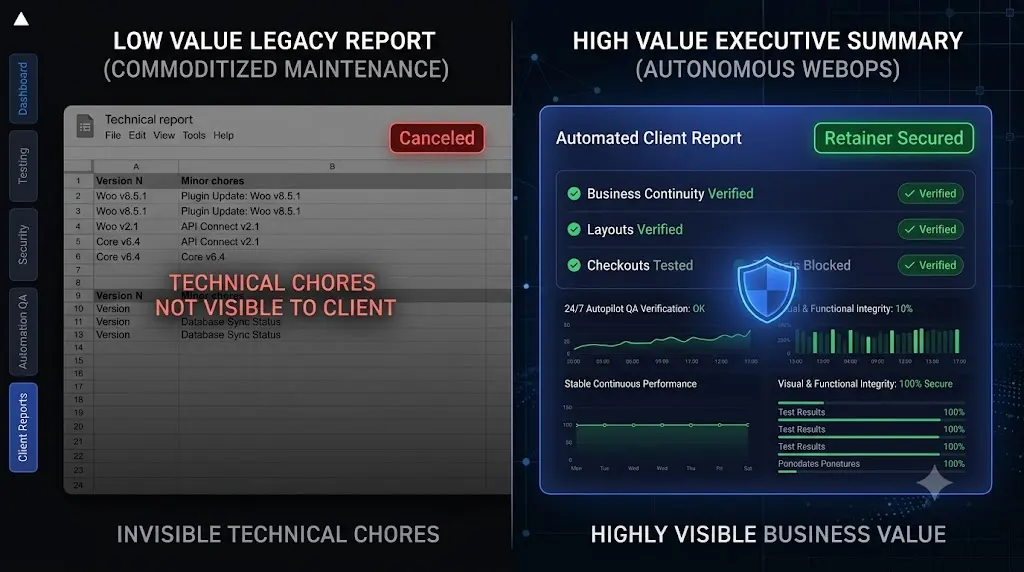
The hardest part of a WordPress maintenance retainer is not selling it. The hardest part is keeping it. To prove value of wordpress maintenance, agencies must demonstrate measurable results through regular reporting, automated QA, and proactive issue detection.
You pitch a $300 a month maintenance plan to a new client. They sign the contract, eager for security and stability. For the next six months, you do your job perfectly. You execute safe WordPress updates, run database optimizations, and ensure the site never goes offline. The client’s digital business runs flawlessly.
Then, month seven arrives. The client reviews their accounting ledger, sees your $300 invoice, and sends you an email:
“Hi team. The website has been running great and we haven’t had any issues all year. I think we are going to pause the maintenance plan to save some budget. We will just click the update buttons ourselves from now on.”
This is the “Invisible Labor Trap.” When you do your job perfectly, nothing breaks. When nothing breaks, the client assumes your job is easy.
To build a highly profitable WordPress maintenance retainer, you cannot just do the work. You must relentlessly prove value of wordpress maintenance every single month.
This guide breaks down exactly why traditional maintenance reports trigger client churn, the psychological shift required to justify your pricing, and how top tier agencies use automated Quality Assurance (QA) data to prove their value undeniably.
Quick Answer: How do you prove the value of WordPress maintenance?
To prove the value of WordPress maintenance, you must stop sending clients technical lists of updated plugins. Instead, you must send automated executive summaries that highlight business outcomes. Use an advanced WordPress maintenance tool like SiteOps to visually test the site during updates, then generate a report showing exactly how many layout breaks were prevented, how many checkout flows were verified via synthetic testing, and how many zero day threats were blocked.
The Problem With Legacy PDF Reports
If you use a legacy ManageWP alternative or a basic MainWP alternative, your software likely includes a reporting feature.
At the end of the month, the tool generates a PDF and emails it to the client. The report looks like this:
- Uptime: 99.9%
- Backups Completed: 30
- Plugins Updated: Yoast SEO (v21.1 to v21.2), WooCommerce (v8.1 to v8.2).
To a web developer, this shows a well maintained environment. To a business owner, this looks like a receipt for an automated chore that took three seconds. It completely devalues your expertise. Listing version numbers does not justify a high ticket retainer; it actively encourages the client to commoditize your service.
The Pivot: Reporting on Risk Mitigation
To eliminate churn, you must change the narrative. You are not a mechanic changing oil; you are a digital security detail protecting a revenue engine.
You must stop telling the client what you did, and start telling them what you prevented.
When a business owner sees that you actively prevented a catastrophe, the retainer instantly transitions from an “expense” to “insurance.” Here are the three specific metrics you must include in your monthly reporting to execute this psychological shift.
1. Visual QA Verification (Brand Protection)
Clients know that clicking “Update” is easy. They do not know that clicking “Update” frequently shatters CSS layouts.
Instead of reporting “We updated Elementor,” your report should state: “We executed 14 plugin updates this month. During this process, our visual regression testing engines captured before and after snapshots of your homepage and critical landing pages. We mathematically verified that 0% of your visual layout was negatively impacted by these code changes, ensuring your brand presentation remained flawless.”
If an update did cause a break and you rolled it back, you must highlight it: “A routine update to your caching plugin attempted to break your mobile navigation menu. Our automated QA detected the visual shift instantly and rolled your database back to safety, preventing your mobile users from experiencing a broken site.”
2. Synthetic Checkout Testing (Revenue Protection)
If you manage e commerce clients, the hidden cost of broken WordPress updates is massive. A broken checkout page is a business ending event.
Instead of reporting “WooCommerce Updated,” your report should state: “This month, we executed 12 synthetic transaction tests. Following every core update, an automated bot visited your store, added an item to the cart, navigated to the checkout page, and visually verified that your Stripe payment fields loaded correctly. We physically verified your ability to process revenue 12 times this month.”
When you report on revenue protection, justifying a $500 to $1,000 monthly retainer becomes effortless.
3. Proactive Threat Deflection (Data Protection)
Standard WordPress security monitoring plugins send alerts when a site is hacked. A high value report highlights the hacks that never happened.
Instead of reporting “Malware Scans Passed,” your report should state: “Our forensic engine continuously tracked the global CVE vulnerability database. This month, we patched 2 known zero day exploits targeting plugins you currently use, neutralizing the threat before automated botnets could attempt a breach. Your customer data remains 100% secure.”
The Agency Bottleneck: You Cannot Write These Manually
The reporting structure outlined above is the ultimate churn killer. However, there is a massive operational problem.
If you manage multiple WordPress sites, you cannot manually write 50 customized executive summaries every month. You cannot pay a developer to manually compile staging test results, cross reference CVE databases, and format PDFs.
If you spend one hour per client compiling a high value report, you are burning 50 unbillable hours a month. You are saving the retainer, but destroying the profit margin.
To scale your agency, you must automate the creation of high value proof.
Automating Executive Reporting with SiteOps
This exact reporting bottleneck is why we engineered SiteOps. We realized that agencies needed a platform that not only performed advanced QA testing but automatically translated that testing into client facing value.
SiteOps acts as your autonomous WebOps team and your account manager.
1. The Data is Generated Autonomously
When you use SiteOps to update client sites, the platform natively executes the high value actions. It spins up headless browsers to perform visual regression testing. It executes synthetic bots to test contact forms and WooCommerce checkouts. It runs deep forensic scans that bypass the WordPress API.
All of this data is collected without any manual human intervention.
2. AI Synthesizes the Business Value
At the end of the billing cycle, SiteOps takes the raw technical data and uses AI to synthesize an executive summary.
It does not generate a boring list of plugin versions. It automatically highlights the exact layout breaks the auto rollback feature prevented. It highlights the exact lead generation forms the synthetic bots successfully submitted. It translates complex WebOps telemetry into clear, undeniable business value.
3. Beautiful White Label Dispatch
The resulting report is a highly professional, beautifully formatted document. Through our white-label WordPress maintenance functionality, the report is stamped with your agency’s logo, colors, and branding.
It is dispatched to the client autonomously. You provide world class client communication and prove your exact ROI every single month, all while spending zero unbillable hours compiling the data.
Secure Your MRR Today
If a client ever asks you, “What exactly are we paying you for?” you have already lost control of the relationship.
To scale a maintenance portfolio, you must answer that question proactively every thirty days. You must transition your reporting from technical execution to automated risk mitigation.
When evaluating the best WordPress monitoring tools in 2026, you must demand a platform that proves its own worth to your clients. A detailed ManageWP vs SiteOps comparison proves that legacy PDF receipts no longer cut it.
Stop hoping your clients understand your value. Prove it to them automatically.
Review the ultimate WordPress maintenance checklist and upgrade your operational stack to match the expectations of modern business owners.
You can automate WordPress maintenance for multiple sites and automate your reporting today.
Try SiteOps free for your first 3 sites. See what a true executive summary looks like.
Frequently Asked Questions
How do you prove the value of WordPress maintenance? To prove value, agencies must stop reporting on technical tasks (like plugin updates) and start reporting on business outcomes. Use automated QA platforms to send monthly executive summaries that highlight how many visual layout breaks were prevented, how many forms were verified, and how much downtime was avoided.
Why do clients cancel WordPress maintenance retainers? Clients typically cancel because of the “Invisible Labor Trap.” When an agency does its job perfectly, the website never breaks. Over time, the client forgets the danger of the internet and begins to view the monthly invoice as an unnecessary expense rather than a vital security measure.
What should a WordPress maintenance report include? A high value report must include branded executive summaries, visual QA testing results, synthetic transaction verifications (proving checkouts and forms work), proactive CVE vulnerability patching data, and standard metrics like uptime (monitored every 5 minutes) and daily cloud backups.
How do I justify the cost of WordPress maintenance? You justify the cost by anchoring it against the cost of failure. Remind the client that a single broken WooCommerce checkout can cost thousands of dollars in lost weekend sales, and a hacked site can destroy their SEO rankings. The retainer is an insurance policy backed by automated QA.
What is visual regression testing in WordPress? Visual regression testing uses a headless browser to take a screenshot of your site before an update, and another screenshot immediately after. AI compares the images pixel by pixel to automatically detect visual breaks, ensuring a plugin update never ruins the client’s frontend brand presentation.
What is synthetic transaction testing? A synthetic transaction is an automated process where a cloud bot acts like a real user. It navigates to a page, fills out a contact form, or adds an item to a cart, visually verifying that the business logic of the site is intact. This proves to the client that their revenue engine is active.
How do agencies generate maintenance reports efficiently? Top tier agencies eliminate manual data entry by using advanced WebOps platforms like SiteOps. The platform automatically collects the testing data throughout the month, uses AI to write an executive summary, applies the agency’s white label branding, and emails it to the client autonomously.
Why is sending a list of updated plugins a bad idea? Listing version numbers (e.g., “Updated Plugin X to v2.1”) means nothing to a business owner. Furthermore, it looks like an automated, low effort task that takes three seconds to execute, which actively encourages the client to commoditize your service and ask for a price reduction.
Can WordPress automatically update plugins safely? Native WordPress auto updates are highly risky because they execute blindly without verifying the frontend. To safely update WordPress plugins, agencies must use a platform equipped with visual verification to ensure the site remains perfectly intact after the code changes.
How does SiteOps help retain agency clients? SiteOps retains clients by providing undeniable proof of ROI. When a client receives a branded monthly report showing that the SiteOps AI caught a broken layout during an update and automatically rolled the site back to prevent downtime, they instantly understand the value of their retainer.
Scale Your Agency Today
Join 500+ agencies automating their WordPress maintenance. Get started with 3 sites for free. No credit card required.