SiteOps Product Update: July 2026 Release Notes (Phase 2 Features)
When we set out to build the ultimate WordPress maintenance tool, our first objective was to eliminate the manual labor of updates. By introducing AI visual regression testing and autonomous auto-rollbacks, we allowed agencies to stop clicking “Update All” blindly and start trusting their infrastructure.
But maintenance is only the baseline of agency operations.
Your clients do not just pay you to keep the site online. They pay you to keep it secure, keep it fast, and help it grow. Switching between a dozen different SaaS products to check performance scores, monitor vulnerabilities, and publish content creates massive operational friction.
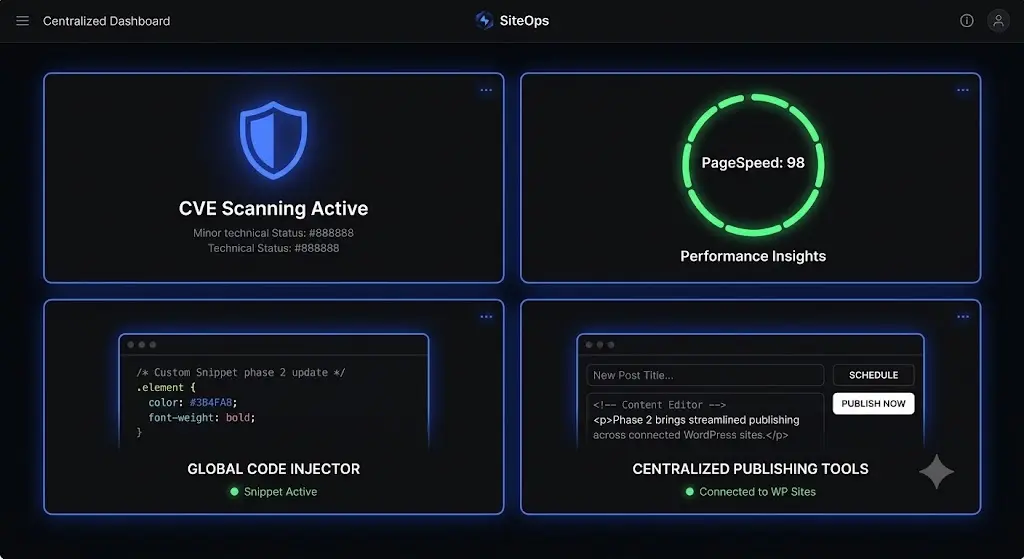
Today, we are thrilled to announce the rollout of SiteOps Phase 2. The July 2026 release fundamentally expands the platform from a WordPress monitoring tool into a centralized, full-stack WebOps command center.
We have integrated native CVE vulnerability scanning, live Google PageSpeed tracking, global code injection, and a multi-site SEO post publisher directly into your dashboard. Here is exactly what is new, how it works, and how it protects your agency margins.
Quick Answer: What is new in the SiteOps July 2026 update?
The SiteOps July 2026 update introduces four major features for agencies. It includes a native CVE Vulnerability Database to scan plugins for zero-day exploits, integration with Google PageSpeed Insights for Core Web Vitals tracking, a centralized Header and Footer Code Injector with URL targeting, and a Multi-Site Post Publisher with real-time SEO scoring. It also adds native compatibility for custom Nginx and VPS server environments.
1. The Vulnerability Database (Proactive CVE Scanning)
The most requested feature from our agency partners is finally live.
Relying on reactive malware scanners means you only find out a site is compromised after the damage is done. In 2026, over 90% of WordPress exploits originate from outdated plugins with known vulnerabilities.
The Agency Bottleneck
Previously, if a critical zero-day vulnerability was announced for a popular form plugin, you had to manually cross-reference your entire client list, figure out who was running that specific plugin, and rush to update it.
The SiteOps Solution
We have added a dedicated, real-time vulnerability scanner. SiteOps now autonomously cross-references every installed plugin and theme across your entire portfolio against live Common Vulnerabilities and Exposures (CVE) databases provided by Wordfence Intelligence and WPVulnerability.
Results are categorized instantly by severity: Critical, High, Medium, and Low.
- Free Plan: View your total active vulnerability count per site.
- Starter Plan: Access full CVE details, CVSS threat scores, affected plugin versions, and specific fix recommendations.
- Growth and Agency Pro Plans: Receive instant, automated push alerts the second a new CVE is discovered for any software running across your network, allowing you to patch vulnerabilities before hackers can exploit them.
This feature transforms your WordPress security monitoring from reactive troubleshooting into proactive defense.
2. Global PageSpeed Insights & Core Web Vitals
A fast website is a requirement for organic search rankings. Google’s Core Web Vitals directly impact how your clients acquire new business.
The Agency Bottleneck
Tracking performance across 50 clients used to require running manual tests through Google’s external web tools, recording the scores in a spreadsheet, and translating technical jargon for your clients.
The SiteOps Solution
SiteOps now tracks Google PageSpeed scores natively for all connected sites directly inside your command center.
You can toggle between mobile and desktop performance scores instantly. The dashboard tracks all essential Core Web Vitals, including Largest Contentful Paint (LCP), Cumulative Layout Shift (CLS), First Contentful Paint (FCP), Time to Interactive (TTI), and Total Blocking Time (TBT).
- Free Plan: View the latest overall performance score for your connected site.
- Starter Plan: Unlock full historical Core Web Vitals breakdowns and specific metrics.
- Growth and Agency Pro Plans: Receive step-by-step, WordPress-specific fix recommendations for every improvement opportunity, complete with difficulty and impact ratings to help your developers prioritize their optimization sprints.
3. Header and Footer Code Injector
Managing third-party tracking scripts is a constant source of friction between marketing teams and development teams.
The Agency Bottleneck
When a client asks you to install a new Facebook Pixel, a Google Analytics tag, or a custom chat widget, your team has to log into the client’s wp-admin, install a bloated third-party snippet plugin, or manually edit the child theme’s functions.php file.
The SiteOps Solution
You can now inject custom code into any connected WordPress site directly from the SiteOps dashboard. You never have to touch the WordPress backend or write PHP again.
Add Google Analytics, Facebook Pixels, custom CSS, Intercom, Crisp, or any HTML and JavaScript to your pages from one dashboard. Snippets are pushed to your WordPress site automatically through the SiteOps plugin and injected on every page load via the native wp_head and wp_footer hooks.
- Free Plan: 3 snippets, sitewide injection only.
- Starter Plan: 5 snippets, URL targeting included.
- Growth Plan: 10 snippets, URL targeting included.
- Agency Pro Plan: Unlimited snippets, URL targeting included.
URL targeting lets you inject code on specific pages only. Use /shop/* to match all shop pages, /contact for a single page, or any pattern with wildcard support.
This feature positions SiteOps as the ultimate ManageWP alternative, giving you deep operational control without bloating the client’s database with unnecessary plugins.
4. Multi-Site Post Publisher with SEO Optimizer
Agencies offering SEO and content marketing retainers need a unified way to distribute content.
The Agency Bottleneck
Publishing a single blog post to five different localized websites requires logging into five different WordPress dashboards, formatting the text five times, and configuring the Yoast or RankMath settings five times.
The SiteOps Solution
The new SiteOps Post Publisher allows you to write, optimize, and publish blog posts to any of your connected WordPress sites from one centralized interface.
We integrated the TipTap editor for a flawless, clean writing experience that supports full rich text formatting. More importantly, we built a native SEO Optimizer directly into the publishing flow.
As you write, the system scores your post in real time across seven distinct technical categories: Title length, meta description, keyword density, URL structure, image alt tags, internal linking, and readability. It assigns a score out of 100 and a final letter grade.
The settings panel includes a slug editor, excerpt controls, SEO title configurations, and a live Google Search preview. You can now execute your white-label WordPress maintenance and content marketing from the exact same platform.
5. Infrastructure Upgrades: Nginx and VPS Compatibility
As agencies scale, they often move their highest-performing clients off basic shared hosting and onto dedicated Virtual Private Servers (VPS) running custom Nginx configurations.
The Agency Bottleneck
Self-hosted management tools and legacy remote controls often struggle to communicate with strict Nginx servers. They hit firewall blocks or fail to process API requests, forcing agencies to look for a MainWP alternative that actually works reliably on advanced infrastructure.
The SiteOps Solution
We completely rebuilt our connection protocol for maximum server compatibility. SiteOps now features native, frictionless compatibility with sites hosted on custom Nginx VPS environments.
When you connect a site, SiteOps autonomously detects whether the client’s server supports standard pretty URLs or if it requires a query string fallback. It securely stores the working method and uses it for all future REST API calls. This guarantees that your security scans, safe WordPress updates, visual regression snapshots, and PageSpeed checks execute flawlessly, regardless of your client’s hosting provider.
Feature Rollout and Plan Availability
To clarify exactly what is available to your agency today, here is the feature breakdown across the new SiteOps pricing tiers.
| New Feature | Free Plan | Starter Plan | Growth Plan | Agency Pro Plan |
|---|---|---|---|---|
| CVE Vulnerability Scanner | Total Count Only | Full Details & CVSS Scores | Instant Push Alerts | Instant Push Alerts |
| PageSpeed Insights | Overall Score Only | Full Core Web Vitals Data | Custom Fix Recommendations | Custom Fix Recommendations |
| Code Injector | 3 Snippets (Sitewide) | 5 Snippets + URL Targeting | 10 Snippets + URL Targeting | Unlimited + URL Targeting |
| SEO Post Publisher | Included | Included | Included | Included |
| Nginx/VPS Compatibility | Included | Included | Included | Included |
Expanding the WebOps Workflow
When you manage multiple WordPress sites, your software stack dictates your profitability.
If you are paying separate subscriptions for a vulnerability scanner, an uptime monitor, an SEO grading tool, and a bulk updater, your overhead is eating your margins.
The July 2026 Phase 2 release represents our commitment to consolidating the entire agency workflow. By combining 5-minute WordPress uptime monitoring, AI visual regression testing, active CVE threat intelligence, and centralized publishing, SiteOps is the only platform you need to run a profitable maintenance business.
Log into your SiteOps dashboard today to experience the new Vulnerability Database and Code Injector.
If you have not yet migrated your portfolio, you can test the entire autonomous platform completely free for 3 sites, no credit card required.
Frequently Asked Questions (July 2026 Update)
What is a CVE vulnerability in WordPress? CVE stands for Common Vulnerabilities and Exposures. It is a standardized, public database of known security flaws. The new SiteOps scanner cross-references your installed plugins against this database to alert you to known exploits before hackers can attack your site.
How does SiteOps track Core Web Vitals? SiteOps integrates natively with the Google PageSpeed Insights API. It queries your connected URLs and pulls the official lab and field data for metrics like Largest Contentful Paint (LCP) and Cumulative Layout Shift (CLS) directly into your dashboard.
Can I inject Google Analytics code without a plugin? Yes. The new SiteOps Header and Footer Code Injector allows you to deploy tracking scripts, Facebook Pixels, Intercom, Crisp, or custom CSS to any connected site via the API, completely eliminating the need for third-party snippet plugins.
Can I target specific pages with the Code Injector? Yes. Users on the Starter, Growth, and Agency Pro plans unlock URL targeting. You can use wildcards like /shop/* to match all shop pages or /contact for a single page, allowing you to inject code dynamically based on the URL path.
Does the SEO Post Publisher work with Yoast or RankMath? The SiteOps Post Publisher features its own native real-time SEO scoring system, grading your content across 7 categories. It allows you to set the SEO title, slug, and meta description directly from the SiteOps dashboard before pushing the post to WordPress.
How does SiteOps handle Nginx and VPS servers? The updated connection protocol autonomously detects your server’s routing rules. If standard pretty URLs are blocked by an Nginx configuration, SiteOps automatically falls back to secure query string routing to ensure all API calls and updates process reliably.
Which SiteOps plan includes instant CVE vulnerability alerts? While the Free and Starter plans offer vulnerability counts and CVSS details, instant push alerts for newly discovered zero-day CVE exploits are available exclusively on the Growth and Agency Pro plans.
Does visual regression testing still happen during updates? Yes. All Safe Updates executed via the SiteOps dashboard still utilize our core AI visual regression testing. The system takes before and after screenshots and triggers an instant auto-rollback if any visual layout shift is detected.
Scale Your Agency Today
Join 500+ agencies automating their WordPress maintenance. Get started with 3 sites for free. No credit card required.