GoDaddy ManageWP Changes: What Agencies Should Do in 2026
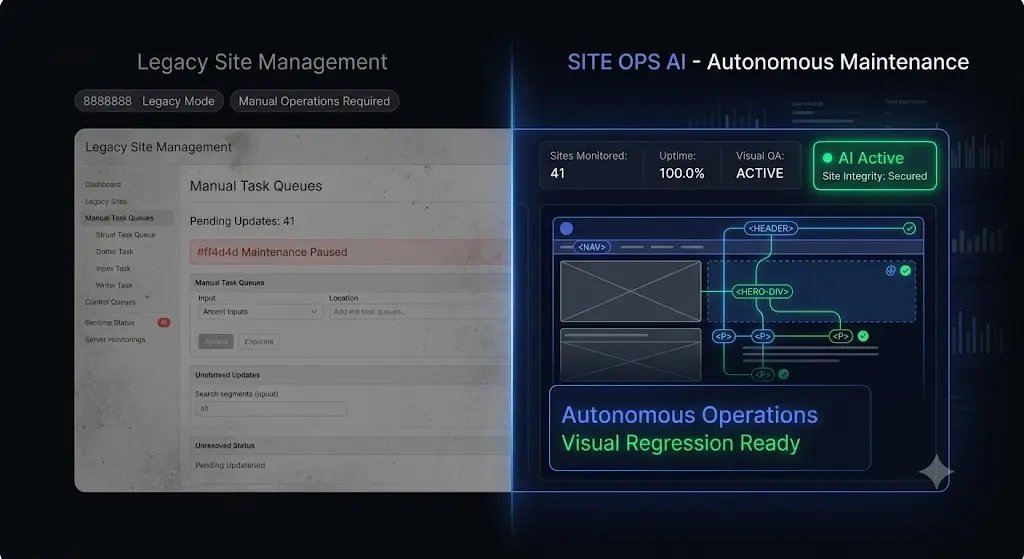
You log into your command center to execute your weekly maintenance routine. You look at the interface, the feature set, and the reporting capabilities. You suddenly realize that the software you use to protect thousands of dollars in Monthly Recurring Revenue looks exactly the same as it did a decade ago.
Since GoDaddy acquired ManageWP in 2016, agency owners have watched the platform transition from an independent, innovative tool into a stagnant cog within the massive GoDaddy Pro ecosystem.
In the software world, a lack of constant innovation is a massive operational risk. WordPress has evolved dramatically. We are building headless architectures, utilizing heavy JavaScript frameworks, and designing incredibly complex WooCommerce checkouts. Relying on a 2016-era remote control to manage 2026-era websites is actively dangerous.
If you are concerned about recent godaddy managewp changes, pricing models, or the sheer lack of platform development, you are not alone. Top-tier agencies are actively migrating away from blind update tools.
This guide breaks down exactly why legacy platforms are failing modern agencies, the true financial cost of staying, and the exact blueprint your team must follow to upgrade your operational stack safely.
Quick Answer: What should agencies do about GoDaddy ManageWP changes?
Agencies concerned about GoDaddy ManageWP changes and the lack of platform innovation should migrate their portfolios to modern, AI-driven platforms. Modern alternatives like SiteOps replace ManageWP’s risky “blind updates” and manual QA testing requirements with AI visual regression testing, automated rollbacks, and flat-rate pricing, ensuring production sites remain completely stable during maintenance.
Part 1: The Architecture of Stagnation
To understand why a migration is necessary, you must evaluate the technical gap between legacy remote controls and modern autonomous operations.
The Problem with Blind Execution
ManageWP was built to solve a very specific problem: logging into 50 different admin panels. It solved that problem beautifully. However, the modern agency problem is no longer execution. The modern problem is verification.
When you click “Bulk Update” in a legacy dashboard, the system pushes the code and checks the server for an HTTP 200 status code. If the server is online, the dashboard tells you the update was successful.
An HTTP 200 status code cannot tell you if a CSS grid shattered. It cannot tell you if a lead form disappeared. It cannot tell you if a JavaScript conflict hid a WooCommerce checkout button. This is what the industry calls a “blind update.”
The hidden cost of broken WordPress updates is massive. When you rely on blind updates, you are forced to spend hours manually clicking through client staging environments to verify the frontend layout. If you skip this step, you risk pushing a broken layout to a live production environment.
The Security Blindspot
Client retainers are built on the promise of security. ManageWP relies heavily on reactive blacklist verification. It scans your URL against databases like Google Safe Browsing. This means you only receive an alert after the site has been hacked and publicly flagged.
Modern WordPress security monitoring requires proactive defense. You must utilize a platform that cross-references your active plugins against global Common Vulnerabilities and Exposures (CVE) databases in real time, alerting you to zero-day threats before a patch is even announced.
Part 2: The A-La-Carte Pricing Trap
Beyond the technical limitations, agencies must evaluate the economic model of the GoDaddy Pro ecosystem.
ManageWP operates on a modular, a-la-carte pricing structure. The basic dashboard is free, but you must pay per-site, per-month for the features required to run a professional agency.
- Automated Daily Backups: $2.00 per site.
- Safe Updates: $2.00 per site.
- Premium Security: $1.00 per site.
- White-Label Reporting: $1.00 per site.
To build a highly profitable WordPress maintenance retainer, you must strictly control your operational overhead.
If you manage 50 sites, a fully featured ManageWP setup costs you roughly $300 a month. As your agency scales to 100 or 150 sites, your software overhead increases linearly. You are actively penalized for acquiring new business.
Every time you sign a new client, a portion of that new revenue is immediately surrendered to GoDaddy. This is why growing agencies actively search for a flat-rate ManageWP alternative that protects their gross margins.
Part 3: The AI Operational Upgrade
Agencies are not just migrating away from GoDaddy; they are migrating toward a fundamentally new way of working.
SiteOps replaces the legacy remote control model with an autonomous AI operational layer. It completely removes the human element from routine maintenance verification.
Here is exactly how SiteOps proves itself as the ultimate AI WordPress maintenance solution.
Visual Regression Testing Replaces Manual QA
SiteOps eliminates the blind update problem. It is engineered to guarantee safe WordPress updates by using pixel-perfect visual regression testing.
When you trigger an update, SiteOps spins up a headless Chromium browser instance. It visits your live production site and takes a high-resolution snapshot of the Document Object Model (DOM). It applies the plugin update, clears the server cache, and takes a second snapshot.
Artificial intelligence overlays the images. It differentiates between expected dynamic content and a fatal layout break. If you want to know exactly how to integrate this into your workflow, read our deep dive on how to safely update WordPress plugins without risking client downtime.
Instant Autonomous Auto-Rollbacks
Visual regression testing is only half the solution. A WordPress monitoring tool that detects a broken site and simply sends you an email at 2:00 AM is still just giving you a job to do.
If SiteOps detects a broken layout, a missing button, or a white screen after an update, it instantly triggers an autonomous auto-rollback. Within seconds, it queries your backup vault and restores the MySQL database and file system to their exact stable pre-update state.
The client never sees the broken site. Their customers can still process orders. You simply wake up to a dashboard notification explaining which specific plugin failed the visual QA test. This single feature completely eliminates the need for manual staging site tests, allowing you to easily automate WordPress maintenance for multiple sites.
Part 4: The Agency Migration Blueprint
The primary reason agencies endure stagnant software is the perceived nightmare of migrating 50 client sites to a new platform.
With SiteOps, the migration process is completely frictionless. It requires zero downtime and can be executed progressively. You do not have to pull the plug on your old system all at once.
Follow this exact blueprint to upgrade your WordPress maintenance tool stack.
Step 1: Account Creation and Pruning
Start by creating your free SiteOps account. Before installing any new plugins, review your current GoDaddy Pro dashboard. Remove staging sites, inactive clients, or dead subdomains that are cluttering your view. Only migrate active, paying retainers.
Step 2: The Coexistence Testing Period
You do not need to uninstall the ManageWP worker plugin to use SiteOps. Both worker plugins can safely coexist on the same WordPress installation without any code conflicts.
We highly recommend connecting a subset of your sites (perhaps 5 low-risk sites) to SiteOps first. Leave ManageWP active.
Trigger a few plugin updates via SiteOps. Watch the visual regression testing in action. Experience an auto-rollback. Verify that the native 5-minute WordPress uptime monitoring alerts are firing correctly. This coexistence period builds your team’s confidence in the autonomous safety features.
Step 3: Upgrading Your Routine
Once your test batch is verified, connect the rest of your portfolio. Review your internal WordPress maintenance checklist. You will immediately notice that tasks like “Clone to Staging” and “Manual Visual Verification” can be completely deleted from your Standard Operating Procedures.
You can also leverage AI to transform your white-label WordPress maintenance reporting. SiteOps translates raw technical data into business-focused executive summaries, proving the value of your retainer to the client automatically.
Step 4: Severing Ties with GoDaddy
When comparing the best WordPress monitoring tools in 2026, you will find that SiteOps entirely replaces the need for legacy systems.
Once your portfolio is fully managed by SiteOps, log into your client sites and bulk-deactivate the old ManageWP worker plugins. Finally, log into your GoDaddy Pro account, delete the sites from the dashboard, and cancel your a-la-carte billing subscriptions.
Part 5: Comparing the Value Proposition
To clearly summarize why a migration is necessary, examine how the structural capabilities compare side-by-side.
| Core Capability | ManageWP (GoDaddy) | SiteOps (AI Automation) | Operational Impact |
|---|---|---|---|
| Update Safety | HTTP 200 Server Ping | Visual Regression Testing | Eliminates manual QA testing hours |
| Failure Response | Sends an email | Instant Auto-Rollback | Protects client revenue immediately |
| Security Scanning | Reactive Blacklist Checks | 4-Level Deep Scan (incl. CVEs) | Prevents hacks before they occur |
| Client Reports | Static PDF Lists | AI Executive Summaries | Increases client retention rates |
| Pricing Model | A-La-Carte (Scales up) | Flat Rate (Unlimited Sites) | Retains 100% margin on new clients |
Part 6: Expanding Beyond SaaS Options
When seeking an alternative, some agencies consider self-hosted options, searching for a MainWP alternative to completely own their data.
However, self-hosted tools simply trade the GoDaddy ecosystem for the massive burden of managing your own command center server. A deeper dive into MainWP vs ManageWP vs SiteOps reveals that self-hosting does not solve the manual QA testing bottleneck. You still have to push updates blindly.
True scalability requires a fully managed cloud platform that handles the heavy computational lifting (like rendering visual regression screenshots and running deep AI analysis) without taxing your client servers or requiring you to act as a sysadmin.
Part 7: Frequently Asked Questions
Why are agencies looking for a ManageWP alternative in 2026? Agencies are frustrated by the lack of feature innovation since the GoDaddy acquisition. The reliance on outdated HTTP 200 checks for updates, the absence of visual regression testing, and an a-la-carte pricing model that penalizes agency growth are driving users away.
What should I do if I am unhappy with GoDaddy Pro changes? You should audit your current portfolio and execute a frictionless migration to a modern platform. Tools like SiteOps allow you to connect your sites and run parallel tests without disconnecting your legacy tools immediately.
What is the best alternative to ManageWP? For agencies prioritizing production safety and profit margins, SiteOps is the premier choice. It replaces manual QA testing with AI visual regression testing and instant auto-rollbacks, operating entirely on a managed cloud infrastructure.
Are blind WordPress updates actually dangerous? Yes. A plugin update can completely break a CSS layout, hide checkout forms, or cause fatal frontend visual errors, while the server continues to return a 200 OK status. True safe updates require visual regression testing to verify the frontend layout.
How does pricing compare between ManageWP and SiteOps? ManageWP uses a modular model where you pay per-site for premium add-ons, which scales rapidly as you acquire more clients. A ManageWP vs SiteOps comparison shows that SiteOps offers a flat-rate Agency plan for unlimited sites, making it far more profitable.
What is visual regression testing in WordPress? Visual regression testing uses a headless browser to take a screenshot of your site before an event, and another screenshot immediately after. AI compares the images pixel-by-pixel to detect visual breaks, missing elements, or layout shifts.
How do I safely update WooCommerce plugins? WooCommerce updates are incredibly fragile. You must either manually test them on a staging environment or use an advanced platform like SiteOps that visually verifies the checkout flow and initiates an auto-rollback if the update fails.
Can I automate WordPress updates without breaking sites? Yes, but you must use a tool that includes visual verification. Automated tools like SiteOps take before-and-after screenshots to visually verify the frontend layout. If an error is detected, the system instantly auto-rollbacks the update.
Does SiteOps slow down my client’s website? No. Advanced platforms like SiteOps process the heavy lifting, like visual regression testing image rendering and AI analysis, entirely on their own cloud infrastructure. They interact with your client’s site via lightweight API calls, resulting in zero performance impact.
What happens if a plugin update breaks a site on SiteOps? The system detects the visual break during the update process. Before the end-user ever sees the error, the AI autonomously triggers an auto-rollback, restoring the site’s database and files to their stable pre-update state in seconds.
The Bottom Line
When the software you use to manage your agency stops evolving, your agency stops growing.
If you continue to rely on management software that blindly pushes code based on outdated HTTP server checks, you are taking an unnecessary risk with your clients’ revenue. Furthermore, paying a-la-carte fees that penalize you for signing new clients is a flawed economic model.
To safely manage multiple WordPress sites in 2026, you must transition to an autonomous platform.
Stop accepting blind updates and the GoDaddy pricing trap. Secure your client sites visually and protect your profit margins permanently.
SiteOps automates the entire workflow. Test the visual regression engine today, free for 1 site, no credit card required.
Scale Your Agency Today
Join 500+ agencies automating their WordPress maintenance. Get started with 3 sites for free. No credit card required.