Why “The Site is Up” Means Nothing: Uptime Monitoring is Lying to You
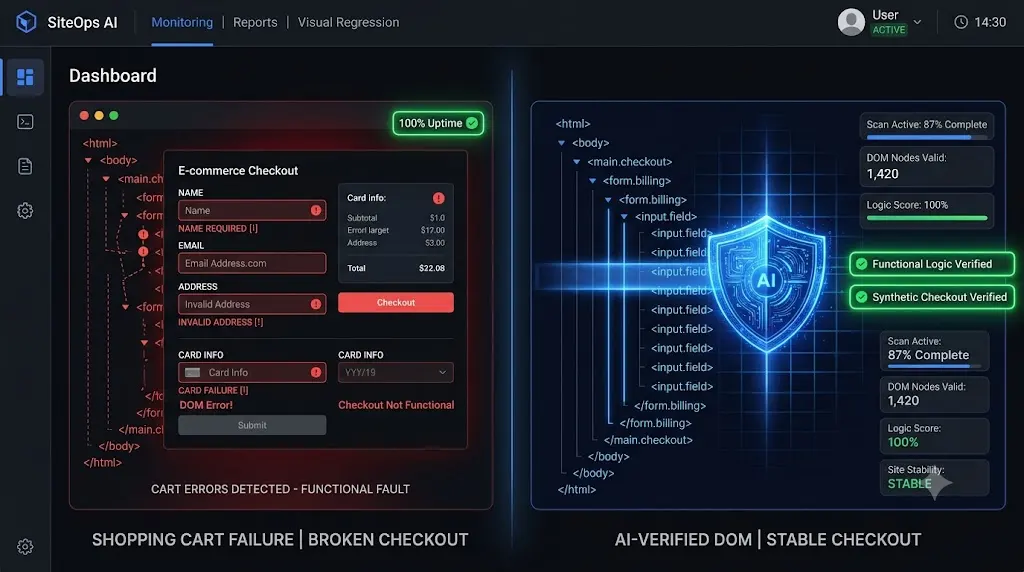
You receive an angry email from a client on a Tuesday morning. They just reviewed their analytics. Their WooCommerce store has not processed a single order in 48 hours. Their wordpress uptime monitoring tool still reports the site as online.
You immediately check your agency command center. You look at your WordPress uptime monitoring dashboard. The metrics are flawless. The site has 100 percent uptime. The server response time is blazing fast.
You visit the live website and click “Add to Cart.” The page refreshes, but the cart remains empty. A silent JavaScript conflict has completely broken the e-commerce functionality. The website is technically online, but the business is functionally dead.
If you manage client retainers, this is the most dangerous operational blind spot in your business. We have been conditioned to believe that a green checkmark on a monitoring dashboard means a healthy website. In the modern era of complex page builders and dynamic APIs, that assumption is entirely false.
Your uptime monitor is actively lying to you.
This guide deconstructs the illusion of basic server pings, explains the three silent failures that cost clients thousands of dollars, and reveals how top tier agencies use synthetic transaction testing to verify actual business logic.
Quick Answer: Why is my website up but not working?
A website can be “up” but not working due to the HTTP 200 Fallacy. Traditional uptime monitors only check if a server is turned on and responding (an HTTP 200 status code). They do not verify if the frontend layout is broken, if a checkout button is missing, or if a contact form is failing to submit. To verify a site is actually working, agencies must use a WordPress monitoring tool that performs visual regression testing and synthetic transactions to validate frontend business logic.
The HTTP 200 Fallacy: How Ping Bots Deceive You
To understand why your client is losing money while your dashboard glows green, you must understand how legacy monitoring technology works.
Whether you use a standalone ping service or the native monitor inside a ManageWP alternative, the underlying mechanics are identical. Every five minutes, the software sends an HTTP request to your client’s server.
It knocks on the door and asks, “Are you awake?”
If the server opens the door and replies with an HTTP 200 OK status code, the bot logs the site as online. It then closes the connection and goes to sleep.
The bot never enters the house. It never looks at the layout. It never tries to buy a product.
This is the HTTP 200 Fallacy. You are conflating technical execution with business success. A server can return a flawless 200 OK status while simultaneously serving a completely shattered CSS layout or a broken checkout flow. If you rely on this metric to manage multiple WordPress sites, you are flying blind.
The 3 Silent Failures That Ping Monitors Miss
When you push routine plugin updates across a portfolio, the server rarely crashes. Instead, the updates trigger nuanced frontend failures. Here are the three most common scenarios where your monitor will report 100 percent uptime while your client bleeds revenue.
1. The Broken Lead Capture Form
Forms rely heavily on AJAX and security nonces (temporary tokens) to submit data without reloading the page.
If you update a caching plugin, it might cache the page with an expired nonce, or aggressively minify the JavaScript required to process the form. A potential customer visits the site, fills out their information, and clicks submit. The button spins endlessly. The server does not throw an error code. The site is “up,” but the client stops receiving new business leads entirely.
2. The Shattered WooCommerce Checkout
A modern WooCommerce store integrates with dozens of external APIs (Stripe, PayPal, shipping calculators).
If a theme update alters the Z-index of a background container, it might overlay the checkout form. The form is physically on the page, and the server is healthy, but the user cannot click into the credit card input fields. Alternatively, an optimization update might defer the specific script Stripe needs to load its secure payment iframe. The user sees a blank white box. The business generates zero revenue, and your ping bot suspects nothing.
3. The Visual Layout Shift
This is the most common result of blind updates. An update to Elementor or a similar page builder changes how a CSS class is rendered. The server pushes the new HTML structure perfectly. However, the client’s custom child theme relies on the old structure.
The mobile navigation menu drops completely off the viewport screen. Users cannot browse the site. The conversion rate plummets. Because a ping bot does not render the Document Object Model (DOM), it cannot see that the site is visually unusable.
The Flawed Solution: Manual Human QA Testing
Agencies that realize their uptime monitors are useless for catching broken layouts eventually turn to manual Quality Assurance (QA).
To ensure safe WordPress updates, they force their senior developers to clone sites to staging environments. The developer runs the updates, manually clicks through the homepage, fills out a test contact form, and processes a fake sandbox transaction.
This works, but it is financially devastating.
If your team spends 20 minutes manually verifying the frontend of a site every Friday, and you manage 50 maintenance retainers, you are burning over 16 hours of unbillable labor every week. You cannot build a highly profitable portfolio if your agency model requires intense human intervention to verify basic business logic.
The Autonomous Shift: Verifying Business Logic with AI
To truly protect your clients and your profit margins, you must abandon passive server pinging and adopt active verification. You need a system that acts like a human QA tester but operates at machine speed.
This operational gap is exactly why top tier agencies use SiteOps. We engineered a platform that stops asking if the server is awake, and starts verifying if the website actually works.
Here is how modern white-label WordPress maintenance replaces legacy ping bots.
1. Synthetic Transaction Testing
You cannot verify a checkout page with a server ping. You must interact with it.
SiteOps utilizes synthetic transaction bots. When you schedule your routine maintenance, the platform spins up a headless Chromium browser in the cloud. It acts as an automated robotic shopper.
- It visits the live site.
- It autonomously adds a product to the cart.
- It navigates to the checkout page.
- It visually verifies that the required payment widget DOM elements (like the Stripe iframe) successfully rendered on the screen.
It mathematically proves that a customer can actually type their credit card number into the box. If this synthetic transaction fails, the site is marked as broken, regardless of what the HTTP status code says.
2. AI Visual Regression Testing
To catch shattered CSS layouts and missing mobile menus, SiteOps employs pixel perfect visual regression testing.
Before any update executes, the system takes a high resolution snapshot of the live site. It applies the plugin updates autonomously and flushes the cache. It takes a second set of screenshots. Artificial intelligence overlays the images. It easily detects a fatal layout break (such as a missing navigation bar) that a basic ping bot completely ignores.
3. Instant Autonomous Auto Rollbacks
The true power of an autonomous WordPress maintenance tool is active remediation.
If the SiteOps AI detects a shattered visual layout, or if the synthetic bot fails to find the checkout fields, the system halts immediately. Within seconds, it triggers an autonomous auto rollback. The MySQL database and file system are restored to their exact stable pre update state.
The client never experiences a broken site. You simply wake up to a dashboard notification explaining exactly which plugin failed the business logic test.
Demand More Than “Alive”
The industry standard of accepting an HTTP 200 status as proof of a healthy website is an operational trap.
If you are using a basic MainWP alternative or relying on simple pinging tools, you are flying blind. You are putting your clients’ revenue and your agency’s reputation on the line every single day.
Your monitoring system must tell you if the website is actually functioning for the end user. It must combine high frequency checks, deep WordPress security monitoring, and proactive visual verification.
Stop finding out about broken sites from angry clients.
Connect your first 3 sites free and deploy synthetic transaction testing on your portfolio today.
Frequently Asked Questions
Why did my WordPress site break but the monitoring tool says it is up? Traditional monitoring tools only check for an HTTP 200 status code, meaning the server responded. They cannot see the frontend of your website. Your site could have a completely broken CSS layout, a missing checkout button, or a Javascript error, and still return a 200 OK status to a basic ping bot.
What is synthetic transaction testing in WordPress? Synthetic transaction testing is an automated process where a headless browser acts like a real user. It navigates to a page, types data into a form, clicks submit, and visually verifies the success message, proving the business logic of the site is intact.
What is the difference between uptime monitoring and website health monitoring? Uptime monitoring simply asks if the server is reachable. Website health monitoring asks if the site is functioning correctly for the user. Health monitoring includes visual regression testing, synthetic transactions, and tracking severe performance degradation.
How do I safely test WordPress updates? Never push code blindly to a live site. You must either manually test the updates on a staging server first, or use an automated maintenance platform like SiteOps that utilizes AI visual regression testing to detect layout breaks and instantly auto rollback failed updates.
What is visual regression testing? Visual regression testing uses a headless browser to take a screenshot of your site before an event, and another screenshot immediately after. AI compares the images pixel by pixel to detect visual breaks, missing elements, or layout shifts that basic code scanners miss.
Why is my WooCommerce checkout blank after an update? WooCommerce updates often involve complex database schema migrations. If the script times out, or if the new WooCommerce version conflicts with an outdated custom theme template, the checkout flow will break or disappear entirely, even if the rest of the site loads fine.
How do agencies manage WordPress updates efficiently? Top tier agencies no longer use manual staging tests for every update because they are highly unprofitable. They use automated maintenance platforms that utilize AI visual regression testing and synthetic transactions to verify frontend layouts autonomously.
What happens if a plugin update breaks a client’s site on SiteOps? If an update causes a visual break, the SiteOps AI detects the layout shift during the update process. Before the end user ever sees the error, the system autonomously triggers an auto rollback, restoring the site’s database and files to their stable state in seconds.
What is the HTTP 200 Fallacy? The HTTP 200 Fallacy is the dangerous assumption that a successful server response equals a healthy, functioning website. In modern web development, a site can return a 200 status while suffering from catastrophic frontend visual or functional failures.
Is there a tool that automatically fixes broken WordPress updates? Yes. SiteOps is designed specifically for this purpose. It acts as an autonomous WebOps agent, visually verifying updates via headless browsers and automatically triggering a database and file rollback if the update shatters the frontend layout.
Scale Your Agency Today
Join 500+ agencies automating their WordPress maintenance. Get started with 3 sites for free. No credit card required.