Stop Losing Sales: The Ultimate Post Update QA Checklist for WooCommerce Stores
You execute a routine batch of plugin updates for a high-volume WooCommerce client. The WordPress dashboard gives you a green success message. The server is online. You log out and move on to your next task without running a woocommerce post update qa checklist to verify that critical store functions still work.
The next morning, your client calls you in an absolute panic. Their analytics dashboard shows plenty of traffic, but they have not received a single order in 14 hours.
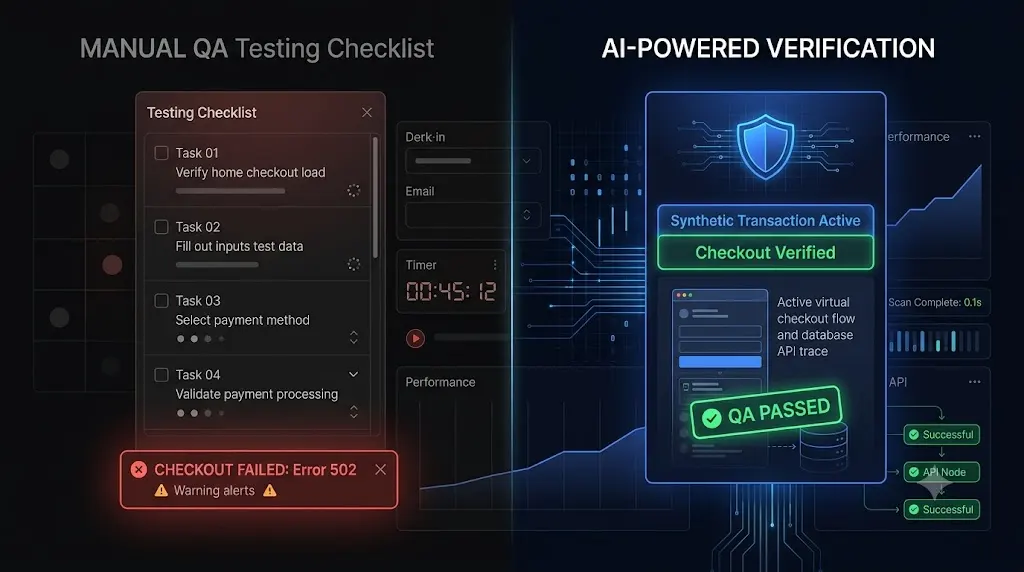
This guide provides the definitive, battle tested woocommerce post update qa checklist. We will break down exactly what you must manually test, why executing this checklist destroys agency profit margins, and how top tier WebOps teams use synthetic transaction bots to automate the entire QA process.
You visit the site and click “Proceed to Checkout.” The page loads, but the Stripe credit card fields are completely missing. A minor caching plugin update aggressively deferred the required JavaScript, breaking the payment gateway integration. The site was technically online, but the business was functionally dead.
If you manage multiple WordPress sites, this scenario is your biggest operational liability. A WooCommerce store is a fragile ecosystem. You cannot push code blindly. To protect your clients’ revenue, you must verify the business logic after every single update.
Quick Answer: What should a WooCommerce QA checklist include?
A reliable WooCommerce post update QA checklist must include visual verification of the Shop, Product, Cart, and Checkout pages across both desktop and mobile devices. Crucially, it must include a functional transaction test. You must add an item to the cart, navigate to checkout, enter sandbox payment credentials, submit a test order, and verify that the database successfully processed the order and triggered the correct customer receipt emails.
Why WooCommerce Breaks After Routine Updates
To understand why a QA checklist is mandatory, you must understand how updates break e-commerce architecture. When you execute an update, you introduce volatility.
- The Theme Override Mismatch: Custom themes often override default WooCommerce PHP templates. When WooCommerce updates its core files, your theme overrides become outdated instantly. This structural mismatch often shatters the frontend CSS layout of the cart or checkout page.
- JavaScript Deferral Conflicts: Payment gateways like Stripe and PayPal use external JavaScript iframes for security. If a performance optimization plugin updates and changes how scripts are minified, those payment iframes fail to load.
- Database Schema Migrations: Major updates change how WooCommerce stores data. If a database update script times out on the server, the tables become misaligned. A customer might be able to click “Place Order,” but the database will fail to log it, resulting in a silent failure.
Relying on basic WordPress uptime monitoring to catch these errors is a massive mistake. A ping bot only verifies that the server is awake; it cannot verify if your checkout page works.
The Ultimate Manual QA Checklist for WooCommerce
If your agency does not utilize AI automation platforms, you must execute this strict manual protocol on a staging environment to guarantee safe WordPress updates.
Phase 1: Visual Layout Verification
A functional site that looks broken destroys customer trust immediately.
- Check the Shop Archive: Ensure the product grid is aligned, images load correctly, and pagination functions.
- Check a Variable Product Page: Verify that color and size dropdowns function and properly update the product price dynamically.
- Check the Cart Page: Add an item to the cart. Verify that the CSS grid holding the order summary has not collapsed.
- Mobile Responsive Check: Open the site on a mobile device emulator. Ensure the “Proceed to Checkout” button has not shifted off the visible screen.
Phase 2: The Critical Transaction Test
This is the most important step. You must verify the business logic by placing a fake order.
- Enable Sandbox Mode: Activate Test Mode in your payment gateway settings (e.g., Stripe or PayPal).
- Navigate the Funnel: Add a product to the cart and proceed to checkout using an Incognito browsing window.
- Verify DOM Elements: Confirm that the credit card input fields and security badges are physically visible on the screen.
- Process the Order: Enter a gateway specific test credit card number (like
4242 4242 4242 4242for Stripe), fill out fake billing details, and click “Place Order.”
Phase 3: Integration and Database Checks
A successful frontend redirect is only half the battle. You must verify the backend execution.
- Database Verification: Log into the WordPress admin dashboard. Navigate to WooCommerce > Orders. Verify the test order appears at the top of the list with a “Processing” status.
- Email Verification: Check the inbox of the email address you used for the test order to ensure the customer receipt was generated and delivered successfully.
- Disable Sandbox Mode: Reactivate live transactions immediately after testing is complete.
The Agency Bottleneck: Why Manual QA Kills Profitability
The checklist above is mathematically bulletproof. It will save your clients from downtime. However, if you run a digital agency, it will completely destroy your profit margins.
Let us run the math on manual e-commerce testing.
If your agency charges $300 a month for a maintenance retainer: Cloning a site to a staging server takes 5 minutes. Running the updates takes 5 minutes. Executing the 3-phase manual QA checklist takes a minimum of 20 minutes. Pushing the verified code to live takes 5 minutes.
That is roughly 35 minutes of highly focused, unbillable labor per client, per week.
If you manage 20 WooCommerce clients, your senior developers are spending nearly 12 hours a week acting as human click testers. If your agency bills at $150 an hour, you are burning $1,800 in potential revenue every single week just to verify that a caching plugin update did not hide a Stripe input field.
The hidden cost of broken WordPress updates is not just the downtime; it is the massive amount of unbillable labor required to prevent it. You cannot build a profitable WordPress maintenance retainer if your team performs manual verification.
The Modern Solution: Automating WooCommerce QA
To scale your MRR profitably, you must decouple the execution of updates from human verification. Top tier agencies have abandoned manual staging tests entirely.
Instead of burning billable hours, they use advanced WebOps platforms to automate their QA processes. This operational shift is exactly how AI WordPress maintenance is changing agencies.
We engineered SiteOps specifically to act as an autonomous QA tester, completely eliminating the risk of a silent checkout failure without requiring human labor.
Here is exactly how SiteOps automates the WooCommerce QA checklist.
1. Synthetic Transaction Testing
You cannot verify a checkout page with a simple server ping. SiteOps utilizes synthetic transaction bots to verify business logic natively.
During a scheduled update, the platform spins up a headless Chromium browser in the cloud. It acts as an automated robotic shopper. It visits the live site, autonomously adds a product to the cart, navigates to the checkout page, and visually verifies that the required payment widget DOM elements successfully rendered on the screen. It mathematically proves that a customer can actually type their credit card number into the box.
2. AI Visual Regression Testing
To catch shattered CSS layouts across the rest of the site, SiteOps employs pixel perfect visual regression testing.
Before any update executes, the system takes a high resolution snapshot of the live site. It applies the plugin updates autonomously and flushes the cache. It takes a second set of screenshots. Artificial intelligence overlays the images. It easily detects a fatal layout break (such as a missing navigation bar) that a basic WordPress monitoring tool completely ignores.
3. Instant Autonomous Auto Rollbacks
Detecting a broken checkout is powerful, but true automation requires active remediation.
If the SiteOps AI detects a shattered visual layout, or if the synthetic bot fails to find the checkout fields, the system halts immediately. Within seconds, it triggers an autonomous auto rollback. The MySQL database and file system are restored to their exact stable pre update state.
The client never experiences a broken site. You simply wake up to a dashboard notification explaining exactly which plugin failed the business logic test.
Stop Guessing and Start Verifying
Understanding how to safely update WordPress plugins is the foundation of agency survival.
If you manage e-commerce retainers using legacy bulk update tools (like a standard ManageWP alternative or MainWP alternative) that rely on simple server pings, you are actively deploying risk. You will eventually push an update that breaks a checkout, and you will eventually lose a high paying client.
Conversely, if you manually execute QA checklists on staging environments, you are capping your agency’s growth potential by burning billable hours.
By upgrading to an autonomous WordPress maintenance tool equipped with synthetic transaction testing and deep WordPress security monitoring, you protect your clients’ revenue and secure your profit margins permanently.
Stop acting as a manual human QA tester. Let the AI handle the verification.
You can automate WordPress maintenance for multiple sites securely today. Test the synthetic transaction engine free for 3 sites with SiteOps.
Frequently Asked Questions
What should a WooCommerce QA checklist include? A reliable checklist must include visual verification of key pages (Shop, Cart, Checkout) on desktop and mobile. Crucially, it must include a functional transaction test using Sandbox mode to verify the payment gateway renders, the database logs the order, and receipt emails are dispatched.
How do I safely test WooCommerce updates? Never push major updates blindly to a live production site. You must either clone the site to a staging environment to run the updates and manually execute your QA checklist, or use an automated AI platform like SiteOps that utilizes visual regression testing to verify the checkout flow automatically.
Why does updating WooCommerce break my checkout? Checkout breakages are usually caused by outdated custom theme template overrides that no longer match the new WooCommerce core files, or by performance optimization plugins that aggressively minify the JavaScript required to load third party payment gateways like Stripe or PayPal.
What is a synthetic transaction in WordPress testing? A synthetic transaction is an automated process where a headless browser acts like a real user. It navigates to a page, adds an item to a cart, or clicks submit on a form, visually verifying that the business logic of the site is intact without requiring human labor.
Why did my monitoring tool say the site was up when the checkout was broken? Legacy monitoring tools only check for an HTTP 200 OK status code. This simply means your server is turned on. Your WooCommerce site could have a completely broken CSS layout or a missing payment gateway, and the basic monitoring bot will still falsely report the site as perfectly healthy.
What is visual regression testing in WordPress? Visual regression testing uses a headless browser to take a screenshot of your site before an update, and another screenshot immediately after. AI compares the images pixel by pixel to detect visual breaks, missing checkout buttons, or shattered CSS layouts that basic HTTP ping monitors miss.
What happens if a plugin update breaks my site on SiteOps? If an update breaks the site layout or checkout flow, the SiteOps AI detects the visual variance instantly. Before the client or their customers ever see the error, the system autonomously triggers an auto rollback, restoring the site’s database and files to their stable pre update state in seconds.
Can WordPress automatically update WooCommerce safely? Native WordPress auto updates are highly risky for e-commerce sites because they execute blindly. They push the new code without verifying if it broke the frontend layout or the checkout flow. Safe automation requires a dedicated third party tool with visual verification capabilities.
How do agencies manage multiple WooCommerce updates efficiently? Top tier agencies no longer use manual staging tests for every update because they are highly unprofitable. They use automated white-label WordPress maintenance tools that combine bulk update capabilities with AI visual regression testing to eliminate manual QA hours.
How do you prove the value of e-commerce maintenance to clients? Do not send a raw PDF listing updated plugins. Use an automated reporting tool that translates technical data into a clear executive summary. The report should highlight exactly how much downtime was avoided and how many potential layout breaks were prevented by your proactive visual testing systems.
Scale Your Agency Today
Join 500+ agencies automating their WordPress maintenance. Get started with 3 sites for free. No credit card required.