Why “Update and Pray” is Failing Modern WooCommerce Stores
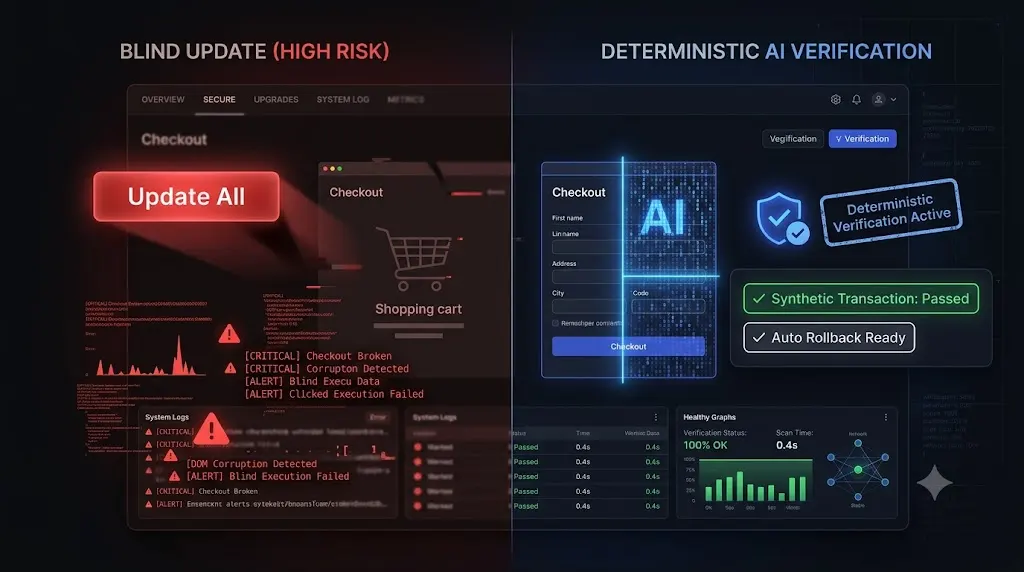
It happens in web agencies worldwide every Friday afternoon. A developer logs into a centralized management dashboard, selects high-revenue WooCommerce client sites, and clicks “Bulk Update.” This update and pray woocommerce approach can turn routine maintenance into a costly disaster.
They hold their breath. The progress bar completes. The dashboard returns a green HTTP 200 status code, indicating the servers are still online. The developer exhales, logs out, and goes home for the weekend.
In the web development industry, this is known as the “Update and Pray” methodology. You push the code blindly, and you pray to the digital gods that you did not just break anything important.
For a simple brochure blog in 2016, this strategy was risky but common. For a modern e-commerce setup processing thousands of dollars a day in 2026, this strategy is an existential threat to your agency.
A modern WooCommerce store is an incredibly fragile ecosystem. A single conflicting line of deferred JavaScript can completely hide the credit card input fields. A minor CSS tweak from an optimization plugin can push the “Add to Cart” button off the mobile viewport. The site remains technically online, but the business is functionally dead.
This opinionated guide breaks down exactly why the “Update and Pray” method is mathematically guaranteed to fail your clients, why manual QA testing is no longer a viable alternative, and how elite agencies are transitioning to autonomous WebOps to secure their high ticket retainers permanently.
Quick Answer: Why is blind updating dangerous for WooCommerce?
Pushing updates blindly (the “update and pray” method) is dangerous for WooCommerce because modern e-commerce sites rely on complex, interconnected plugins, headless React blocks, and third party APIs. An unverified update can easily shatter the checkout CSS or break the payment gateway JavaScript. To guarantee safe WordPress updates, agencies must replace blind execution with automated visual regression testing and synthetic transaction bots to verify the frontend layout autonomously.
The Anatomy of the “Update and Pray” Failure
To understand why your client just lost a weekend of sales, you have to look at the legacy tools you are using to manage their site.
Legacy management platforms (like a standard ManageWP alternative or MainWP alternative) operate as simple remote controls. When you trigger an update through these tools, they execute the PHP command on the server and check for an HTTP 200 OK status code.
If the server says “I am awake,” the dashboard gives you a green checkmark.
This is the HTTP 200 Fallacy. Your legacy WordPress monitoring tool is completely blind to the actual user experience. It does not render the Document Object Model (DOM). It does not know that your Stripe iframe failed to load. It only knows the code was pushed.
When you click update without visual verification, you are not performing maintenance. You are deploying risk at scale.
Why Modern WooCommerce Architecture Shatters
You might argue that you have updated WooCommerce hundreds of times without incident. But the architecture of e-commerce has fundamentally changed, making it vastly more volatile.
1. The Rise of Dynamic Block Checkouts
Modern WooCommerce checkouts rely heavily on React blocks and dynamic API calls to function. They are no longer static PHP forms.
When you update a performance optimization plugin to improve Core Web Vitals, it applies new rules for deferring or minifying JavaScript. If it aggressively defers the specific script required by your payment gateway, the entire checkout sequence fails silently. The user clicks “Place Order,” and the button simply spins endlessly.
2. The Fragility of Theme Overrides
Custom e-commerce themes look beautiful because developers use template overrides. They copy the default WooCommerce PHP files into their theme folder to create a bespoke layout.
When WooCommerce updates its core files, those custom theme overrides instantly become outdated. The structural mismatch causes the CSS grid to collapse. The “Update and Pray” method will never catch this visual degradation because the server is still functioning perfectly in the background.
The Unbillable Trap of Manual QA Testing
When agency owners realize that pushing code blindly is a massive liability, they usually pivot to the traditional solution: manual Quality Assurance (QA) testing.
To avoid breaking the live site, developers clone the WooCommerce store to a staging environment. They run the plugin updates incrementally. Then, they manually click through the shop archive, add a product to the cart, navigate to checkout, and process a test transaction using a fake sandbox credit card.
This protocol works. It is also an absolute profitability killer.
If you manage multiple WordPress sites and have 20 e-commerce clients on retainer, executing this manual workflow takes roughly 30 minutes per site. Your senior developers are burning 10 hours a week acting as human click testers.
If your agency bills at $150 an hour, you are setting $1,500 on fire every single Friday just to verify that a routine update did not break your clients’ websites. The hidden cost of broken WordPress updates is not just the downtime; it is the massive amount of unbillable payroll you waste trying to prevent it.
You cannot build a highly profitable WordPress maintenance retainer if your agency model requires intense human intervention to verify basic business logic.
The Autonomous Shift: Deterministic Verification
Hope is not an operational strategy. You must replace “Update and Pray” with deterministic verification.
Top tier agencies have recognized that execution is easy, but verification is hard. They have abandoned legacy remote controls and shifted to autonomous AI platforms that actually “see” the website exactly like a human buyer does.
This is exactly how AI WordPress maintenance is changing agencies.
We engineered SiteOps specifically to eliminate the anxiety of e-commerce updates. SiteOps acts as your autonomous WebOps engineer, completely replacing the need for manual staging tests.
Here is how deterministic verification permanently replaces blind updates.
1. Synthetic Transaction Testing
You cannot verify a checkout page with a simple server ping. You must interact with it.
During the update sequence, SiteOps spins up a headless Chromium browser in the cloud. It acts as an automated robotic shopper. It autonomously visits the live site, adds a product to the cart, and navigates to the checkout page.
It visually verifies that the required payment widget DOM elements (like the Stripe iframe) successfully rendered on the screen. It mathematically proves that a customer can actually type their credit card number into the box.
2. AI Visual Regression
To catch shattered CSS grids and missing mobile menus, SiteOps takes a high resolution snapshot of the live site before an update. It applies the plugins, clears the cache, and takes a second snapshot.
Artificial intelligence overlays the images pixel by pixel. It easily detects a fatal layout break that a standard ping monitor completely ignores.
3. Instant Autonomous Auto Rollbacks
Detecting a broken checkout is powerful, but true automation requires active remediation. If your tool just sends you an email at midnight telling you the site broke, you still have to wake up and fix it.
If the SiteOps AI detects a shattered visual layout during the update process, or if the synthetic bot fails to find the checkout fields, the system halts immediately.
Within seconds, it triggers an autonomous auto rollback. The MySQL database and file system are restored to their exact stable pre update state. The client never experiences a broken checkout. Their ad spend is protected. You simply wake up to a dashboard notification explaining exactly which plugin failed the business logic test.
Stop Praying. Start Verifying.
Understanding why the legacy update model is broken is the first step in taking control of your agency’s financial liability.
If you offer white-label WordPress maintenance using basic bulk update tools that rely on simple server pings, you are actively deploying risk. You will eventually push an update that breaks a checkout, and you will eventually lose a high paying client because of it.
By upgrading to an autonomous WebOps platform equipped with synthetic transaction testing, visual regression, and proactive WordPress security monitoring, you completely eliminate the manual QA bottleneck.
You protect your clients’ revenue and secure your profit margins permanently. Stop acting as a manual human QA tester. Let the AI handle the verification.
Test the synthetic transaction engine today. Claim your free sites, execute your first deterministic update, and stop praying for green checkmarks.
Frequently Asked Questions
Why is Update and Pray failing WooCommerce stores? Modern WooCommerce setups rely on complex React components and fragile third party API integrations (like payment gateways). Pushing updates blindly without visually verifying the frontend frequently results in silent checkout failures, where the site appears online but cannot process transactions.
What is the HTTP 200 Fallacy in web maintenance? The HTTP 200 Fallacy is the dangerous assumption that a successful server response (Code 200 OK) equals a healthy, functioning website. A site can return a 200 status while serving a completely shattered CSS layout or a broken checkout flow, rendering basic WordPress uptime monitoring tools useless.
How do I safely test WooCommerce updates? Never push major updates blindly to a live production site. You must either clone the site to a staging environment to run the updates and manually execute a test transaction, or use an automated AI platform like SiteOps that utilizes synthetic transaction bots to verify the checkout flow autonomously.
What is a synthetic transaction in WordPress testing? A synthetic transaction is an automated process where a headless browser acts like a real user. It navigates to a page, adds an item to a cart, or clicks submit on a form, visually verifying that the business logic of the site is intact without requiring human labor.
Why did my monitoring tool say the site was up when the checkout was broken? Legacy monitoring tools only check for a server ping. They do not render the HTML or execute JavaScript. Your WooCommerce site could have a completely broken CSS layout or a missing payment gateway, and the basic monitoring bot will still falsely report the site as perfectly healthy.
What is visual regression testing in WordPress? Visual regression testing uses a headless browser to take a screenshot of your site before an update, and another screenshot immediately after. AI compares the images pixel by pixel to automatically detect visual breaks, missing checkout buttons, or shattered CSS layouts that manual testing often misses.
What happens if a plugin update breaks my site on SiteOps? If an update breaks the site layout or checkout flow, the SiteOps AI detects the visual variance instantly. Before the client or their customers ever see the error, the system autonomously triggers an auto rollback, restoring the site’s database and files to their stable pre update state in seconds.
Can WordPress automatically update WooCommerce safely? Native WordPress auto updates are highly risky for e-commerce sites because they execute blindly. They push the new code without verifying if it broke the frontend layout or the checkout flow. Safe automation requires a dedicated third party tool with visual verification capabilities.
How do agencies manage multiple WooCommerce updates efficiently? Top tier agencies no longer use manual staging tests for every update because they are highly unprofitable. They use automated maintenance platforms that combine bulk update capabilities with AI visual regression testing to automate WordPress maintenance for multiple sites safely, eliminating manual QA hours.
How do you prove the value of e-commerce maintenance to clients? Do not send a raw PDF listing updated plugins. Use an automated reporting tool that translates technical data into a clear executive summary. The report should highlight exactly how much downtime was avoided and how many fatal layout breaks were prevented by your proactive visual testing systems.
Scale Your Agency Today
Join 500+ agencies automating their WordPress maintenance. Get started with 3 sites for free. No credit card required.