How We Manage 20+ WordPress Sites Without Losing Our Minds (Agency Case Study)
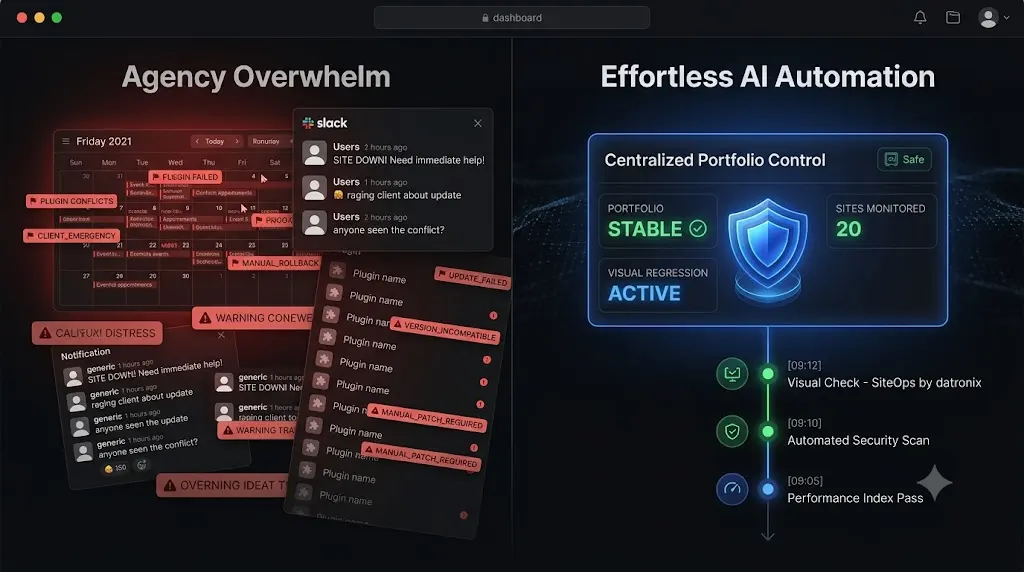
You sign your 20th WordPress maintenance client. You should be opening champagne. Instead, you are looking at your calendar with a sense of impending dread.
Managing three client websites is a side hustle. Managing 20 client websites is a complex logistical operation. When you hit the 20 site threshold, you realize that your initial workflow no longer functions. Pushing plugin updates manually takes hours. Logging into individual dashboards to optimize databases ruins your Friday afternoons. And the constant anxiety that a WooCommerce checkout page might break over the weekend keeps you tied to your laptop.
At Datronix Tech, we hit this exact operational wall. We realized that if we continued to manage our portfolio using manual Quality Assurance (QA) testing and legacy bulk update tools, we would never scale.
If you want to know how to manage multiple WordPress sites without burning out your team or destroying your profit margins, this case study is for you. We will break down the exact math of the agency bottleneck, why legacy remote controls fail at scale, and the precise AI automation framework we built to reclaim our billable hours.
Quick Answer: How do you manage 20+ WordPress sites efficiently?
To manage 20 or more WordPress sites efficiently, agencies must abandon manual updates and adopt centralized automation. The most effective workflow utilizes an AI powered maintenance platform like SiteOps. This allows agencies to execute bulk plugin updates with visual regression testing, ensuring that if a layout breaks, the system autonomously rolls the site back. This eliminates manual QA testing and centralizes security, backups, and uptime monitoring in one dashboard.
The 20 Site Breaking Point: Why Manual Workflows Fail
Before we automated our infrastructure, we had to audit exactly where our agency was bleeding time and money.
When you manage a small handful of sites, you can afford to be meticulous. You clone the site to a staging environment, run the updates, and click through the frontend to verify nothing broke. You then push those changes to production.
The Math of Unbillable QA Hours
Once we crossed 20 active retainers, the math became a crisis.
- Cloning to staging and running updates: 5 minutes per site.
- Manual visual QA testing across key pages: 10 minutes per site.
- Pushing verified code to production: 5 minutes per site.
That is 20 minutes of highly focused, manual labor per site, per week. For 20 sites, our senior developers were spending nearly 7 hours every single week just acting as human click testers. That translates to roughly 28 hours a month of unbillable labor.
If your agency bills at $120 an hour, you are burning over $3,300 in potential revenue every month just to verify that a caching plugin update did not break a CSS grid.
The Illusion of Legacy Bulk Updaters
To stop the bleeding, we initially turned to legacy management dashboards. We needed a ManageWP alternative workflow that could speed up the process.
These tools allowed us to select all 20 sites and click “Update All.” It saved us 7 hours of manual labor immediately. However, it replaced that labor with massive operational liability.
Legacy tools execute blind updates. They push the new plugin files and check the server for an HTTP 200 OK status code. If the server responds, the dashboard logs the update as a success.
We quickly learned the hard way that an HTTP 200 code only means the server is turned on. It does not verify if a Javascript conflict hid a client’s primary lead capture form. The hidden cost of broken WordPress updates destroyed our profit margins as we spent our weekends in frantic triage mode fixing layouts we broke during our bulk updates.
Our Tech Stack Audit: Searching for the Right Tool
We realized we could not scale our MRR (Monthly Recurring Revenue) if we had to choose between unbillable manual QA testing and the extreme liability of blind bulk updates. We needed a system that actually verified its own work.
We evaluated the industry standard options to find a suitable MainWP alternative or SaaS solution.
Testing the SaaS Remote Controls
Tools like WP Umbrella and ManageWP offered beautiful interfaces. They solved the problem of logging into 20 different admin panels. They handled uptime monitoring well.
However, they still forced us to act as manual testers. Because they lacked native visual verification, we still had to load every client homepage after clicking “Update All” to ensure the layouts remained intact. They were excellent remote controls, but terrible automated assistants.
Testing the Self Hosted Command Centers
We explored MainWP to gain complete control over our data privacy.
The architecture required us to install the command center on our own Virtual Private Server (VPS). We immediately encountered a new bottleneck. Triggering simultaneous backups and deep security scans across 20 client sites caused massive CPU spikes, frequently crashing our own management dashboard.
A detailed MainWP vs ManageWP vs SiteOps analysis proved that becoming a server administrator for our own internal tools was a step backward in efficiency.
The Datronix Framework: How We Automate 20+ Sites
To scale a maintenance portfolio profitably, we needed an autonomous operational layer. We needed a platform that performed the exact steps a human QA tester would perform, but at machine speed and scale.
This specific agency pain point is exactly why we built SiteOps.
Today, Datronix manages our growing portfolio using a strict, automated framework. Our total human involvement in routine maintenance for 20+ sites is strictly capped at under one hour a week. Here is our exact automated workflow.
Step 1: Autonomous Visual Regression Testing
The core of our automation is pixel perfect visual regression testing. This single feature allowed us to entirely eliminate manual staging tests.
When we trigger our weekly plugin updates via our WordPress maintenance tool, the system acts identically to our senior developers.
- It spins up a headless Chromium browser instance in the cloud.
- It visits the live production site and takes a high resolution snapshot of the Document Object Model (DOM) and a visual screenshot of key pages.
- It applies the necessary plugin or core updates.
- It automatically clears the server cache and edge caching to ensure it is viewing the newly compiled live code.
- It takes a second set of screenshots.
Artificial intelligence then overlays the images. It easily differentiates between expected dynamic content and a fatal layout break. We no longer have to manually load 20 homepages to verify visual alignment.
Step 2: Instant Auto Rollbacks
Visual regression is incredible, but detecting a broken site does not save you time if you still have to manually log in via FTP to fix it.
If the SiteOps AI detects a broken layout after an update, it instantly halts the process. Within seconds, it queries our backup vault and triggers an autonomous auto rollback. It restores the MySQL database and file system to their exact stable pre update state.
The client never experiences downtime. Their customers can still process orders. We simply receive a dashboard notification explaining which specific plugin failed the visual QA test. This is exactly how we safely update WordPress plugins without ever risking client revenue.
Step 3: Proactive 4 Level Security Scanning
Managing security across 20 sites requires a centralized view. We used to spend hours auditing security logs across multiple disparate plugins.
Now, we utilize a centralized WordPress security monitoring approach. SiteOps executes a 4 level deep scan autonomously across our entire portfolio daily.
- Core File Integrity: It verifies that core files match the official WordPress.org cryptographic checksums to detect malicious injections immediately.
- Active CVE Tracking: It continuously cross references our active plugins against global Common Vulnerabilities and Exposures (CVE) databases. We are alerted to zero day threats before patches are even announced.
- Deep Malware Scanning: It scans the database to detect obfuscated PHP backdoors.
- Configuration Hardening: It autonomously audits configuration file permissions.
Step 4: AI Executive Client Reporting
The biggest threat to a maintenance retainer is client apathy. If the sites run perfectly, the client will eventually ask why they are paying us.
We used to spend an entire day compiling raw data into basic PDF reports for 20 clients. Now, we use AI to automate our white-label WordPress maintenance reporting.
The platform analyzes the month’s raw data, translates technical actions into business value, and generates a customized, human readable executive summary. It highlights the specific disasters we prevented, such as layout breaks avoided by auto rollbacks or unauthorized logins blocked by the firewall.
Comparing the Workflows: Manual vs AI Automation
To clearly summarize how our agency transformed, examine the operational differences side by side.
| Agency Operations | Datronix Workflow (Legacy) | Datronix Workflow (with SiteOps) | Operational Impact |
|---|---|---|---|
| Update Verification | Manual Staging Tests | AI Visual Regression Testing | Saved 28+ hours a month |
| Failure Response | Frantic FTP manual restore | Instant Auto Rollbacks | Zero downtime for clients |
| Security Posture | Reactive Blacklist checks | 4 Level Deep Scan + CVE tracking | Prevented zero day exploits |
| Client Reporting | Manual Data Compilation | AI Executive Summaries | Increased retention rates |
| Uptime Monitoring | Basic 30 minute pings | Native 5 minute interval checks | Faster emergency triage |
The Financial Impact: Scaling Agency MRR
The software you choose directly dictates your agency economics.
When evaluating the best WordPress monitoring tools in 2026, you must look at pricing models. Legacy tools use a la carte modular pricing. Every time you sign a new client, you have to pay extra for daily backups, safe updates, and white label reporting. Your operational overhead increases linearly, punishing your growth.
We engineered SiteOps specifically to help agencies scale their MRR infinitely.
We eliminated the per site scaling penalty. The SiteOps Agency Plan operates on a flat monthly rate for unlimited sites. Whether our portfolio sits at 20 sites or we scale to 100 sites, our software overhead remains exactly the same. Every time we close a deal and sign a new maintenance retainer, we retain 100% of the profit margin on that new contract.
This financial predictability is the cornerstone of building a truly profitable WordPress maintenance retainer.
Escaping the Bottleneck with SiteOps
If you run a digital agency, managing 20+ WordPress sites manually is not a sustainable business model. It leads directly to developer burnout and shrinking profit margins.
We built SiteOps because we were tired of being human QA testers. We were tired of the anxiety associated with the bulk update button. We were tired of legacy tools that promised automation but delivered massive liability.
By transitioning our agency to an autonomous AI WordPress maintenance platform, we reclaimed our weekends, protected our clients’ revenue, and scaled our profit margins beyond anything we could achieve with manual labor.
If you are ready to automate WordPress maintenance for multiple sites safely, you can replicate our exact workflow today.
Test the visual regression engine and auto rollbacks that power our agency operations. SiteOps is free for 3 sites, no credit card required.
Frequently Asked Questions
How do I manage multiple WordPress sites efficiently? To manage multiple sites efficiently, you must transition from manual workflows to centralized automation. Use a platform like SiteOps to execute bulk plugin updates, automate off site backups, and run daily security scans from a single unified dashboard, eliminating the need to log into individual sites.
What is the best tool to manage multiple WordPress sites? For agencies prioritizing safety and profit margins, SiteOps is the leading platform. Unlike legacy remote control tools, it uses AI visual regression testing and instant auto rollbacks to verify updates, allowing agencies to scale their operations without hiring additional QA staff.
Can WordPress automatically update plugins safely? Native WordPress auto updates are highly risky for agency clients because they execute blindly. They push the new code without verifying if it broke the frontend layout or CSS. Safe automation requires a third party tool that performs visual verification before and after the update.
How does visual regression testing save agency hours? Visual regression testing uses a headless browser to “see” a website and detect layout breaks during an update. This completely eliminates the need for a human developer to spend hours manually clicking through staging sites to verify that a plugin update did not break the design.
Why is an HTTP 200 check not enough for monitoring? An HTTP 200 status code simply means your server is turned on and responded to a request. A website could have a completely shattered layout, a blank white screen from a PHP error, or a missing lead form, and still return a 200 OK status to a basic legacy monitoring bot.
How do you automate WordPress maintenance for multiple sites? To automate maintenance securely, connect your portfolio to a centralized dashboard like SiteOps. This allows the platform to execute scheduled backups, run 4 level deep security scans, and handle bulk plugin updates using AI visual validation automatically.
What happens if a plugin update breaks a client’s site? If you update manually, you must quickly restore the site from a backup via FTP. If you use a modern automation platform like SiteOps, the system detects the visual break during the update and automatically restores the site to its pre update state in seconds before the client notices.
How does pricing impact agency maintenance operations? Legacy tools use modular a la carte pricing, meaning software costs scale up rapidly as you acquire more clients. To scale profitably, agencies use flat rate platforms like SiteOps that offer unlimited sites, ensuring software overhead stays fixed regardless of portfolio growth.
How do I prove the value of a maintenance plan to a client? The best way to prove ongoing value is through an automated monthly report. Do not just send raw server data. Use AI tools to generate an executive summary that highlights the specific disasters you prevented, such as unauthorized logins blocked or layout breaks avoided.
How do I migrate my sites to a new management tool? Migrating is simple and requires zero downtime. You install the new platform’s worker plugin on your client sites, verify the connection in your new dashboard, and then simply deactivate and delete the old legacy worker plugin from the client sites.
The Bottom Line
Hitting the 20 site milestone should be a moment of celebration, not the beginning of operational chaos.
If you continue to manage client sites using manual staging tests, basic pinging tools, and blind bulk updates, your profit margins will eventually collapse under the weight of manual labor and client emergency calls.
To build a truly profitable, scalable agency, you must automate safety. Review your WordPress maintenance checklist and upgrade your operational stack today.
By implementing visual regression testing, autonomous rollbacks, and proactive security scanning, you protect your clients’ revenue while radically preserving your own margins.
Stop letting manual maintenance tasks bottleneck your agency growth. SiteOps automates the entire workflow.
Scale Your Agency Today
Join 500+ agencies automating their WordPress maintenance. Get started with 3 sites for free. No credit card required.