The Hidden Cost of Broken Checkouts: Why WooCommerce Stores Lose Thousands After Routine Updates
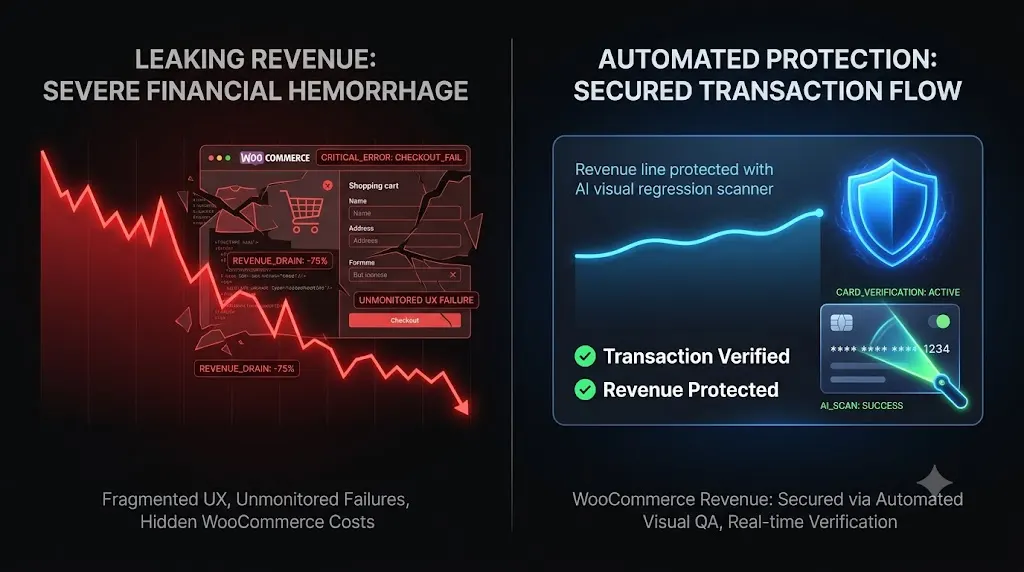
You run a successful digital agency. It is Friday afternoon, and you are executing weekly maintenance for a client whose WooCommerce store processes $10,000 a day in sales. The hidden cost of broken checkouts can quickly turn a routine update into a major financial loss.
You click “Bulk Update” on your management dashboard. Five minutes later, the system gives you a bright green checkmark. Every plugin updated perfectly. The server is online. You log off for the weekend.
On Monday morning, you open an email from the furious business owner. Their sales dashboard recorded exactly zero transactions for the entire weekend.
You visit the live website. The homepage looks pristine. The product catalog is lightning fast. You click “Add to Cart,” but when you proceed to the checkout page, the Stripe credit card input fields are completely missing. The site was technically online for 60 hours, but the business was functionally dead.
A silent checkout failure is the most expensive operational disaster an agency can face. The financial damage extends far beyond the missed retail sales, triggering a cascade of wasted advertising budgets and unbillable agency labor.
This guide performs a complete financial autopsy on silent e commerce failures. We will break down exactly how routine plugin conflicts cause these invisible breaks, why traditional monitoring tools fail to warn you, and how top tier agencies automate their transaction testing to guarantee total revenue protection.
Quick Answer: What is the hidden cost of broken checkouts?
The hidden cost of broken checkouts includes the immediate loss of retail revenue during the downtime window, the wasted Return on Ad Spend (ROAS) from driving paid traffic to a broken funnel, and the unbillable developer hours the agency must burn in emergency triage to fix the layout. To prevent these massive financial losses, modern agencies abandon manual testing and use automated platforms like SiteOps to perform synthetic transaction testing and instantly auto rollback any update that breaks the WooCommerce DOM.
The Financial Autopsy of a Silent Checkout Failure
When you push an update without verifying the frontend, you are deploying risk at scale. To understand the true hidden cost of broken WordPress updates, we must look at the specific ways a broken checkout bleeds money from both the merchant and the agency.
1. The Immediate Retail Hemorrhage
In our scenario, the client averages $10,000 a day. A 60 hour weekend outage (Friday 5:00 PM to Monday 5:00 AM) means your 5 second click on the “Update All” button just cost the client $25,000 in hard revenue.
Customers do not email support when a checkout fails; they immediately purchase the item from a competitor. That revenue is permanently lost, and the brand trust with those potential buyers is severely damaged.
2. Wasted Return on Ad Spend (ROAS)
E commerce businesses survive on paid acquisition. If your client spends $1,000 a day on Meta or Google Ads, they are paying premium rates to drive high intent buyers directly into their funnel.
When those users reach a broken checkout page and bounce, the client is literally setting their advertising budget on fire. For a weekend outage, that is $2,500 in wasted ad spend. Furthermore, the influx of bounced traffic completely skews the Facebook Pixel and Google Analytics conversion data, damaging the algorithmic optimization of future ad campaigns.
3. The Unbillable Agency Triage Tax
The financial bleeding strikes your agency directly. When you receive that frantic Monday morning email, your team must drop all profitable project work to enter emergency triage.
A senior developer must manually dig through the server, isolate the conflicting caching rule or payment gateway update, restore the database backup, and reconfigure the staging environment to test a fix. If this process takes four hours, and your agency bills at $150 an hour, you just burned $600 in unbillable labor.
If the client’s profitable WordPress maintenance retainer is $300 a month, you just wiped out the gross margin for that specific client for two months. And that assumes the client does not fire you for losing them $25,000 in sales.
Why Do Routine Updates Break WooCommerce Checkouts?
To stop the financial bleed, you must understand the architectural fragility of modern e commerce. A WooCommerce store is a heavily integrated application. It relies on a delicate balance of payment gateways, custom theme templates, and caching rules.
When you update plugins, you introduce volatility. Here are the three most common reasons a checkout shatters silently.
1. The JavaScript Minification Conflict
Modern payment gateways (like Stripe and PayPal) do not process credit cards directly on your client’s server. To comply with PCI regulations, they load a secure iframe via external JavaScript to capture the card details safely.
To improve Core Web Vitals, you likely installed a performance optimization plugin. When you update that plugin, it applies new rules for deferring or minifying JavaScript. If it aggressively defers the specific script required by Stripe, the iframe never initializes. The customer sees their order summary, but the box where they type their credit card number is completely blank.
2. Outdated Theme Template Overrides
Custom WordPress themes rarely use the default WooCommerce checkout layout. Theme developers copy the core WooCommerce PHP files into their own theme folder to heavily customize the design.
When you safely update WordPress plugins, including major WooCommerce core updates, the underlying HTML structure often changes. If your client’s custom theme still relies on an old, overridden template, the structural mismatch instantly breaks the CSS grid. The “Place Order” button might drop completely off the mobile viewport screen.
3. Database Schema Migrations Timing Out
Major WooCommerce updates often restructure how data is stored (such as implementing High Performance Order Storage). When you click update, a background script attempts to migrate the database tables.
Due to a brief timeout on a shared hosting server, the script can fail midway. The frontend website continues to load perfectly, but the database can no longer correctly process or store transaction data, resulting in a silent failure when a user clicks submit.
The Failure of Legacy Monitoring (The HTTP 200 Trap)
If the checkout was broken for 60 hours, why didn’t your legacy ManageWP alternative or your dedicated WordPress uptime monitoring tool send you an alert?
You were a victim of the HTTP 200 Fallacy.
Legacy bulk update dashboards and basic ping bots operate on a very simple premise. They send a request to your server. If the server is turned on and responds with an HTTP 200 OK status code, the dashboard gives you a green checkmark indicating the site is perfectly healthy.
An HTTP 200 code only verifies that the server responded. It does absolutely nothing to verify the Document Object Model (DOM). Your client’s site had a completely shattered CSS layout and a missing JavaScript payment iframe, but because the server was technically awake, your dashboard falsely reported 100 percent success.
When evaluating the best WordPress monitoring tools in 2026, you must realize that automating the execution of an update without automating the visual verification of the frontend is simply deploying risk at scale.
Automating Checkout Verification with SiteOps
To scale a maintenance portfolio profitably, you must replace human QA testers with autonomous AI. The goal of a modern WordPress maintenance tool is to completely remove the human element from routine tasks while maintaining absolute, verifiable safety.
This specific e commerce bottleneck is exactly why we engineered SiteOps. We needed an autonomous system that eliminated the risk of a silent checkout failure and protected agency profit margins.
Here is exactly how the SiteOps engine guarantees transaction stability during a plugin update.
1. Synthetic Transaction Testing
You cannot verify a checkout page with a simple server ping. You must interact with it.
SiteOps utilizes synthetic transaction bots. When you schedule your routine maintenance, the platform spins up a headless Chromium browser in the cloud. It acts as an automated robotic shopper.
- It visits the live site autonomously.
- It adds a product to the cart.
- It navigates to the checkout page.
- It visually verifies that the required payment widget DOM elements (like the Stripe iframe) successfully rendered on the screen.
It mathematically proves that a customer can actually type their credit card number into the box. If this synthetic transaction fails, the site is marked as broken.
2. AI Visual Regression Testing
To catch shattered CSS layouts and missing mobile menus, SiteOps employs pixel perfect visual regression testing.
Before any update executes, the system takes a high resolution snapshot of the live site. It applies the plugin updates autonomously and flushes the cache. It takes a second set of screenshots. Artificial intelligence overlays the images. It easily detects a fatal layout break (such as a missing “Proceed to Checkout” button) that a basic ping bot completely ignores.
3. Instant Autonomous Auto Rollbacks
Detecting a broken checkout is powerful, but true automation requires active remediation.
If the SiteOps AI detects a shattered visual layout, or if the synthetic bot fails to find the checkout fields, the system halts immediately. Within seconds, it triggers an autonomous auto rollback. The MySQL database and file system are restored to their exact stable pre update state.
The client never experiences a broken site. You simply wake up to a dashboard notification explaining exactly which plugin failed the business logic test.
Stop Guessing and Start Verifying
Understanding how AI WordPress maintenance is changing agencies is the first step in taking control of your agency’s financial liability.
If you manage multiple WordPress sites using legacy bulk update tools that rely on simple server pings, you are actively deploying risk. A detailed ManageWP vs SiteOps comparison reveals exactly why autonomous visual operations are replacing blind remote controls.
By upgrading to an autonomous WebOps platform equipped with synthetic transaction testing, deep WordPress security monitoring, and instant auto rollbacks, you protect your clients’ revenue, secure your agency’s reputation, and radically preserve your billable hours.
Stop manually testing WooCommerce staging sites. Review your WordPress maintenance checklist and let the AI handle the verification.
You can automate WordPress maintenance for multiple sites securely today. Test the visual regression engine free for 3 sites.
Frequently Asked Questions
Why did my WooCommerce checkout break after a plugin update? Checkout breakages are usually caused by outdated custom theme template overrides that no longer match the new WooCommerce core files, or by performance optimization plugins that aggressively minify the JavaScript required to load third party payment gateways like Stripe or PayPal.
What is the hidden cost of broken checkouts? The hidden cost includes the immediate loss of retail revenue during the downtime window, the wasted advertising spend driving traffic to a dead page, the unbillable developer hours spent in emergency triage, and the severe reputational damage that often leads to client churn.
How do I safely update WooCommerce plugins? Never push major updates blindly to a live production site. You must either clone the site to a staging environment to run the updates and manually test a transaction, or use an automated AI platform like SiteOps that utilizes visual regression testing to verify the checkout flow automatically.
What is a synthetic transaction in WordPress testing? Synthetic transaction testing is an automated process where a headless browser acts like a real user. It navigates to a page, adds an item to a cart, or clicks submit on a form, visually verifying that the business logic of the site is intact without requiring human labor.
Why did my monitoring tool say the site was up when the checkout was broken? Legacy monitoring tools only check for an HTTP 200 OK status code. This simply means your server is turned on. Your WooCommerce site could have a completely broken CSS layout or a missing payment gateway, and the basic monitoring bot will still falsely report the site as perfectly healthy.
What is visual regression testing in WordPress? Visual regression testing uses a headless browser to take a screenshot of your site before an update, and another screenshot immediately after. AI compares the images pixel by pixel to detect visual breaks, missing checkout buttons, or shattered CSS layouts that basic HTTP ping monitors miss.
What happens if a plugin update breaks my site on SiteOps? If an update breaks the site layout or checkout flow, the SiteOps AI detects the visual variance instantly. Before the client or their customers ever see the error, the system autonomously triggers an auto rollback, restoring the site’s database and files to their stable pre update state in seconds.
Can WordPress automatically update WooCommerce safely? Native WordPress auto updates are highly risky for e commerce sites because they execute blindly. They push the new code without verifying if it broke the frontend layout or the checkout flow. Safe automation requires a dedicated third party tool with visual verification.
How do agencies manage multiple WooCommerce updates efficiently? Top tier agencies no longer use manual staging tests for every update because they are highly unprofitable. They use automated white-label WordPress maintenance tools that combine bulk update capabilities with AI visual regression testing to eliminate manual QA hours.
Is MainWP safe for bulk updating WooCommerce sites? While seeking a MainWP alternative, agencies realize that self hosted tools still lack native automated visual verification. A deeper dive into MainWP vs ManageWP vs SiteOps proves that pushing bulk updates without visual testing carries the exact same risk of breaking a frontend layout as updating manually.
Scale Your Agency Today
Join 500+ agencies automating their WordPress maintenance. Get started with 3 sites for free. No credit card required.