How SiteOps Detects and Removes WordPress Malware Automatically (ClickFix & Ghost Admin)
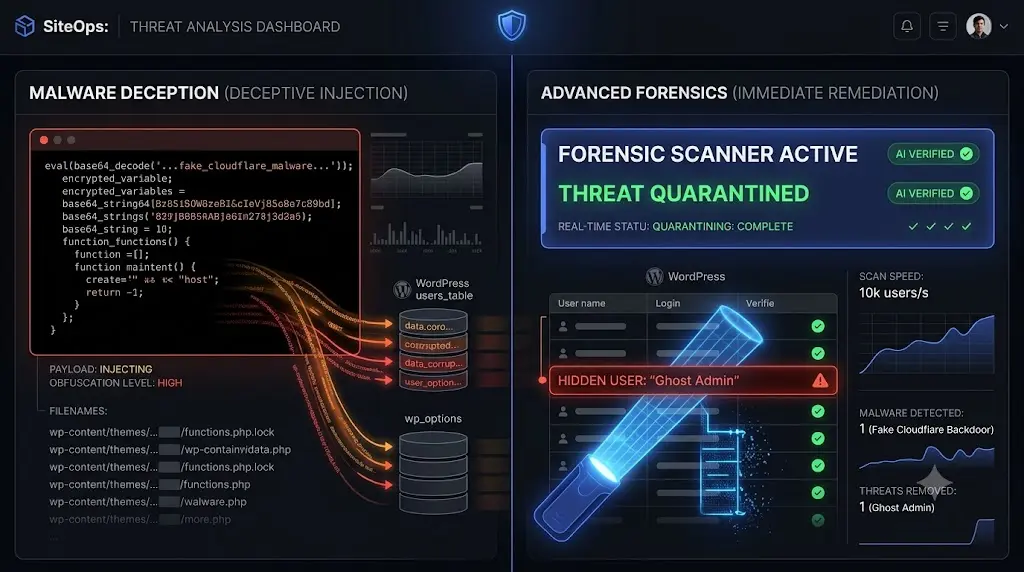
WordPress malware has gotten frighteningly sophisticated. The days of hackers simply defacing your homepage with a digital signature are over. Today, attackers operate silent, highly lucrative networks designed to hijack your traffic and infect your visitors.
The latest wave of attacks specifically targets agency portfolios. These threats bypass every major security scanner (including Wordfence), stay completely invisible in the standard WordPress admin panel, and automatically rebuild themselves seconds after you delete them.
At Datronix Tech, we realized that traditional, reactive malware blacklists were no longer sufficient. We built a forensic Emergency Scanner into SiteOps that actually catches and kills these evasive threats.
This guide breaks down exactly how the new ClickFix and Ghost Admin malware families operate, why your current security plugin cannot see them, and how the SiteOps 9-phase forensic scanner permanently removes them.
Quick Answer: How do you remove the fake Cloudflare malware in WordPress?
The fake Cloudflare malware (ClickFix) evades traditional scanners by storing its payload in fragmented, obfuscated database options rather than plain text files. To remove it, you must use a forensic scanner like SiteOps that scans the wp_options table directly, detects the obfuscated JavaScript, and uses regex to clean the malicious injection without destroying your legitimate site settings.
What We Are Fighting: The New Malware Meta
Two specific malware families are hitting WordPress agencies incredibly hard right now. They are engineered specifically to evade detection.
Threat 1: The ClickFix Attack (Fake Cloudflare)
The ClickFix attack is a highly deceptive social engineering payload. When a legitimate user visits your infected WordPress site, they do not see your homepage. Instead, they are presented with a fake Cloudflare “Human Verification” page.
This page displays a CAPTCHA asking the visitor to verify they are human by pressing Windows + R, pasting a provided command, and hitting Enter. That command opens PowerShell on the victim’s computer and silently installs a remote access trojan or infostealer malware.
Why traditional scanners miss it: The injection is designed for extreme evasion. The malicious URL is never written in plain text inside your PHP files. Instead, it is dynamically constructed from code fragments, stored deep within the WordPress MySQL database, or loaded from heavily obfuscated JavaScript blocks. A standard file scanner will report your site is 100% clean while you are actively infecting your visitors.
Threat 2: The Ghost Admin (Phantom Admin)
The second major threat is the Ghost Admin (also referred to as Phantom Admin). This is a persistence mechanism. The attacker injects a file that creates a hidden WordPress administrator account, typically named admindefault.
Why traditional scanners miss it: This malware hooks directly into WordPress core database queries. It intercepts the pre_user_query hook to actively erase this malicious user from every list in your dashboard. It adjusts the total user count so the numbers still add up perfectly. It blocks the WordPress admin from deleting the user via standard methods and hides the account entirely from the REST API.
The attacker secures permanent, silent access. Site owners will clean everything they can see, only to get hacked again two days later because the hidden Ghost Admin was never removed.
How SiteOps Finds Invisible WordPress Malware
To catch malware designed to hide, you cannot rely on signature files or basic blacklists that are easily outdated. You must investigate the environment like a forensic security researcher.
We built a 9-phase forensic Emergency Scanner that runs directly on your WordPress installation via the SiteOps worker plugin.
The 9-Phase Forensic Deep Scan
- Phase 1 (Timestamp Auditing): The scanner inventories every PHP, JavaScript, HTML, and
.htaccessfile, analyzing modification timestamps to identify irregular changes that occurred outside of your known update windows. - Phase 2 (Fragment Detection): It searches for known ClickFix indicators across the entire codebase. Crucially, this includes analyzing dynamically constructed strings that attempt to split a malicious domain across multiple concatenations to hide from basic text searches.
- Phase 3 (Obfuscation Hunting): Attackers hide code. Phase 3 detects heavy obfuscation techniques, flagging functions like
evalpaired with base64 decode,gzinflate,str_rot13,shell_exec, andcreate_functionwhich are heavily utilized to hide payload code. - Phase 4 (Core Checksums): It compares your live WordPress core files against the official cryptographic checksums hosted by WordPress.org to instantly find modified or injected core files.
- Phase 6 (Uploads Directory Audit): It actively flags any executable PHP files hiding inside your
/wp-content/uploads/directory, where they should never exist. - Phase 7 (Persistence Mechanisms): It hunts for the mechanisms hackers use to reinstall themselves. This includes checking for
auto_prepend_filedirectives inphp.inior.user.ini, analyzing malicious Must-Use (mu-plugins) that load before the rest of WordPress, and identifying WordPress hooks designed to recreate deleted files. - Phase 8 (Direct Database Scanning): This is how we catch ClickFix. The scanner bypasses the file system and queries the database directly. It checks the
wp_optionstable, posts, widgets, and theme settings for injected iframes, clipboard hijacking scripts, and suspicious obfuscated JavaScript.
Ghost Admin Specific Detection
For the Ghost Admin backdoor, the scanner explicitly checks the wp_options table for the _pre_user_id key that stores the hidden user ID. It scans for known backdoor usernames and actively audits your mu-plugins folder for the characteristic pre_user_query hook pattern used to render the admin invisible.
Every finding that matches a confirmed pattern is flagged instantly.
How SiteOps Fixes and Removes the Malware
Finding the malware is only the first step. You must remove it without destroying the client’s website in the process. For each forensic finding, SiteOps gives the agency three distinct remediation choices based on the risk level.
1. Quarantine (Safe Isolation)
If the scanner flags a suspicious file, but you are unsure if it is a false positive (for example, a poorly coded custom plugin using eval), you can select Quarantine. This moves the file to a protected, encrypted siteops-quarantine directory. The site continues running, the malicious code cannot execute, but the file can be safely restored if needed.
2. Delete (Permanent Removal)
For confirmed malicious files hiding in your uploads folder or fake core files, you can select Delete. This permanently purges the file from the server after you provide explicit user confirmation.
3. Clean (Database Regex Stripping)
This is vital for combating ClickFix. If the malware injected a massive block of obfuscated JavaScript into your legitimate wp_options table (like your active theme settings), deleting the entire option would break your site layout.
The Clean action uses advanced Regular Expressions (Regex) to surgically strip only the malicious JavaScript from the option values without deleting the options themselves. Your site settings stay intact; the payload is completely neutralized.
One-Click Ghost Admin Removal
For the Ghost Admin threat, SiteOps provides a specialized 1-click removal tool. It autonomously deletes the hidden user directly from the database, removes the malicious _pre_user_id option, scans and deletes the associated payload file, cleans the mu-plugins folder, and automatically runs a verification scan to guarantee the site is clean.
Note: Every destructive action that carries risk to the site (like deleting a modified functions.php file or removing a persistence mechanism from php.ini) requires explicit user confirmation with a plain-English explanation of what could break and why.
The Intelligence Layer: Crowdsourced Defense
The most powerful feature of the SiteOps forensic scanner is the decentralized intelligence network.
Every confirmed malware finding executed by an agency gets added to our internal MalwareSignature database. This logs the file type, injection pattern, malware family, severity level, and a confirmed occurrence count.
When any SiteOps user runs a scan, their files and database are checked against this global database first. A file hash or obfuscated code pattern that has been confirmed as malicious on any SiteOps site triggers an instant CRITICAL warning on every other site in the network that contains it.
There is no analysis required and no waiting for a third-party vendor to push a signature update. The more agencies use SiteOps to clean their portfolios, the faster and more aggressive the scanner becomes for everyone. Catching a new ClickFix variant on a site in London instantly immunizes a server in New York.
Plan Availability
Managing WordPress security monitoring requires constant vigilance. The new Emergency Forensic Scanner is available to agencies today.
- Starter Plan: Includes 1 deep forensic scan per site, per week.
- Growth and Agency Pro Plans: Includes increased scan frequencies per week for high-risk portfolios.
- Free Plan: Users will see the forensic feature available in their dashboard with a prompt to upgrade to execute the deep scan.
Additional emergency scan bundles will be available for agencies that need to perform high-frequency forensic audits during an active triage event.
If you are dealing with a recurring malware infection that standard tools cannot fix, deploy the SiteOps worker plugin today and run a true forensic audit.
Frequently Asked Questions
What is the fake Cloudflare ClickFix malware? ClickFix is a deceptive malware payload that displays a fake Cloudflare “Human Verification” screen on infected WordPress sites. It asks visitors to press Windows+R and paste a malicious script into their computer’s run dialog, silently installing trojans or infostealers on the victim’s machine.
Why doesn’t my security plugin detect ClickFix? Traditional scanners look for known malicious strings inside PHP files. ClickFix evades this by storing its payload as fragmented, obfuscated JavaScript deep within the WordPress MySQL database, making it invisible to basic file scanners.
What is the Ghost Admin WordPress hack? Also known as Phantom Admin, this malware creates a hidden administrator account (often named admindefault). It injects code into WordPress core hooks to erase this user from the admin dashboard user list, ensuring the hacker maintains permanent, invisible access to your site.
How do I remove a hidden WordPress admin? To remove a Ghost Admin, you must bypass the WordPress dashboard. You must scan the wp_options database table for the _pre_user_id key, delete the hidden user directly via SQL, and remove the malicious code hiding in your mu-plugins directory. The SiteOps scanner automates this entire process with a 1-click removal tool.
What does the SiteOps Quarantine feature do? If a file is flagged as suspicious but you are unsure if it is critical to your theme, the Quarantine feature encrypts and moves the file to a secure, isolated directory. The malicious code cannot execute, but it can be restored safely if it proves to be a false positive.
How does SiteOps clean database malware without breaking my site? When malware injects code into legitimate theme settings within the wp_options table, SiteOps uses advanced Regex (Regular Expressions). This allows the scanner to surgically strip only the malicious JavaScript payload while leaving your legitimate website configurations perfectly intact.
What is the SiteOps MalwareSignature database? It is a crowdsourced threat intelligence layer. Every time an agency confirms a new malware variant using SiteOps, that specific code pattern is logged globally. Any other site on the SiteOps network containing that pattern is instantly flagged, providing real-time zero-day protection.
Can I run the forensic scanner on the SiteOps Free plan? Free plan users can view the forensic scanner interface and see their basic vulnerability counts, but executing the deep 9-phase forensic audit and utilizing the automated removal tools requires upgrading to the Starter plan or higher.
Does the forensic scanner slow down my live website? The heavy computational analysis, hash comparisons, and Regex processing occur on the SiteOps cloud infrastructure, not your server. The worker plugin simply feeds the necessary raw data to the cloud, ensuring your client’s frontend performance remains completely unaffected.
How do I prevent these attacks from happening again? The best prevention is keeping all software updated. SiteOps automatically executes safe WordPress updates using visual regression testing, closing the vulnerability loopholes that allow ClickFix and Ghost Admin to infect your site in the first place.
The Bottom Line
When standard security tools fail, agencies are left spending dozens of unbillable hours manually digging through database tables searching for obfuscated payloads.
The ClickFix and Ghost Admin malware families represent a massive shift in how hackers attack WordPress. They are designed specifically to hide from you. To protect your clients, you must upgrade your operational stack to include deep, forensic database auditing and crowdsourced threat intelligence.
Stop relying on reactive blacklists. Deploy the SiteOps forensic scanner and permanently neutralize evasive malware today.
Scale Your Agency Today
Join 500+ agencies automating their WordPress maintenance. Get started with 3 sites for free. No credit card required.