CVE-2025-48757 WordPress Vulnerability: How Agencies Automate the Patch
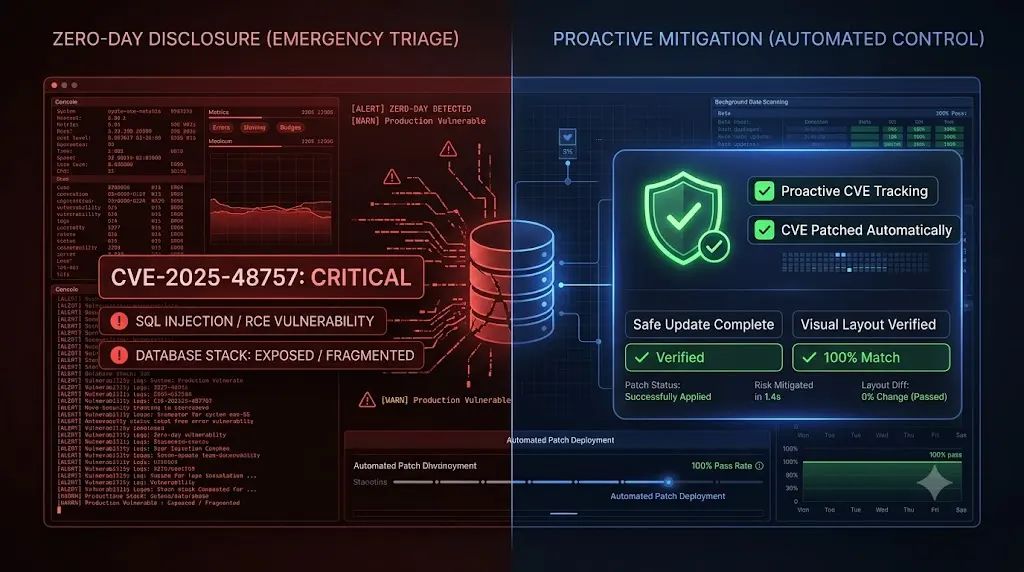
The alert is assigned the designation CVE-2025-48757. The severity score is a 9.8 out of 10. Within hours, automated botnets are scanning the internet, looking to exploit this exact vulnerability to drop hidden malware, establish Ghost Admins, and exfiltrate customer databases.
It happens without warning. A major cybersecurity research firm publishes a highly critical threat bulletin. A popular plugin used by millions of websites has a zero day exploit.
If you manage a WordPress agency, your phone immediately starts buzzing. Your clients are reading the same security news, and they want to know if their digital storefronts are safe.
To protect your clients, you must identify every single site in your portfolio running the vulnerable software and apply the emergency patch immediately. However, if you apply that patch blindly across 50 sites, you risk shattering a custom WooCommerce checkout layout or breaking a critical API integration.
You are caught between the liability of a data breach and the liability of a broken website.
This guide breaks down the anatomy of critical threats like CVE-2025-48757, the massive unbillable cost of manual agency triage, and exactly how top tier agencies use AI visual regression testing to autonomously hunt and safely patch zero day vulnerabilities across their entire portfolio.
Quick Answer: What is the CVE-2025-48757 vulnerability?
CVE-2025-48757 represents a highly critical security vulnerability within the WordPress ecosystem. When a CVE (Common Vulnerabilities and Exposures) of this magnitude is disclosed, attackers use automated botnets to exploit unpatched sites within hours. To protect client retainers, agencies must immediately cross reference their portfolios against the CVE database and apply the security patch. Modern agencies use automated platforms like SiteOps to track CVEs proactively and deploy patches using visual regression testing to ensure the update does not break the website layout.
The Anatomy of a Critical WordPress CVE
To understand why a vulnerability like CVE-2025-48757 causes massive panic in the agency space, you must understand the speed of modern cyber warfare.
When a vulnerability is officially published to a CVE database, it means the exact blueprint of how to hack the plugin is now public knowledge. Hackers do not manually target your client’s website. They write a script, load it into a global botnet, and scan millions of IP addresses simultaneously.
The 5 Hour Exploitation Window
Industry data indicates that the median time from a public CVE disclosure to the first mass automated exploitation attempt is roughly five hours.
If a vulnerability drops at 2:00 PM on a Friday, and you wait until Monday morning to run your manual WordPress maintenance checklist, your client’s site is exposed to active botnet attacks for over 60 hours.
During that window, attackers can inject obfuscated JavaScript into the wp_options table, establish persistent Must Use (MU) plugin backdoors, or silently skim credit card data from a WooCommerce checkout. The site will appear visually perfect on the frontend, meaning basic uptime monitors will entirely miss the breach.
The Agency Nightmare: Manual Emergency Triage
When an agency relies on legacy workflows, a critical CVE disclosure instantly destroys their profit margins for the month.
If you do not have a centralized WordPress security monitoring platform, this is the manual triage nightmare your team must execute:
1. The Portfolio Audit: You must manually log into 50 different client websites to check which sites are running the specific vulnerable plugin and which version they have installed.
2. The Staging Clone: For the sites that require the patch, you cannot just click “Update.” Security patches frequently alter core PHP functions. If you push it blindly, you risk the White Screen of Death. You must clone the affected sites to a staging environment.
3. The QA Test: You apply the patch on the staging server and manually click through the homepage, the contact forms, and the checkout flow to ensure the new security code did not break the existing theme layout.
4. The Production Push: Once verified, you replicate the patch on the live production server.
The Profitability Black Hole
This manual protocol guarantees safe WordPress updates, but it is a financial disaster.
Executing this manual QA process takes roughly 30 minutes per affected site. If 20 of your clients require the emergency patch, your senior developers must immediately drop all billable project work and burn 10 hours of unbillable labor to secure the portfolio.
You cannot build a highly profitable WordPress maintenance retainer if your agency model requires emergency human intervention every time a security researcher discovers a new flaw in a third party plugin.
The Flaw of Legacy Management Dashboards
Many agencies attempt to speed up this process by using a legacy ManageWP alternative or a self hosted MainWP alternative.
These tools allow you to quickly identify which sites run the vulnerable plugin and let you click a “Bulk Update” button to apply the patch across all of them instantly.
This solves the speed problem, but it creates a massive operational liability. Legacy tools execute blind updates. They push the patch to the server and check for an HTTP 200 OK status code. If the server is awake, the dashboard tells you the update was successful.
An HTTP 200 code does not verify if your CSS grid shattered. It does not verify if your WooCommerce checkout button disappeared. By rushing to close the CVE vulnerability using blind bulk updates, you risk triggering the hidden cost of broken WordPress updates, replacing a security crisis with a revenue blocking layout crisis.
How SiteOps Automates the CVE Defense
To scale an agency securely in 2026, you must decouple the execution of security patches from manual human verification. You need an autonomous WebOps platform that acts as both a security researcher and a Quality Assurance tester.
This operational necessity is exactly why we engineered SiteOps. SiteOps fundamentally changes how agencies respond to critical threats like CVE-2025-48757.
Here is exactly how the SiteOps engine neutralizes a zero day vulnerability without requiring a single minute of unbillable manual labor.
1. Proactive CVE Portfolio Tracking
You do not have to read security blogs to know your clients are at risk. SiteOps integrates a native, real time CVE vulnerability scanner directly into your agency command center.
The platform continuously cross references every installed plugin and theme across your entire portfolio against global threat databases. The second a vulnerability like CVE-2025-48757 is published, SiteOps instantly flags the specific client sites that are exposed, categorizing the threat by its CVSS severity score.
2. Autonomous Visual Regression Testing
When the patch is released by the plugin developer, you do not need to clone the site to a manual staging environment. SiteOps acts as your automated QA tester.
When you initiate the update via the centralized WordPress maintenance tool, SiteOps spins up a headless Chromium browser in the cloud. It visits the live production site and takes a pixel perfect snapshot of the Document Object Model (DOM).
It autonomously applies the security patch and flushes the server caching layers. The headless browser returns and takes a second set of screenshots. Artificial intelligence overlays the images to calculate the visual variance.
3. Instant Autonomous Auto Rollbacks
If the security patch conflicts with the client’s custom theme and shatters the layout, the SiteOps AI detects it instantly.
Within seconds, the platform triggers an autonomous auto rollback. The MySQL database and file system are restored to their exact stable pre update state before the client or their customers ever see a broken page. You are notified exactly which patch failed the visual test, allowing you to isolate it while keeping the rest of your portfolio moving.
4. Deep Forensic Database Auditing
If a vulnerability was active before the patch was applied, you must verify the site was not already compromised.
SiteOps executes a 4 level deep forensic scan. It bypasses the standard WordPress API to read raw database tables, hunting for obfuscated JavaScript payloads in the wp_options table and detecting hidden Ghost Admin accounts that standard security plugins completely miss.
Secure Your Portfolio Before the Next CVE Drops
Understanding how AI WordPress maintenance is changing agencies is the first step in taking control of your operational liability.
If you manage multiple WordPress sites using legacy tools that push code blindly, or if you rely on manual staging tests, a critical CVE disclosure is an impending financial disaster for your agency.
You must adopt a workflow that autonomously tracks threats, verifies the visual integrity of every patch, and guarantees that a broken layout never reaches a live production environment.
By implementing automated visual regression testing and proactive CVE tracking, you protect your clients’ revenue, secure your agency’s reputation, and radically preserve your profit margins.
Stop executing emergency updates blindly.
SiteOps automates the entire forensic workflow. Test the CVE scanner and visual regression engine today, free for 3 sites.
Frequently Asked Questions
What is the CVE-2025-48757 vulnerability in WordPress? CVE-2025-48757 represents a critical security flaw assigned by the Common Vulnerabilities and Exposures system. Vulnerabilities of this severity typically allow attackers to execute remote code, bypass authentication, or establish hidden administrative backdoors within the WordPress database.
How fast do hackers exploit a new WordPress CVE? The median time from a public CVE disclosure to the first automated botnet exploitation attempt is roughly five hours. Agencies must patch critical vulnerabilities within this window to prevent unauthorized database access and malware injection.
How do I safely patch a critical WordPress vulnerability? Never push a security patch blindly to a live production site, as core code changes frequently break custom themes. You must manually test the patch on a staging server or use an automated AI platform like SiteOps that utilizes visual regression testing to instantly auto rollback the update if the layout breaks.
How do agencies track CVE vulnerabilities across multiple clients? Top tier agencies eliminate manual tracking by using centralized WebOps platforms. Tools like SiteOps run automated, deep forensic scans daily and cross reference every active plugin against live CVE databases, alerting the agency the second a zero day threat is announced.
What is visual regression testing in WordPress? Visual regression testing uses a headless browser to take a screenshot of a client’s site before a patch is applied, and a second screenshot immediately after. AI compares the images pixel by pixel to automatically detect visual breaks, missing elements, or shattered CSS layouts.
Why is an HTTP 200 check not enough when updating plugins? An HTTP 200 status only confirms the server responded. A site could suffer a shattered WooCommerce checkout button due to a plugin conflict, and the basic monitoring bot will still receive a 200 OK status, falsely reporting the site as healthy and fully operational.
Can WordPress automatically update plugins safely? Native WordPress auto updates are highly risky for agency clients because they execute blindly. They push the new code without verifying if the security patch broke the frontend layout or CSS. Safe automation requires a dedicated third party tool with visual verification.
How do I prove the value of security updates to my clients? Do not just send a raw PDF listing updated plugins. Use an automated reporting tool to generate an executive summary. The report should highlight exactly how many CVE threats were proactively patched and how many fatal layout breaks were prevented by your visual testing systems.
Does tracking CVEs require migrating my client sites? No. SiteOps is a centralized WebOps platform that connects to your existing WordPress installations via a secure worker plugin. You can scan for CVEs, update plugins, and manage your sites regardless of which hosting provider your clients currently use.
What happens if a security patch breaks my client’s site on SiteOps? If a patch causes a visual break, the SiteOps AI detects the layout shift during the update process. Before the end user ever sees the error, the system autonomously triggers an auto rollback, restoring the site’s database and files to their stable pre update state in seconds.
Scale Your Agency Today
Join 500+ agencies automating their WordPress maintenance. Get started with 3 sites for free. No credit card required.