The Real Cost of a Broken Checkout: A WooCommerce Downtime Calculator
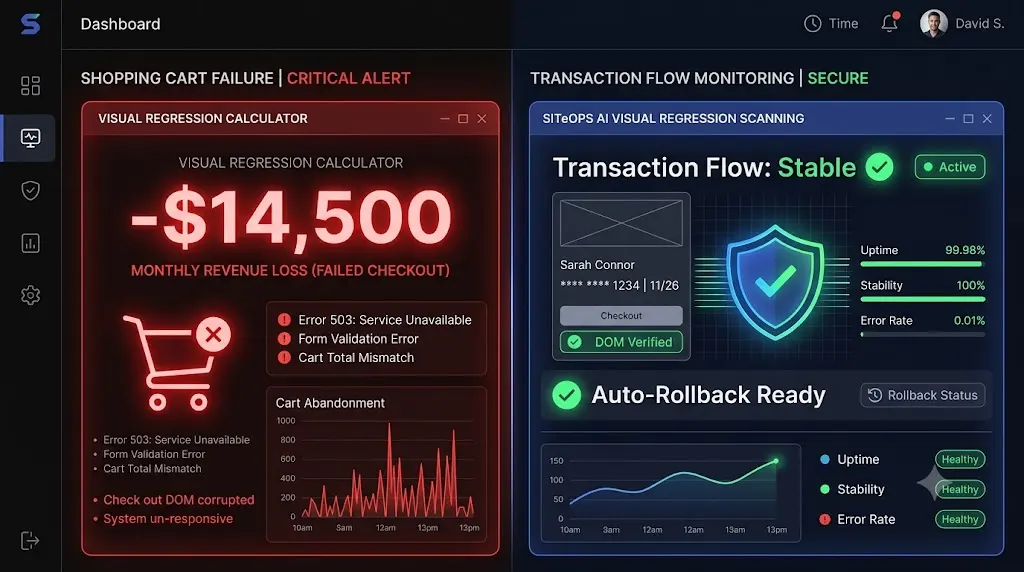
It is 6:00 PM on a Wednesday. You just pushed a routine caching plugin update to your highest-performing WooCommerce client. Your dashboard shows a green “HTTP 200 OK” checkmark. You log off for the weekend. But you haven’t considered the cost of a broken checkout if customers can no longer complete their purchases.
On Monday morning, you open an email from the furious store owner. Traffic was high all weekend, but their sales dashboard reads zero.
You visit the live website. The homepage looks perfect. The product pages load instantly. But when you click “Proceed to Checkout,” the credit card input fields are completely missing. The site was technically online the entire weekend, but the business was functionally dead for 60 hours.
This is a silent checkout failure. According to 2026 e-commerce data, the average WooCommerce order value sits at roughly $122. If your client normally processes 50 orders a day, that single Friday afternoon plugin update just cost them over $15,000 in lost revenue.
When you manage a WordPress maintenance retainer, your client’s revenue loss becomes your agency’s liability.
Stop guessing how much risk you are deploying. Use our interactive ecommerce downtime cost calculator below to discover the true financial hemorrhage of a broken checkout, and learn how top-tier agencies use AI to guarantee this never happens to their clients.
🧮 The WooCommerce Downtime Calculator
Enter your client’s metrics below to calculate the true cost of a silent checkout failure.
Calculate Total Loss
(If you are an agency owner, screenshot these results and send them to your client to prove the value of your maintenance retainer).
The Cascading Financial Damage of a Broken Checkout
When you calculate the cost of a broken checkout, the immediate loss of retail revenue is only the surface of the problem. A silent checkout failure triggers a cascading financial collapse that impacts multiple layers of a business.
1. Wasted Acquisition Costs (ROAS Destruction)
E-commerce businesses survive on paid acquisition. The global cart abandonment rate already sits at a punishing 70.22% under normal circumstances.
If your client is spending $500 a day on Meta or Google Ads, they are paying top dollar to drive high-intent buyers into their funnel. When those users reach a broken checkout page, they do not email customer support and wait for you to fix the site. They immediately bounce to a competitor.
You haven’t just lost the sale; you have literally set their advertising budget on fire. This permanently damages their Return on Ad Spend (ROAS) for the month and skews their conversion tracking data.
2. The Unbillable Agency Triage Trap
The financial bleeding extends directly to your agency. When a furious client calls you on a Monday morning demanding a fix, you must drop all billable project work to enter emergency triage.
Your senior developer must frantically dig through the server, disable plugins one by one, locate the specific conflict, and manually restore a database backup. If this takes four hours, and your agency bills at $150 an hour, you just burned $600 in unbillable time.
If the client’s monthly maintenance retainer is only $250, you just wiped out your profit margin for that client for almost three months.
3. The Churned Retainer
The ultimate cost is the loss of the client entirely. You sold them a maintenance retainer based on the promise of security and stability. When you push a blind update that breaks their primary revenue engine, that trust evaporates instantly.
The HTTP 200 Fallacy: Why Your Monitoring Tool Missed It
If the checkout was broken for 48 hours, why didn’t your legacy WordPress monitoring tool send you an alert?
Because you are the victim of the HTTP 200 Fallacy.
Standard uptime monitors and legacy remote controls (like ManageWP or MainWP) operate on a very simple premise. They send a ping to your server. If the server is turned on and responds with an HTTP 200 OK status code, the dashboard gives you a bright green checkmark indicating the site is perfectly healthy.
An HTTP 200 code only verifies that the server responded. It does absolutely nothing to verify the Document Object Model (DOM) on the frontend.
Your client’s WooCommerce site could have a completely shattered CSS layout, an aggressive JavaScript minification conflict hiding the Stripe iframe, or a failed database migration script. But because the server is technically “awake,” your dashboard falsely reports 100% success.
Automating the execution of a WooCommerce update without automating the visual verification of the frontend is simply deploying risk at scale.
The Flawed Agency Solution: Manual QA Testing
To prevent checkout failures and achieve truly safe WordPress updates, traditional agency wisdom dictates that you must use a staging environment.
The manual protocol requires your team to:
- Clone the live database to a staging URL.
- Run the plugin updates incrementally.
- Manually browse to the staging site, add a product to the cart, and enter sandbox credit card credentials to submit a test order.
- Verify the database processes the transaction.
- Repeat the exact update sequence on the live site.
This protocol is incredibly safe. It is also an operational nightmare that destroys agency scalability.
Executing this level of manual woocommerce checkout testing takes a minimum of 30 minutes per client. If you manage multiple WordPress sites and have 40 WooCommerce clients on retainer, your senior developers are spending 20 hours a week acting as human click-testers. You cannot build a profitable WordPress maintenance retainer if you are burning half your week on manual verification.
Stop Guessing. Start Automating Visual QA.
To scale a maintenance portfolio profitably in 2026, you must replace human QA testers with autonomous AI. You must stop relying on HTTP pings and start verifying what the user actually sees.
This specific e-commerce bottleneck is exactly why we engineered SiteOps. SiteOps does not just push code; it acts as an autonomous QA tester, completely eliminating the risk of a silent checkout failure.
1. Synthetic Transaction Testing
When you connect a WooCommerce site to SiteOps, the platform executes a synthetic transaction during your update cycle.
It spins up a headless Chromium browser in the cloud, autonomously adds a product to the cart, navigates to the checkout page, and visually verifies that the required payment widget DOM elements (like the Stripe iframe) successfully rendered on the screen. It mathematically proves that a customer can actually type in their credit card number.
2. AI Visual Regression Testing
Before any update executes, SiteOps takes a high-resolution snapshot of your client’s live site. It applies the updates, flushes the cache, and takes a second screenshot.
Artificial intelligence overlays the images. It easily detects a fatal layout break, such as a missing “Place Order” button or a shattered CSS grid.
3. Instant Autonomous Auto-Rollbacks
Detecting a broken checkout is powerful, but true automation requires active remediation.
If the SiteOps AI detects that a plugin update shattered the checkout DOM, it halts immediately. Within seconds, it triggers an autonomous auto-rollback. The MySQL database and file system are restored to their exact stable pre-update state.
The client never experiences downtime. Their customers can still check out. You simply wake up to a dashboard notification explaining exactly which plugin failed the visual QA test.
Secure Your E-Commerce Retainers Today
Understanding the true hidden cost of broken WordPress updates is the first step in taking control of your agency’s liability.
If you manage e-commerce retainers using legacy bulk-update tools that rely on simple server pings, you are actively deploying risk. You will eventually push an update that breaks a checkout, and you will eventually lose a high-paying client.
By upgrading to an autonomous WordPress maintenance tool equipped with synthetic transaction testing and AI visual regression, you protect your clients’ revenue and secure your agency’s profit margins permanently.
Stop manually testing plugins on staging servers. Let the AI handle the verification.
SiteOps automates the entire workflow. Test the visual regression engine today, free for 3 sites.
Frequently Asked Questions
What causes a broken WooCommerce checkout? A broken WooCommerce checkout is usually caused by outdated custom theme template overrides that no longer match the new WooCommerce core files, or by aggressive JavaScript minification from caching plugins that prevent third-party payment gateways (like Stripe or PayPal) from loading their secure iframes.
How much does a broken checkout cost an e-commerce store? The cost scales with traffic, but it includes the immediate loss of retail revenue (AOV × missed orders), wasted daily advertising spend, and severe reputational damage. Our downtime calculator estimates these combined losses instantly.
How do I test a WooCommerce checkout safely? Never test an update directly on a live site. You must clone the site to a staging environment, apply the updates, enable your payment gateway’s Test Mode, and manually process a sandbox transaction. Alternatively, use an automated platform like SiteOps to run synthetic visual transaction tests autonomously.
Why did my monitoring tool say the site was up when the checkout was broken? Legacy monitoring tools only check for an HTTP 200 OK status code. This simply means your server is turned on. Your WooCommerce site could have a completely broken CSS layout or a missing payment gateway, and the basic monitoring bot will still falsely report the site as perfectly healthy.
What is a synthetic transaction in WordPress maintenance? A synthetic transaction is an automated test where a headless browser acts like a real user. It adds an item to the cart and navigates to the checkout page to visually verify that all form fields and payment widgets load correctly, ensuring the site is capable of processing orders.
What is visual regression testing for WooCommerce? Visual regression testing uses a headless browser to take a screenshot of your checkout page before an update, and another screenshot immediately after. AI compares the images pixel by pixel to automatically detect visual breaks, missing checkout buttons, or shattered CSS layouts.
Should I refund a client if their WooCommerce site goes down? This depends heavily on your Service Level Agreement (SLA). If the downtime was caused by a third-party plugin failure, agencies typically do not offer refunds. However, if your agency pushed a flawed update without visually testing it, offering a discount on the next month’s retainer is a common goodwill gesture to prevent churn.
What happens if an update breaks my WooCommerce site on SiteOps? If an update breaks the checkout layout, the SiteOps AI detects the visual variance instantly. Before the client or their customers ever see the error, the system autonomously triggers an auto-rollback, restoring the database and files to their stable pre-update state in seconds.
How do agencies manage multiple WooCommerce updates efficiently? Top-tier agencies no longer use manual staging tests for every update because they are highly unprofitable. They use automated white-label WordPress maintenance tools that combine bulk update capabilities with AI visual regression testing to eliminate manual QA hours.
Can WordPress automatically update WooCommerce safely? Native WordPress auto-updates are highly risky for e-commerce sites because they execute blindly. They push the new code without visually verifying if it broke the frontend layout or the checkout flow. Safe automation requires a dedicated third-party tool with visual verification.
Scale Your Agency Today
Join 500+ agencies automating their WordPress maintenance. Get started with 3 sites for free. No credit card required.