The Most Expensive Plugin Update You Will Ever Run (A WooCommerce Horror Story)
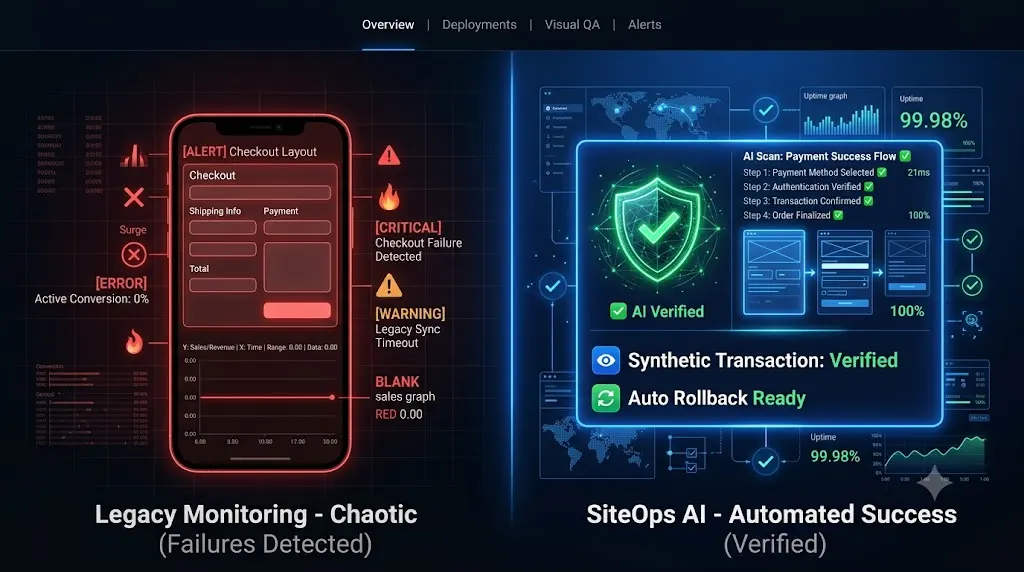
It is Friday at 4:30 PM. You are wrapping up the week. You log into your agency management dashboard, select your portfolio of 30 client websites, and click “Bulk Update All.” Within minutes, a broken woocommerce update could turn a routine deployment into an expensive emergency.
You watch the progress bar fill up. Five minutes later, the screen returns a wall of green checkmarks. Your legacy WordPress monitoring tool confirms that every single server responded with a perfect HTTP 200 OK status code. You close your laptop, satisfied that you have completed your maintenance obligations, and you head out for the weekend.
You sleep perfectly fine on Saturday. You enjoy your Sunday.
Then Monday morning arrives.
At 9:00 AM, you open your inbox to find three consecutive emails marked “URGENT” from your highest paying e-commerce client. The client averages $5,000 a day in WooCommerce sales. Over the entire weekend, their Stripe dashboard recorded exactly zero transactions.
You visit their live website. The homepage loads perfectly. The product catalog looks beautiful. You click “Add to Cart” and the slide out cart functions exactly as intended. But when you click “Proceed to Checkout,” the screen loads a completely blank white box where the credit card input fields are supposed to be.
The website was technically online, but the business had been functionally dead for 64 hours.
You just ran the most expensive plugin update of your agency’s history.
This is not a hypothetical scenario. It is a terrifying reality that happens to web agencies every single week. This guide breaks down the exact financial and technical autopsy of a broken woocommerce update, why the tools you trust actively lied to you, and how top tier agencies completely eliminate this risk using autonomous AI verification.
Quick Answer: What is the cost of a broken WooCommerce update?
The true cost of a broken WooCommerce update includes the immediate loss of retail revenue during the downtime window, the wasted ad spend driving traffic to a dead checkout page, the unbillable developer hours spent in emergency triage, and the severe reputational damage that often leads to client churn. Agencies prevent these massive financial losses by utilizing AI visual regression testing to verify the checkout layout and automatically roll back failed updates instantly.
The Financial Autopsy: Calculating the True Damage
When a client discovers a broken checkout before their agency does, the financial impact extends far beyond the immediate technical fix. If you want to understand the hidden cost of broken WordPress updates, you must look at the cascading business failures.
1. The Immediate Revenue Hemorrhage
In our scenario, the client averages $5,000 a day in sales. The checkout was broken from Friday at 5:00 PM until Monday at 9:00 AM. That is roughly 64 hours of downtime.
Your 5 second click on the “Update All” button just cost your client over $13,000 in hard revenue. According to data from the Baymard Institute, cart abandonment rates already hover around 70 percent under normal conditions. If a high intent buyer encounters a broken payment form, they will not email support and wait for a fix. They will immediately purchase the item from a competitor. That revenue is permanently lost.
2. The Wasted Advertising Spend
E-commerce businesses survive on paid acquisition. If your client runs $500 a day in Meta or Google Ads traffic, they just set $1,500 on fire over the weekend. They paid top dollar to acquire highly targeted clicks, only to send those users into a broken conversion funnel.
When the client reviews their Return on Ad Spend (ROAS) for the month, the campaign will look like a failure, directly impacting their future marketing budgets.
3. The Unbillable Triage Trap
The financial bleeding also impacts your agency. When you receive that frantic Monday morning email, you must drop all billable project work. Your senior developer must frantically dig through the server via FTP, disable plugins one by one, locate the specific conflict, and manually restore a database backup.
If this takes three hours, and your agency bills at $150 an hour, you just burned $450 in unbillable time. If the client’s monthly maintenance retainer is $250, you just wiped out the profit margin for that specific client for nearly two months.
4. The Loss of Agency Trust
The most expensive consequence is the loss of the client entirely. You sold them a white-label WordPress maintenance package based on the promise of security and stability. When you break their primary revenue engine and fail to notice it for three days, that trust evaporates.
If the client cancels their $250 monthly retainer, your agency just lost $3,000 in annualized recurring revenue.
The Technical Autopsy: Why Did the Checkout Break?
To prevent this disaster from happening again, you must understand the architectural fragility of modern e-commerce. A WooCommerce store is a heavily integrated application. It is not just one plugin. It relies on payment gateways, shipping calculators, taxation APIs, and highly customized theme templates.
When you update plugins, you introduce volatility into this delicate ecosystem. Here are the three most common reasons a routine update shatters a checkout flow.
The JavaScript Minification Conflict
Modern payment gateways like Stripe do not process credit cards directly on your client’s server. To comply with PCI regulations, Stripe loads a secure, isolated iframe via external JavaScript to capture the card details safely.
To improve Core Web Vitals, your agency likely installed a performance optimization plugin (like WP Rocket or LiteSpeed Cache). When you updated that optimization plugin on Friday, it implemented new rules for deferring or minifying JavaScript.
The new rules aggressively deferred the specific script required by Stripe. Because the script failed to execute in the correct sequence, the iframe never loaded. The customer saw a blank white box instead of a place to type their credit card number.
The Theme Template Override Mismatch
Custom WordPress themes rarely use the default WooCommerce checkout layout. Theme developers copy the core WooCommerce files (located in the woocommerce/templates/ folder) into their own theme folder to heavily customize the design.
When you updated the WooCommerce core plugin on Friday, WooCommerce altered the underlying HTML structure within those default template files. However, your client’s custom theme was still relying on the old, overridden templates. This structural mismatch instantly broke the CSS grid, pushing the “Place Order” button completely off the mobile viewport screen.
The Database Schema Migration Failure
Major WooCommerce updates often restructure how data is stored to improve performance (such as implementing High Performance Order Storage).
When you clicked update, a background script attempted to migrate the database tables. Due to a brief timeout on the shared hosting server, the script failed midway. The frontend website continued to load perfectly, but the database could no longer correctly process or store transaction data, resulting in a silent failure when users attempted to check out.
Why Legacy Management Tools Actively Lie to You
If the checkout was broken for 64 hours, why didn’t your ManageWP alternative or your dedicated WordPress uptime monitoring tool send you an alert?
You were a victim of the HTTP 200 Fallacy.
Legacy bulk update dashboards and basic ping bots operate on a very simple premise. They send a request to your server. If the server is turned on and responds with an HTTP 200 OK status code, the dashboard gives you a green checkmark indicating the site is perfectly healthy.
An HTTP 200 code only verifies that the server responded. It does absolutely nothing to verify the Document Object Model (DOM). Your client’s site had a completely shattered CSS layout and a missing JavaScript payment iframe, but because the server was technically awake, your dashboard falsely reported 100 percent success.
Automating the execution of an update without automating the visual verification of the frontend is simply deploying risk at scale.
The Flawed Solution: Manual Staging Environments
To achieve truly safe WordPress updates, traditional agency wisdom dictates that you must use a staging environment.
The manual protocol requires you to clone the live database to a staging URL, run the updates incrementally, and manually click through the key pages. For WooCommerce, it requires your developer to actually add a product to the cart, enter sandbox credit card credentials, and submit a test order to ensure the database correctly processes the transaction.
This protocol is incredibly safe. It is also an operational nightmare that destroys agency profitability.
Executing this level of manual QA testing takes a minimum of 30 minutes per client. If you manage multiple WordPress sites and have 40 WooCommerce clients on retainer, your senior developers are spending 20 hours a week acting as human click testers. You cannot build a profitable WordPress maintenance retainer if you are burning half your week on manual verification.
The Comparison: E Commerce QA Workflows
To clearly summarize how agencies approach the liability of WooCommerce updates, examine the operational differences side by side.
| Quality Assurance Method | Speed of Execution | Checkout Protection | Impact on Agency Profit Margins |
|---|---|---|---|
| Blind Bulk Updates (Legacy) | Very Fast (Seconds) | Zero (Relies on HTTP 200) | High Liability (Costs lost clients) |
| Manual Staging Verification | Very Slow (Hours) | High | Destroys margins via unbillable labor |
| SiteOps AI Visual Regression | Fast (Automated) | Perfect (Verifies DOM) | Maximizes margins with zero manual labor |
| SiteOps Synthetic Transactions | Fast (Automated) | Perfect (Verifies Gateway) | Secures client revenue autonomously |
The Fix: Automating Checkout Verification with SiteOps
To scale a maintenance portfolio profitably in 2026, you must replace human QA testers with autonomous AI. The goal of a modern WordPress maintenance tool is to completely remove the human element from routine tasks while maintaining absolute, verifiable safety.
This specific e-commerce bottleneck is exactly why we engineered SiteOps. We needed an autonomous system that eliminated the risk of a silent checkout failure.
Here is exactly how the SiteOps engine guarantees transaction stability during a plugin update.
1. AI Visual Regression Testing
The only way to guarantee that an update did not break a layout is to actually look at it. SiteOps achieves this through pixel perfect visual regression testing.
Before any update executes, the system spins up a headless Chromium browser in the cloud. It visits your live production site and takes a high resolution snapshot of the DOM across the critical e-commerce path (Shop Archive, Single Product, Cart, and Checkout).
It then applies the plugin updates autonomously and flushes the server caching layers. The headless browser returns and takes a second set of screenshots. Artificial intelligence overlays the images. It easily detects a fatal layout break, such as a missing “Place Order” button or a shattered CSS payment form.
2. Synthetic Transaction Testing
SiteOps goes beyond static images to verify actual business logic. To ensure the database and APIs survived the update, the headless browser executes a synthetic transaction.
It autonomously adds a product to the cart, navigates to the checkout page, and visually verifies that the required payment widget DOM elements (like the Stripe iframe or the PayPal button) successfully rendered on the screen. It confirms that the customer can actually type in their credit card number.
3. Instant Autonomous Auto Rollbacks
Detecting a broken woocommerce update is powerful, but it does not save the client’s revenue if you still have to manually log in via FTP to fix it at midnight.
If the SiteOps AI detects that the custom theme overrides failed and shattered the CSS, or if the synthetic transaction bot confirms the Stripe fields are missing, the system halts immediately.
Within seconds, SiteOps triggers an autonomous auto rollback. The MySQL database and file system are restored to their exact stable pre update state.
The client never experiences downtime. Their customers can still check out. You simply wake up to a dashboard notification explaining exactly which plugin failed the visual QA test, allowing you to investigate the conflict on a staging server safely.
Stop Updating and Praying
Understanding how AI WordPress maintenance is changing agencies is the first step in taking control of your agency’s liability.
If you manage e-commerce retainers using legacy bulk update tools that rely on simple server pings, you are actively deploying risk. A ping bot cannot tell you if your checkout is broken. A detailed MainWP vs ManageWP vs SiteOps teardown reveals exactly why autonomous operations are replacing legacy remote controls.
By implementing an autonomous platform equipped with AI visual regression and synthetic transaction testing, you protect your clients’ revenue, secure your agency’s reputation, and radically preserve your billable hours.
Stop manually testing plugins on staging servers. Let the AI handle the verification.
Test the visual regression engine today. SiteOps is free for 3 sites, no credit card required. Fill out our form to secure your agency margins.
Frequently Asked Questions
Why did my WooCommerce checkout break after a plugin update? Checkout breakages are usually caused by outdated custom theme template overrides that no longer match the new WooCommerce core files, or by performance optimization plugins that aggressively minify the JavaScript required to load third party payment gateways like Stripe or PayPal.
How do I safely update WooCommerce plugins? Never push major updates blindly to a live production site. You must either clone the site to a staging environment to run the updates and manually test a transaction, or use an automated AI platform like SiteOps that utilizes visual regression testing to verify the checkout flow automatically.
What is the true cost of a broken WordPress update? The true cost includes the immediate loss of retail revenue during the downtime window, the wasted advertising spend driving traffic to a dead page, the unbillable developer hours spent in emergency triage, and the severe reputational damage that often leads to client churn.
What is visual regression testing in WordPress? Visual regression testing uses a headless browser to take a screenshot of your site before an update, and another screenshot immediately after. AI compares the images pixel by pixel to detect visual breaks, missing checkout buttons, or shattered CSS layouts that basic HTTP ping monitors miss.
Why did my monitoring tool say the site was up when the checkout was broken? Legacy monitoring tools only check for an HTTP 200 OK status code. This simply means your server is turned on. Your WooCommerce site could have a completely broken CSS layout or a missing payment gateway, and the basic monitoring bot will still falsely report the site as perfectly healthy.
How does SiteOps test a WooCommerce checkout automatically? During an update, the SiteOps headless browser executes a synthetic transaction. It automatically adds a product to the cart, navigates to the checkout page, and verifies that the required payment widget DOM elements render correctly on the screen after the update is applied.
What happens if a plugin update breaks my site on SiteOps? If an update breaks the site layout or checkout flow, the SiteOps AI detects the visual variance instantly. Before the client or their customers ever see the error, the system autonomously triggers an auto rollback, restoring the site’s database and files to their stable pre update state in seconds.
Can WordPress automatically update WooCommerce safely? Native WordPress auto updates are highly risky for e-commerce sites because they execute blindly. They push the new code without verifying if it broke the frontend layout or the checkout flow. Safe automation requires a dedicated third party tool with visual verification.
How do agencies manage multiple WooCommerce updates efficiently? Top tier agencies no longer use manual staging tests for every update because they are highly unprofitable. They use automated WordPress maintenance tools that combine bulk update capabilities with AI visual regression testing to eliminate manual QA hours.
How do you prove the value of e-commerce maintenance to clients? Do not send a raw PDF listing updated plugins. Use an automated reporting tool that translates technical data into a clear executive summary. The report should highlight exactly how much downtime was avoided and how many fatal layout breaks were prevented by your proactive visual testing systems.
Scale Your Agency Today
Join 500+ agencies automating their WordPress maintenance. Get started with 3 sites for free. No credit card required.