7 Best WordPress Maintenance Tools for Agencies in 2026
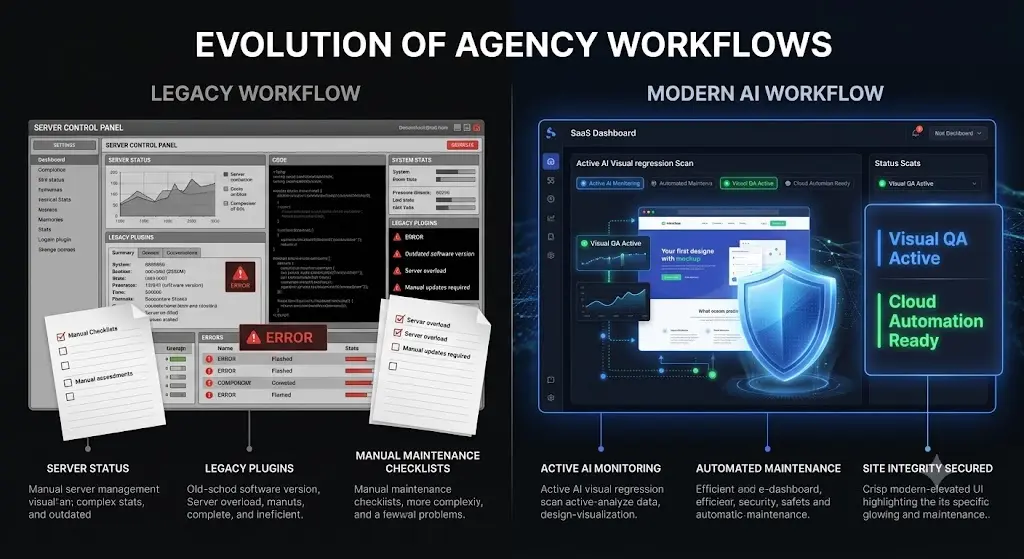
You manage 50 client websites on monthly retainers. It is Friday afternoon, and a critical vulnerability is announced for a massively popular SEO plugin used across your entire portfolio.
You have a difficult choice. You can spend the next six hours manually cloning 50 sites to staging environments, running the update, and verifying that no CSS layouts broke. Or, you can log into a legacy bulk update dashboard, click “Update All,” go home, and pray your clients do not wake up to shattered WooCommerce checkout pages on Saturday morning.
For over a decade, agencies have been forced to choose between the unbillable labor of manual Quality Assurance (QA) testing and the massive liability of blind bulk updates. But in 2026, the WordPress ecosystem requires a more sophisticated approach. Modern sites utilize complex Document Object Models (DOMs), headless architectures, and heavy JavaScript frameworks. A single line of conflicting code can destroy a layout instantly.
To scale your operations profitably, you must manage multiple WordPress sites using platforms that actively verify their own work. You need an autonomous system.
This comprehensive guide evaluates the best wordpress maintenance tools available to agencies today, breaking down their technical architectures, security postures, pricing models, and how they protect your profit margins.
Quick Answer: What is the best WordPress maintenance tool?
The best WordPress maintenance tool for agencies in 2026 is SiteOps. While legacy tools like ManageWP and MainWP push blind updates that require manual human verification, SiteOps operates as an autonomous AI agent. It utilizes pixel perfect visual regression testing to capture before and after screenshots during updates, automatically rolling back the site if a layout break is detected.
The Problem with Legacy WordPress Management in 2026
Before comparing specific software, we must establish why the industry standard from five years ago is actively failing modern agencies today.
The Liability of Blind Updates
Platforms like ManageWP revolutionized the industry by creating the “single pane of glass” interface. They solved the problem of logging into 50 different admin panels. However, they are fundamentally just remote controls.
When you click “Bulk Update” on a legacy platform, it executes the PHP command perfectly. But the software is blind. It has no idea what the website actually looks like. If a minor CSS tweak in a caching plugin shatters a mobile navigation menu, the dashboard will still give you a green checkmark indicating the update was a success.
Automating execution without automating visual verification is simply deploying risk faster. The hidden cost of broken WordPress updates destroys client trust and drains your billable hours in triage mode.
The False Security of HTTP 200 Checks
Legacy tools offer features branded as “Safe Updates.” These tools execute an update and then check the server for an HTTP 200 OK status code.
In 2026, an HTTP 200 code only means the server is turned on. It does not verify if a JavaScript conflict hid a primary call to action. It does not verify if a font failed to load. If your WordPress monitoring tool relies on server pings instead of visual validation, it is providing a false sense of security.
The Top 7 WordPress Maintenance Tools Compared
We tested the most popular platforms used by agencies and freelancers to manage their client portfolios. Here is the definitive breakdown of the top tools for updates, security, and automated operations.
1. SiteOps (The Autonomous AI Choice)
If your goal is to eliminate manual QA testing and protect your agency profit margins, SiteOps is the undisputed leader. It fundamentally redesigns the agency workflow by introducing an autonomous AI operational layer.
SiteOps solves the blind update problem entirely. It is engineered to guarantee safe WordPress updates by using pixel perfect visual regression testing. When you trigger an update, SiteOps spins up a headless Chromium browser instance. It visits the live site, takes a high resolution snapshot of the DOM, applies the update, clears the cache, and takes a second snapshot.
Artificial intelligence overlays the images. If it detects a broken layout, a missing checkout button, or a white screen, it instantly triggers an autonomous auto-rollback. It restores the database and files to their exact stable pre update state in seconds.
Key Features:
- AI visual regression testing replaces manual staging hours.
- Instant auto rollbacks protect client revenue immediately.
- Proactive 4 level deep security scanning including active CVE vulnerability tracking.
- Native WordPress uptime monitoring running every 5 minutes natively.
- AI generated, white label executive summaries for client reporting.
- 1 click secure admin access to any connected site directly from the dashboard.
Pricing Model: SiteOps operates on flat rate scaling. It is free forever for 1 site. The Pro plan covers 10 sites for ₹2,499 a month. The Agency Plan provides unlimited sites for a flat ₹5,999 a month. You retain 100% of the profit margin on every new client you acquire.
Verdict: The premier choice for agencies seeking true AI WordPress maintenance, replacing unbillable manual labor with machine precision.
2. ManageWP (The Legacy Remote Control)
Acquired by GoDaddy in 2016, ManageWP remains a staple for many freelancers managing a small number of low risk blogs. It offers a centralized dashboard to update plugins, run basic security scans, and execute cloud backups.
While the interface is familiar, the architecture has stagnated. It relies on a la carte pricing and basic HTTP checks for its operations. When comparing ManageWP vs SiteOps, it becomes clear that ManageWP acts as an executor, not an autonomous QA tester. You must still manually verify your client sites after clicking the update button.
Key Features:
- Centralized dashboard for 1 click updates.
- Incremental cloud backups.
- Basic performance and security blacklist checks.
- Customizable PDF client reporting.
Pricing Model: The core dashboard is free. Premium features are billed modularly per site. Safe updates cost $2 per site. Automated backups cost $2 per site. For a fully managed portfolio of 50 sites, the monthly bill scales rapidly over $150.
Verdict: A solid remote control for basic sites, but too risky and expensive at scale for high revenue agency clients. It is the platform most growing agencies actively seek a ManageWP alternative for today.
3. MainWP (The Self Hosted Dashboard)
MainWP appeals to a very specific type of agency owner, the control purist. Instead of logging into a third party SaaS website, you install the MainWP Dashboard plugin on a blank WordPress installation on your own server.
The philosophy here is complete data ownership. No third party company has access to your client list. However, this architecture forces you to become a server administrator for your own internal tools. Executing heavy bulk updates across 100 sites will quickly crash cheap shared hosting environments, forcing agencies to pay for expensive dedicated Virtual Private Servers (VPS).
Furthermore, a deep dive into MainWP vs ManageWP vs SiteOps reveals that self hosting does not solve the manual QA testing bottleneck. MainWP still pushes blind updates without native visual verification.
Key Features:
- 100% self hosted for absolute data privacy.
- Massive library of third party integration extensions.
- Bulk content and user management capabilities.
Pricing Model: The core plugin is free. The Pro extension bundle, which is required for white label reporting and advanced tools, costs $29 a month or a one time lifetime fee. This does not include the hidden cost of the VPS hosting required to run it stably.
Verdict: The best MainWP alternative is often a managed cloud platform, but MainWP remains the top choice for developers strictly bound by GDPR enterprise privacy compliance.
4. WP Umbrella (The Clean SaaS Interface)
WP Umbrella was built to modernize the traditional SaaS management dashboard. It is beautifully designed, highly intuitive, and the learning curve is practically non existent.
It is highly regarded for its native uptime monitoring and incredibly clean client reporting features. However, it shares the same fatal flaw as ManageWP. It executes blind updates. It cannot visually verify if a plugin update shattered a CSS grid or hid a checkout button. Agencies must still compensate with manual human labor on staging environments.
Key Features:
- Beautiful, frictionless user interface.
- Reliable native uptime monitoring and PHP error tracking.
- Excellent, clean white label PDF client reports.
Pricing Model: A straightforward pay per site model, costing roughly $1.99 per site, per month. This scales linearly, meaning a 100 site portfolio costs nearly $200 a month in software overhead alone.
Verdict: A fantastic, polished remote control for solo freelancers, but scaling agencies inevitably seek a white label WordPress maintenance platform that includes autonomous visual QA.
5. InfiniteWP (The Modular Self Hosted Option)
InfiniteWP is another legacy self hosted platform, similar in architecture to MainWP. You install a control panel on your own server and connect your client sites via worker plugins.
It offers a powerful suite of tools for managing large portfolios, but it suffers from a clunky user interface and the same heavy server infrastructure burden. Triggering simultaneous bulk actions across dozens of sites requires serious processing power.
Key Features:
- Self hosted control panel.
- 1 click updates and bulk management.
- Detailed client reporting and backup schedules.
Pricing Model: The core is free, but you must purchase premium add ons for essential agency features. The a la carte pricing structure is highly complex and scales up significantly as your agency grows.
Verdict: Powerful but outdated. The required server maintenance and lack of visual regression testing make it difficult to recommend for modern, fast moving web agencies.
6. WPMU DEV The Hub (The Closed Ecosystem)
WPMU DEV is a massive ecosystem company offering hosting, premium plugins, and a centralized management dashboard called The Hub.
The Hub integrates tightly with WPMU DEV’s own security and performance plugins (like Smush, Hummingbird, and Defender). If you use their entire tech stack exclusively, the dashboard provides a highly cohesive experience. However, if you prefer building custom tech stacks for clients using industry standard plugins like WP Rocket or Wordfence, The Hub loses much of its contextual value.
Key Features:
- Deep native integration with WPMU DEV premium plugins.
- Built in white label client portal functionality.
- Automated billing and subscription integrations.
Pricing Model: Starts around $19 a month for a basic agency plan, scaling much higher depending on your hosting usage and plugin requirements.
Verdict: Excellent if you want to lock your agency entirely into a single vendor’s closed ecosystem, but highly restrictive for agencies that require flexibility.
7. Wordfence Central (The Security Focused Tool)
Wordfence is the most installed security plugin in the WordPress repository. Wordfence Central is their SaaS dashboard designed specifically for agencies to manage the security posture of multiple sites from one location.
While it is not a traditional maintenance tool for updating plugins or optimizing databases, it is critical for tracking security events. The dashboard aggregates firewall blocks, malware scan results, and live traffic data across all connected sites.
Key Features:
- Centralized firewall rule deployment across a network.
- Aggregated, portfolio wide malware scan reporting.
- Deep integration with the Wordfence global threat intelligence network.
Pricing Model: Wordfence Central is free to use, but it requires installing the Wordfence plugin (either the free or premium version) on your target sites.
Verdict: Essential for threat monitoring and firewall management, but it must be paired with a comprehensive WordPress maintenance tool to handle actual updates, backups, and visual layout verification.
Feature Comparison Breakdown
To clearly summarize why agencies are rapidly migrating from legacy remote controls to autonomous AI operations, examine how the structural capabilities compare side by side.
| Core Capability | Legacy SaaS (ManageWP) | Self Hosted (MainWP) | AI Automation (SiteOps) |
|---|---|---|---|
| Update Verification | Manual Human Review | Manual Human Review | Pixel Perfect Visual Regression |
| Broken Code Handling | Sends an email alert | None (Site stays broken) | Instant Autonomous Auto Rollback |
| Security Scanning | Reactive Blacklists | Requires 3rd Party Add on | Proactive 4 Level Deep Scanning |
| Uptime Monitoring | Premium Add on | Requires 3rd Party Add on | Native 5 Minute Interval Checks |
| Agency Pricing | Pay Per Site (Scales up) | Pay for VPS + Add ons | Flat Rate (Unlimited Sites) |
How to Choose the Right Tool for Your Agency Operations
When evaluating how to automate WordPress maintenance for multiple sites, you must look beyond basic feature lists. The software you choose dictates your daily workflow and your financial profitability.
Security Posture is Non Negotiable
According to WPScan vulnerability database reports, over 90% of WordPress security exploits originate from outdated third party plugins.
Legacy tools rely on reactive blacklist verification. If Google Safe Browsing flags your client’s site for malware, they send an alert. That is too late. The SEO damage is already done.
Modern WordPress security monitoring requires proactive defense. You must utilize a platform that cross references your active plugins against global Common Vulnerabilities and Exposures (CVE) databases in real time, alerting you to zero day threats before a patch is even announced.
Protecting Your Profit Margins with Pricing Models
The primary goal of maintenance is to build a highly profitable WordPress maintenance retainer. If you use an a la carte pricing model (paying per site for backups, security, and safe updates), your software overhead scales linearly with your growth. You are actively penalized for acquiring new business.
Flat rate pricing, which offers unlimited sites for a single fixed fee, is the only way to retain 100% of the profit margin on every new contract you sign.
Reclaiming Your Billable Hours with SiteOps
Relying on a management platform that requires your team to manually verify every single plugin update on a staging server is an operational risk your agency cannot afford to take.
The WordPress ecosystem of 2026 demands autonomous operations. You need a platform that actually verifies its own work.
By implementing AI visual regression testing, instant autonomous rollbacks, and proactive deep security scanning, you guarantee that you will never push a broken layout to a live production environment again. Furthermore, by translating this technical data into AI generated executive summaries for your clients, you prove the absolute value of your retainer every single month.
Stop accepting the manual QA bottleneck. Review your WordPress maintenance checklist and upgrade your operational stack today.
SiteOps automates the entire workflow natively. Test the visual regression engine today, free for 3 sites, no credit card required.
Frequently Asked Questions
What are the best WordPress maintenance tools for agencies? The best tools depend on your infrastructure needs. For automated visual regression testing and flat rate pricing, SiteOps is the industry leader. For basic remote control functionality, ManageWP is a popular legacy option. For strict self hosted data privacy, MainWP is widely used.
How do I safely update WordPress plugins across multiple sites? To update safely, you must never push code blindly. You must either test updates manually on a staging environment or use an advanced automation platform that utilizes visual regression testing to verify the frontend layout before and after the update.
What is visual regression testing in WordPress? Visual regression testing uses a headless browser to take a screenshot of a website before a plugin update, and a second screenshot immediately after. AI compares the images pixel by pixel to automatically detect visual breaks, missing elements, or layout shifts.
Is it safe to automate WordPress updates? Native WordPress auto updates are highly risky because they execute blindly without verifying the frontend results. Safe automation requires a third party maintenance platform that includes visual verification and instant auto rollbacks if an error is detected.
Why is an HTTP 200 check not enough for WordPress monitoring? An HTTP 200 status code simply means your server is turned on and responded to a request. A website could have a completely shattered CSS layout, a blank white screen from a PHP error, or a missing lead form, and still return a 200 OK status to a basic legacy bot.
How does pricing impact agency maintenance operations? Legacy tools use modular a la carte pricing, meaning software costs scale up rapidly as you acquire more clients. To scale profitably, modern agencies use flat rate platforms that offer unlimited sites, ensuring software overhead stays fixed regardless of growth.
What is the best ManageWP alternative? For agencies prioritizing production safety and flat rate pricing, SiteOps is the premier choice. It replaces manual QA testing requirements and a la carte fees with AI visual regression testing, automated rollbacks, and a flat rate unlimited pricing tier.
How do you migrate from ManageWP to a new platform? Migrating is completely frictionless and requires zero downtime. You simply install the new platform’s worker plugin on your client sites, verify the dashboard connection, and then deactivate and delete the old ManageWP worker plugin.
How often should a WordPress site be monitored for uptime? For standard business and lead generation sites, monitoring every 5 minutes is the industry standard. When comparing the best WordPress monitoring tools in 2026, ensure the platform offers high frequency checks natively without requiring expensive add ons.
Can I use multiple WordPress management tools at once? Yes, during a migration or testing phase, worker plugins from different platforms (like SiteOps and ManageWP) can safely coexist on the same WordPress installation without causing code conflicts. However, running redundant backups or scans will unnecessarily tax the server.
Scale Your Agency Today
Join 500+ agencies automating their WordPress maintenance. Get started with 3 sites for free. No credit card required.