Automated Form Testing: The Missing Link in Your WordPress Maintenance Stack
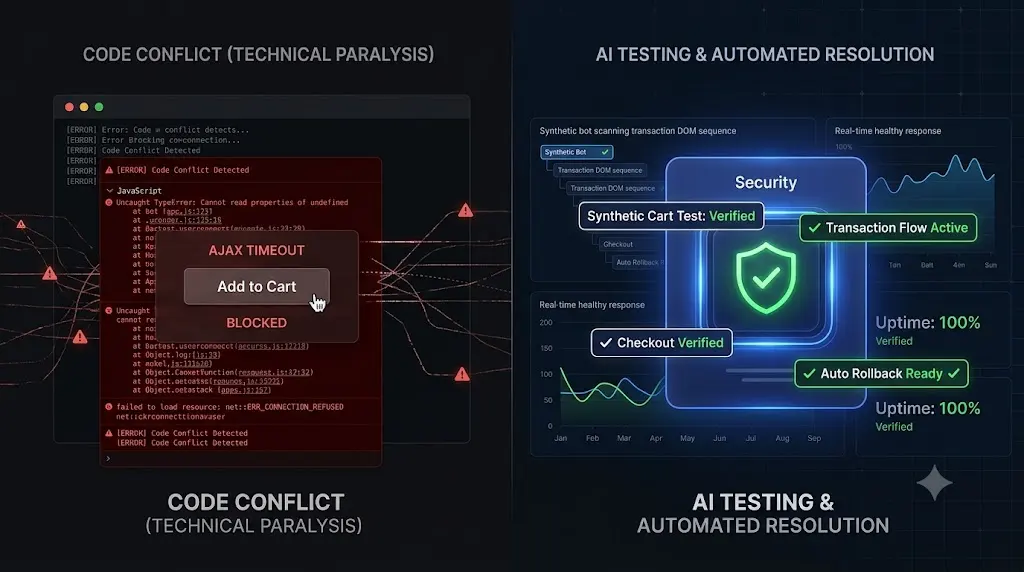
Look at your agency’s current WordPress maintenance offering. If you are like 90% of the industry, your stack has three pillars: automated off-site backups, blind bulk plugin updates, and an HTTP 200 uptime monitor. Adding automated form testing wordpress helps verify that forms actually work not just that the site is online.
You sell this triad to your clients as “peace of mind.”
Then, a caching plugin update silently expires the AJAX security nonce on your client’s primary lead capture page. The server is perfectly healthy. Your uptime monitor shows 100% availability. Your dashboard shows all plugins are up to date. But for the next six days, every single customer who tries to request a quote is met with an endlessly spinning submit button.
You did everything right according to the traditional maintenance playbook, but your client still lost a week of revenue.
This happens because the traditional white-label WordPress maintenance stack is fundamentally incomplete. It verifies the server, but it ignores the business logic.
In 2026, automated form testing is no longer a luxury for enterprise sites; it is a mandatory requirement for professional site management. This guide breaks down exactly why legacy tech stacks fail to protect lead funnels, the unbearable cost of manual Quality Assurance (QA), and how top tier agencies use synthetic transaction bots to complete their operational architecture.
Quick Answer: How do you automate WordPress form testing?
To achieve automated form testing in WordPress, agencies must move beyond basic server pings and deploy synthetic transaction testing. Using an advanced WebOps platform like SiteOps, a headless Chromium browser autonomously navigates to the client’s contact page, physically types test data into the form fields, clicks the submit button, and visually verifies that the success message renders on the Document Object Model (DOM). If the form fails to submit after a plugin update, the system alerts the agency or triggers an auto rollback immediately.
The Flaw in the Traditional Maintenance Stack
To understand why your current stack is failing your clients, you must look at how legacy WordPress monitoring tools define success.
The traditional stack is built on a massive assumption: If the PHP code executes without a fatal error, the website must be working.
This is the HTTP 200 Fallacy. Basic uptime monitors ping a server to see if it is awake. They do not render the CSS, they do not execute the JavaScript, and they certainly do not test the third party API connections that power modern lead generation forms.
If you push an update to an optimization plugin (like WP Rocket or Autoptimize), it might aggressively defer the JavaScript required by Gravity Forms or WPForms. The site will load lightning fast, scoring a perfect 100 on Google PageSpeed Insights. The server will return a healthy 200 status code. But the “Submit” button on the contact form will be completely dead.
If your tech stack cannot detect a dead submit button, your tech stack is missing a critical link.
The Unbillable Trap of Manual Form Verification
When agencies realize their remote control dashboards are blind to broken forms, they usually try to patch the hole with manual human labor.
To guarantee safe WordPress updates, agency owners force their developers to perform staging site QA. After updating the plugins on a staging server, a junior developer is tasked with visiting the contact page, typing in a fake name and email, clicking submit, and checking a shared inbox to ensure the lead arrived.
This protocol works. It is also an absolute profitability killer.
If you manage multiple WordPress sites and have 40 clients on retainer, executing this manual workflow takes roughly 10 minutes per site. Your team is burning over 6 hours a week acting as human click testers.
If your agency bills at $150 an hour, you are destroying nearly $4,000 in potential revenue every month just to verify basic business logic. You cannot build a highly profitable WordPress maintenance retainer if your model requires intense manual data entry every single Friday.
The Missing Link: Synthetic Transaction Testing
To scale your MRR (Monthly Recurring Revenue) securely, you must bridge the gap between technical server health and frontend business logic. You must replace human QA testers with autonomous AI.
This operational requirement is exactly why top agencies are upgrading their stacks and exploring how AI WordPress maintenance is changing agencies.
The missing link is a technology called Synthetic Transaction Testing. Instead of asking a server if it is awake, a synthetic transaction asks the website to perform a task.
How SiteOps Automates Form Verification
We engineered SiteOps specifically to act as your autonomous WebOps engineer. It native integrates synthetic testing directly into your update workflow.
Here is exactly how SiteOps completes your maintenance stack:
1. The Headless Bot Deployment When you schedule your routine maintenance, or set up continuous monitoring intervals, SiteOps does not just ping the server headers. It spins up a headless Chromium browser in the cloud. This bot acts exactly like a human prospect visiting your client’s website.
2. Interacting with the DOM The synthetic bot navigates to the specific URL containing the client’s primary lead generation form. It analyzes the Document Object Model (DOM) to locate the input fields. It physically types predefined test data into the Name, Email, and Message boxes.
3. Verifying Business Logic The bot clicks the submit button. It does not just assume the click worked. It waits and visually verifies that the specific success message (e.g., “Thank you, we will be in touch shortly”) successfully rendered on the screen. It mathematically proves that a customer can contact the business, catching AJAX failures, expired caching nonces, and deferred JavaScript conflicts instantly.
Tying Verification to Remediation (Auto Rollbacks)
Detecting a broken form is incredibly powerful, but true automation requires active remediation.
The most dangerous time for a contact form is during a plugin update. If you use SiteOps to update your plugins, the platform runs these synthetic form tests immediately after the new code is applied.
If the synthetic bot fails to submit the form successfully post update, SiteOps halts the process immediately. Within seconds, it triggers an autonomous auto rollback. The MySQL database and file system are restored to their exact stable pre update state.
The client never experiences a broken lead funnel. You simply wake up to a dashboard notification explaining exactly which optimization plugin broke the JavaScript logic, allowing you to investigate safely on a staging server.
Building the Ultimate 2026 WebOps Stack
A proper WordPress maintenance checklist for an agency must cover every potential failure point.
If you are using a legacy ManageWP alternative or a basic MainWP alternative, you are likely only covering backups and blind updates. You are leaving your clients exposed to the hidden cost of broken WordPress updates that silently kill their lead generation.
The modern 2026 agency stack must be unified in a single platform:
- Disaster Recovery: Automated, isolated off site cloud backups.
- Proactive Security: 4 level deep WordPress security monitoring that tracks CVE vulnerabilities in real time.
- Visual Stability: AI visual regression testing that catches shattered CSS layouts during updates.
- Business Logic Verification: Automated synthetic form and checkout testing to guarantee revenue continuity.
Stop acting as a manual QA tester. Stop guessing if your clients’ forms are actually working.
You can automate WordPress maintenance for multiple sites with absolute certainty today.
Test the synthetic transaction engine for free. Connect your first site to SiteOps and complete your maintenance stack.
Frequently Asked Questions
What is automated form testing in WordPress? Automated form testing uses a cloud based headless browser (a bot) to visit your website, type data into your contact or lead generation forms, click submit, and verify that the success message appears. It ensures your forms are working without requiring a human to manually test them.
Why do WordPress forms stop working after updates? Forms usually fail silently after updates due to aggressive caching plugins stripping required AJAX security nonces, optimization plugins deferring the JavaScript needed to process the submission, or page builder updates altering the CSS and hiding the submit button.
What is a synthetic transaction? A synthetic transaction is a simulated user interaction. Instead of passively waiting for a real user to report an error, a monitoring system generates artificial traffic (a synthetic transaction) to actively test critical paths like filling out a contact form, logging in, or adding an item to a cart.
Why did my uptime monitor miss my broken contact form? Basic WordPress uptime monitoring tools only check if your server responds with an HTTP 200 OK code. A server can be perfectly online and healthy while serving a broken JavaScript file that prevents a form from submitting. You need synthetic testing to verify business logic.
How do agencies test forms at scale without losing money? Top tier agencies eliminate manual QA testing by using automated maintenance platforms like SiteOps. These platforms natively integrate synthetic transaction testing, automatically verifying that forms work across dozens of client sites every single day without requiring unbillable human labor.
Can automated form testing prevent spam? While synthetic testing is designed to verify functionality, you must ensure your testing bot is whitelisted in your spam protection (like reCAPTCHA or Akismet). The testing tool ensures legitimate users can get through; it is up to your form’s configuration to block the actual spam.
What happens if a plugin update breaks a form on SiteOps? If a plugin update causes the synthetic form test to fail, the SiteOps AI detects the failure instantly. Before the client ever misses a real lead, the system autonomously triggers an auto rollback, restoring the site’s database and files to their stable pre update state in seconds.
Does automated form testing mess up my client’s CRM data? Professional testing tools allow you to configure specific test email addresses and names (e.g., siteops-test@youragency.com). You can set up simple filtering rules in your client’s inbox or CRM to automatically archive or delete leads coming from that specific test address.
How do you prove the value of form testing to a client? Do not just list technical features in your monthly report. Use an automated reporting tool that translates this data into business value. Your executive summary should highlight exactly how many times the lead funnel was verified as healthy, proving you are actively protecting their sales pipeline.
Is there a tool that combines backups, updates, and form testing? Yes. SiteOps is designed as a complete WebOps platform for agencies. It unifies daily off site backups, AI visual regression testing for safe updates, deep forensic security scanning, and automated synthetic form testing into a single, flat rate dashboard.
Scale Your Agency Today
Join 500+ agencies automating their WordPress maintenance. Get started with 3 sites for free. No credit card required.