AI Changelog Analysis: Prioritizing WordPress Security and Feature Updates
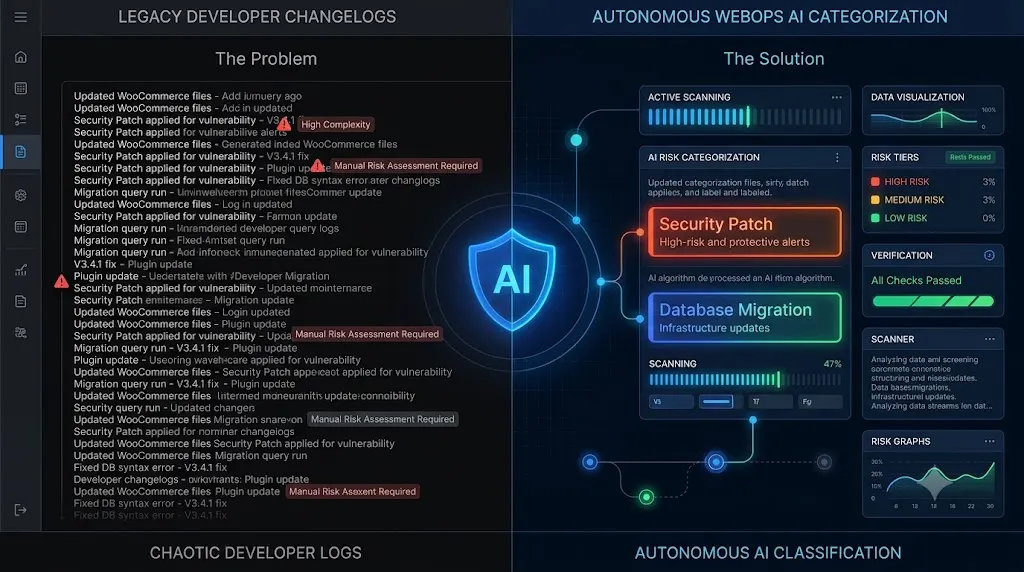
To bridge this gap, elite WebOps teams are abandoning blind bulk updates. They are leveraging ai wordpress changelog analysis to autonomously parse developer notes, assess the threat level of an update, and dictate the deployment strategy before a single file is modified on the server.
In a traditional DevOps CI/CD pipeline, every code deployment is strictly controlled, tested, and reviewed. However, when managing a portfolio of WordPress websites, DevOps engineers are forced to operate in a highly volatile ecosystem.
You are not just deploying your own code. You are managing third party software written by dozens of different development teams globally. Every week, those teams push updates to their plugins and themes.
The golden rule of server administration is to never push third party code to a production environment without reading the developer changelog first. You must know if an update is a minor CSS tweak, a critical zero day security patch, or a massive database schema migration.
But if you manage multiple WordPress sites for agency clients, reading every single changelog manually is mathematically impossible.
This technical guide breaks down the operational danger of unread changelogs, how Natural Language Processing (NLP) categorizes deployment risk, and how modern platforms automate the entire pre flight verification process.
Quick Answer: What is AI WordPress changelog analysis?
AI WordPress changelog analysis is an automated WebOps process where an artificial intelligence text model reads the readme.txt developer notes of a pending plugin update before it is installed. The AI uses Natural Language Processing to categorize the update. If it detects keywords like “CVE” or “Security Patch,” it prioritizes the update. If it detects “Database Migration” or “Deprecated API,” it flags the update as High Risk and pauses the deployment for human approval, ensuring safe WordPress updates without requiring manual reading.
The Problem With the “Update All” Button
If you are using a legacy ManageWP alternative to maintain your client portfolio, your workflow likely revolves around the “Update All” button.
This button executes a simple worker job: it pulls the new ZIP file from the WordPress repository, deletes the old plugin folder, and unpacks the new code.
It does this blindly.
If you push a major WooCommerce update blindly, and the underlying changelog explicitly stated, “Warning: This version requires a full database migration to High Performance Order Storage,” your server will likely time out during the bulk execution. The frontend layout will shatter, the checkout will break, and you will be forced into hours of unbillable emergency triage.
The hidden cost of broken WordPress updates is almost always rooted in a failure to read the documentation.
The Manual Review Bottleneck
If blind execution is a liability, the traditional agency solution is manual Quality Assurance (QA).
To execute the ultimate WordPress maintenance checklist properly, a senior developer must review the pending updates across the portfolio. If 50 client sites have an average of 5 pending updates each, that is 250 changelogs to review every single week.
Your highly paid DevOps engineers are burning hours reading plain text files just to figure out if an update is safe to push to a staging environment.
You cannot build a highly profitable WordPress maintenance retainer if your business model requires intense, unbillable human data parsing just to maintain the status quo.
The Solution: Autonomous Pre Flight Risk Assessment
To scale a maintenance portfolio profitably, you must decouple risk assessment from human labor.
This operational shift is the core of how AI WordPress maintenance is changing agencies. Instead of relying on humans to read notes, advanced platforms deploy AI text models to parse the developer documentation instantly.
Here is how a deterministic ai wordpress changelog analysis engine categorizes and routes your deployments.
Category 1: The Critical Security Patch
When a vulnerability is disclosed, speed is everything.
The AI scans the pending changelog for keywords such as CVE, Security Fix, Vulnerability, XSS, or SQLi.
When these markers are detected, the system categorizes the update as a Critical Security Patch. It bypasses standard weekly scheduling and prioritizes the worker job for immediate deployment, working alongside your WordPress security monitoring tools to close the backdoor before an automated botnet can exploit it.
Category 2: The Routine Feature and Bug Fix
The vast majority of updates fall into this category.
The AI reads the notes and detects phrases like CSS adjustment, Typo fixed, Added new filter, or Performance improvement.
Because these updates pose a low structural risk, the AI clears them for the standard deployment pipeline. The worker job executes the update and immediately passes the site to the visual regression testing engine to verify the frontend layout autonomously.
Category 3: The High Risk Structural Change
This is where the AI proves its enterprise value.
The AI scans for architectural keywords such as Database Migration, Deprecated API, Requires PHP 8.2, Major Rewrite, or Breaking Changes.
When these terms are identified, the system halts the worker job for that specific plugin. It flags the update as High Risk. Instead of blindly executing a dangerous database migration across 50 live production servers, the platform pauses the update and requests manual human approval.
The AI isolates the danger, allowing you to route that specific, volatile update to a staging environment for deep manual testing, while the rest of your portfolio updates seamlessly.
Integrating AI Changelog Analysis with SiteOps
When evaluating the best WordPress monitoring tools in 2026, you must look beyond basic uptime pings. You need a platform that actively protects your deployment pipeline.
We engineered SiteOps to operate as your autonomous WebOps team. The platform integrates native AI changelog analysis directly into its core update engine.
When you initiate a bulk update via the SiteOps WordPress maintenance tool, you are not pushing code blindly.
- Pre Flight Check: SiteOps parses every single developer changelog across your entire portfolio in seconds.
- Risk Routing: It flags the dangerous database migrations for your review and prioritizes the security patches.
- Execution and Verification: It executes the safe updates and instantly deploys headless Chromium browsers to perform pixel perfect visual regression testing.
- Active Remediation: If an approved update unexpectedly shatters a CSS layout, the system instantly triggers an autonomous auto rollback, restoring the database to safety before the client ever notices.
Stop Deploying Risk at Scale
If your agency relies on legacy dashboards that push code without reading the developer documentation, you are mathematically guaranteed to experience catastrophic client downtime. A detailed ManageWP vs SiteOps comparison proves that automating execution without automating risk assessment is a deeply flawed model.
By upgrading to an autonomous WebOps platform equipped with AI changelog analysis, visual regression testing, and synthetic transaction bots, you eliminate the unbillable manual QA bottleneck entirely.
You protect your clients’ revenue and scale your Monthly Recurring Revenue (MRR) without hiring a single additional QA tester.
Stop pushing code blindly.
See how SiteOps AI changelog analysis works today. Connect your first 3 sites free and experience absolute deployment control.
Frequently Asked Questions
What is AI WordPress changelog analysis? It is an automated process where an AI text model reads the developer release notes (changelogs) of a pending plugin update. The AI uses Natural Language Processing to categorize the update as a security patch, a routine bug fix, or a high risk database migration before the code is executed on the server.
Why shouldn’t I just click Update All on my dashboard? Clicking “Update All” executes code blindly. If a plugin update contains a massive database schema migration or deprecates a core API that your custom theme relies on, pushing it blindly will cause a fatal error or a shattered layout, taking your client’s site offline.
How does the AI know an update is dangerous? The AI is trained to recognize specific developer terminology. It scans for keywords like “Breaking Changes,” “Database Migration,” “Deprecated,” or “Requires PHP 8.x.” When it detects these structural markers, it flags the update as high risk and pauses the deployment.
What happens when the AI detects a security vulnerability patch? When the AI detects keywords like “CVE,” “Security Fix,” or “XSS Patched,” it categorizes the update as critical. Advanced platforms like SiteOps will prioritize this worker job, allowing you to deploy the security patch immediately to protect the site from active botnets.
Can WordPress automatically update plugins safely on its own? Native WordPress auto updates execute blindly. They push the new code without reading the changelog for risk factors and without visually verifying if the update broke the frontend layout. Safe automation requires a dedicated third party platform with AI assessment capabilities.
How much time does changelog analysis save an agency? Agencies manually managing 50 sites often spend hours every week just reading plugin release notes to determine which updates require staging environments. AI parses hundreds of changelogs in seconds, reducing unbillable assessment time to near zero.
What is visual regression testing in WordPress? Visual regression testing is the post flight safety net. It uses a headless browser to take a screenshot of your site before an update, and another screenshot immediately after. AI compares the images pixel by pixel to automatically detect visual breaks or shattered CSS layouts.
What happens if an update passes the AI check but still breaks the site? In platforms like SiteOps, if an update passes the text analysis but unexpectedly breaks the visual layout during execution, the post flight visual regression test will catch it. The system will instantly trigger an autonomous auto rollback, restoring the site to safety.
How do I safely update WooCommerce sites at scale? WooCommerce sites are incredibly fragile. You must use AI changelog analysis to pause major database structure updates for manual review, and you must use synthetic transaction bots to physically verify that the checkout flow still works after routine updates are applied.
Does tracking CVEs replace the need for changelog analysis? No. CVE databases track known security flaws. Changelog analysis tracks operational risk. A plugin might have zero CVE security vulnerabilities, but its newest update might include a massive architectural rewrite that will break your custom theme. You need both to guarantee total stability.
Scale Your Agency Today
Join 500+ agencies automating their WordPress maintenance. Get started with 3 sites for free. No credit card required.