Your WordPress Updates Aren’t the Problem. What Happens After “Update All” Is.
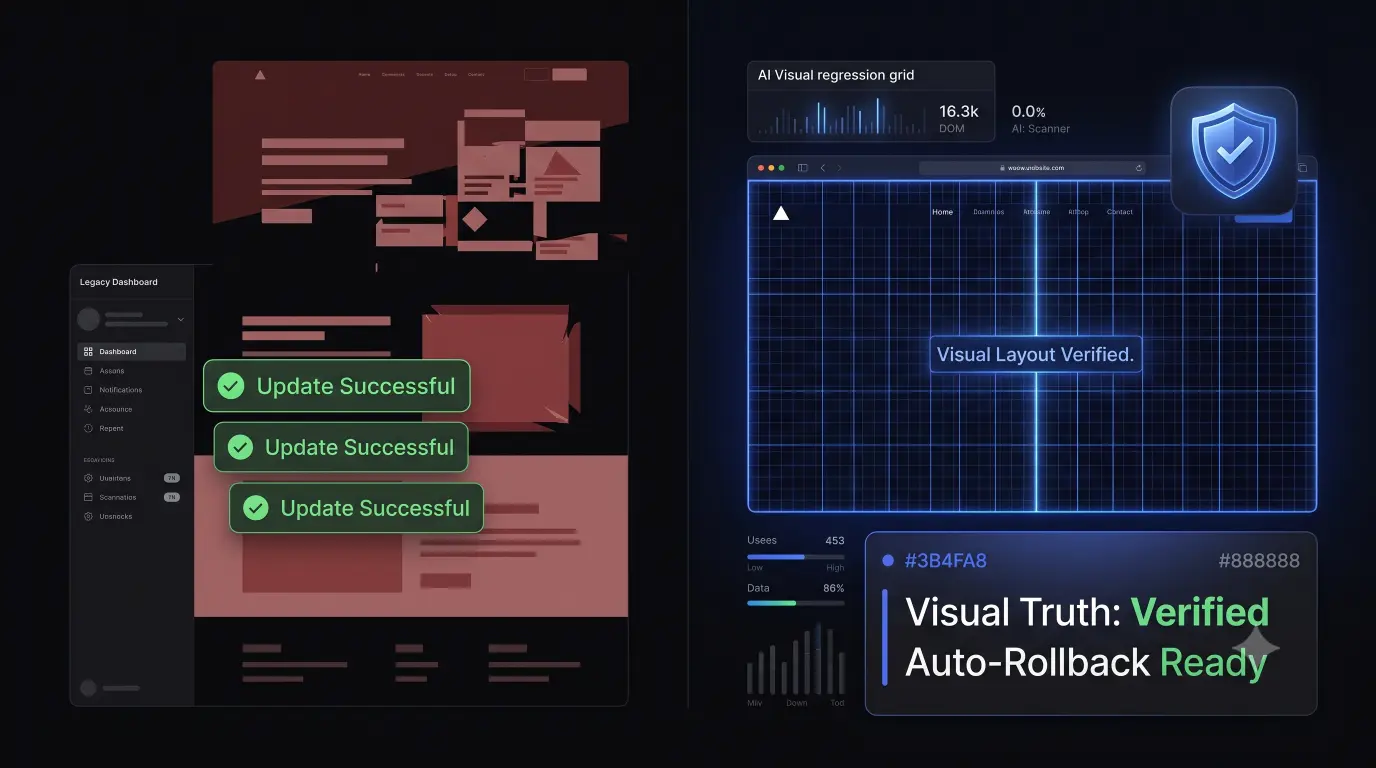
It is Friday afternoon. You log into your command center. You click “Update All.”
Forty-seven client sites report successful plugin updates. Everything in your management dashboard looks green. The progress bars hit 100 percent. You close your laptop with confidence and go home for the weekend.
Monday morning, your highest-paying e-commerce client calls you in a panic. Their website is broken. Nobody has been able to check out for 48 hours. They have lost thousands of dollars in weekend sales.
The problem isn’t that the plugin update failed. The plugin files downloaded and installed perfectly.
The problem is that your maintenance tool told you the update succeeded when the actual website experience had already fundamentally changed. The code was fresh, but the layout was shattered.
If your agency relies on recurring revenue, this scenario is your biggest operational liability. The legacy wordpress management tools for agencies that we use to save time are actively lying to us about the actual health of our clients’ websites. If you want to successfully automate wordpress maintenance at scale, you have to realize that execution is only half the battle.
Managing multiple WordPress sites? See how SiteOps handles the true update verification workflow. Explore the Sandbox →
Does “Successful Update” Actually Mean “Healthy Website”?
The WordPress ecosystem has evolved drastically over the last decade. We are no longer managing simple text blogs. We are managing complex page builders, headless architectures, dynamic custom post types, and intricate WooCommerce checkouts.
In this highly fragile environment, we must acknowledge a critical distinction. There is a massive, costly difference between Technical Success and Business Success.
Technical Success (What legacy tools check): Standard wordpress management tools for agencies rely on basic technical indicators. When they push an update, they check a few superficial metrics. They verify that the API responded. They verify that the plugin zip file unzipped successfully. They check if WordPress is reachable. Most importantly, they ping the server for an HTTP 200 OK status. If the server says “I am awake,” the tool marks the update as a success.
Business Success (What your client actually cares about): Your client does not care about an HTTP 200 status code. Business success requires a much deeper level of verification.
- The homepage hero section still renders correctly.
- The lead capture forms still accept submissions.
- The CSS structure hasn’t broken into a single, unstyled column.
- The JavaScript powering the mobile navigation hasn’t failed.
- Important landing pages haven’t changed unexpectedly.
- The visual layout remains perfectly intact.
- Critical checkout functionality hasn’t disappeared off the screen.
When you use a standard dashboard, it only verifies Technical Success. If a caching plugin update shatters a CSS grid, the server still returns an HTTP 200 code. The dashboard shows green, but the business is losing money. To truly automate wordpress maintenance, your software must bridge the gap between technical execution and business reality.
We Don’t Need Faster Updates. We Need Safer Updates.
For a decade, the agency software market focused entirely on speed. The goal was to update 100 sites as fast as humanly possible. But speed without verification is just deploying risk faster.
Top-tier agencies have realized that execution is no longer the bottleneck. Verification is the bottleneck. You must transition your team from a traditional workflow to a modern, autonomous workflow built around visual regression testing.
The Traditional Agency Workflow:
- Update: You click “Bulk Update All.”
- Health Check: The tool performs an HTTP 200 server ping.
- Verification: You hope everything worked, or you spend hours clicking through staging sites manually.
- Issue Discovery: The client discovers the issue on a Sunday night.
- Remediation: You perform a frantic, manual FTP restore on Monday morning.
The Modern Autonomous Workflow:
- Update: The platform initiates Scheduled Autonomous Updates.
- Health Check: A Deep Technical Health Check runs in the background.
- Verification: AI Visual Regression Testing acts as a human tester, comparing before and after screenshots.
- Issue Discovery: The AI discovers the issue instantly during the update.
- Remediation: The system executes an Instant Autonomous Auto-Rollback before the client ever sees it.
Modern platforms do not eliminate every single manual check you will ever do, but they drastically reduce the operational burden and provide absolute visibility into what actually happened on the frontend of the website.
How Much Is Manual WordPress Maintenance Actually Costing Your Agency?
To combat the risk of blind updates, responsible agencies rely on manual Quality Assurance (QA). They clone sites to staging environments, run the updates, and have a junior developer click through the pages to ensure nothing broke.
While this allows you to safely update wordpress plugins, it is a massive drain on your profitability. Let us look at the actual math of manual QA testing to uncover the hidden cost of broken wordpress updates.
- Total Websites Managed: 50 sites
- Time spent checking pages post-update: 15 minutes per site
- Time spent per weekly update cycle: 12.5 hours
- Update cycles per month: 4 weeks
- Total unbillable hours: 50 hours per month
How much is one hour of your senior developer’s time worth? If your agency bills at $100 an hour, you are burning $5,000 in potential revenue every single month just to manually verify that a plugin update didn’t break a layout.
The hidden cost of broken wordpress updates is not just the immediate client churn when a site crashes; it is the sheer amount of payroll you waste trying to prevent those crashes in the first place. You cannot scale an agency if every new client adds hours of manual checking to your weekly workload.
Want to see how much of this workflow you can automate? See what this workflow looks like in practice. Connect 3 sites free →
The 7 Things Your WordPress Management Tool Should Check After an Update
If you want to safely update wordpress plugins without relying on human click-testers, your operational stack must ask and answer seven specific questions immediately after the new code is applied to the server.
1. Is the site reachable? This is the baseline. The tool must ping the server to ensure a fatal PHP syntax error hasn’t triggered a White Screen of Death.
2. Did the update actually complete? The system must verify that the file versions in the database match the requested update package, ensuring the zip extraction didn’t fail midway.
3. Did PHP or server errors appear? The tool must parse the WordPress debug logs and server error logs to catch silent syntax mismatches that might not crash the homepage but break backend functionality.
4. Did critical pages change? The system must monitor the Document Object Model (DOM) for structural shifts. If the number of divs or core elements drastically changes, it is a red flag.
5. Did the visual layout change? This is the most critical step. Using visual regression testing, a headless browser must capture a screenshot before and after the update. AI must analyze the pixel variance to see if a button shifted or a CSS file failed.
6. Are important resources failing? The system must verify that the Content Delivery Network (CDN) and caching layers are still serving the correct CSS and JS assets after the cache purge.
7. Does anything require human attention? The tool must filter out false positives (like a new blog post appearing in a feed) so developers only look at genuine, fatal failures.
This level of scrutiny is impossible for a human to perform across 50 sites simultaneously. It requires an AI-driven platform equipped with machine vision to truly automate wordpress maintenance.
The Problem With “Update All”
When evaluating wordpress management tools for agencies, you will find dozens of platforms that prominently feature a bulk update button.
Most WordPress management platforms are very good at telling you what changed. They will gladly send you a beautiful PDF report stating that WooCommerce changed from version 8.1 to 8.2, and Yoast SEO was successfully updated.
The harder question is: “What did that change DO to the website?”
Standard legacy tools cannot answer this. They execute the code and leave the verification entirely up to you.
Modern platforms answer this question through Visual Regression Testing. By spinning up a headless Chromium browser, taking a high-resolution screenshot before the update, taking a second screenshot after the update, and overlaying the images, AI can instantly spot a broken layout.
If the AI detects a shattered CSS grid or a missing lead form, it does not just send an alert. It executes an instant auto-rollback. It fixes the site autonomously, before your client, or their customers, ever see the error.
Automate the Verification, Not Just the Execution
A broken client website is an operational failure. But a broken website that you do not know about until an angry client complains is a massive agency failure.
If you want to build a highly profitable maintenance retainer model, you must stop accepting blind updates. You must upgrade to a system that verifies its own work, protects your clients’ revenue, and reclaims your unbillable QA hours.
Stop finding out about broken sites from your clients. Manage your WordPress portfolio from one WebOps command center.
Scale Your Agency Today
Join 500+ agencies automating their WordPress maintenance. Get started with 3 sites for free. No credit card required.