Stop Guessing: A Foolproof System to Test WordPress Forms Post Update
You just executed your weekly maintenance routine across a portfolio of 40 agency clients. You updated Gravity Forms, WPForms, and several heavy caching plugins. Every website reports a 100% successful update, and the uptime monitors are glowing green. Before considering maintenance complete, test wordpress forms post update to ensure every form still captures and delivers leads correctly.
You close your laptop, confident that your clients are secure.
On Wednesday, a B2B client calls you in a panic. They spend thousands of dollars a week on Google Ads, but they have not received a single inquiry since Friday. You navigate to their site, fill out their “Request a Quote” form, and click submit.
The button simply spins. It never resolves. The email never sends.
Your client just burned five days of their marketing budget sending traffic to a dead funnel, and your agency is entirely to blame.
When you manage multiple WordPress sites, assuming a site works just because the server is online is a massive operational liability. You must actively test wordpress forms post update to guarantee business continuity.
This guide breaks down exactly why forms break silently, compares the dangerous “pinging” method against the grueling manual testing method, and reveals the foolproof automated system top tier agencies use to guarantee their clients never miss a lead.
Quick Answer: How do you test a WordPress form after an update?
To test WordPress forms post update, you must verify the actual frontend business logic. Standard server pinging (uptime monitoring) cannot detect a broken form. You must either manually visit the site, enter test data, and submit the form to verify the AJAX script fires properly, or use an advanced WebOps platform like SiteOps. SiteOps deploys synthetic transaction bots to autonomously fill out your forms and visually verify the success message after every plugin update.
Why WordPress Forms Break Silently
Before you can build a testing system, you must understand the architecture of the failure. Forms do not crash the server; they fail in the browser.
When you run routine updates to achieve safe WordPress updates, you alter the delicate balance between your form plugin, your theme, and your performance optimization tools.
- The AJAX Caching Trap: Modern forms use AJAX to submit data without refreshing the page. They use a security “nonce” (a temporary token) to validate the submission. If you update a caching plugin like WP Rocket, it may aggressively cache an expired nonce. When a user clicks submit, WordPress rejects the token silently. The button spins forever.
- JavaScript Deferral Conflicts: To improve Core Web Vitals, optimization plugins defer JavaScript execution. A minor update can alter the minification rules, accidentally deferring the specific jQuery script required to validate your form fields. The form becomes a static, unclickable box.
These failures do not trigger PHP fatal errors. They happen entirely on the user’s screen, which is why your legacy tools completely miss them.
Method 1: Automated Pinging (The False Sense of Security)
Most agencies rely on the native functionality of their legacy WordPress maintenance tool to verify updates.
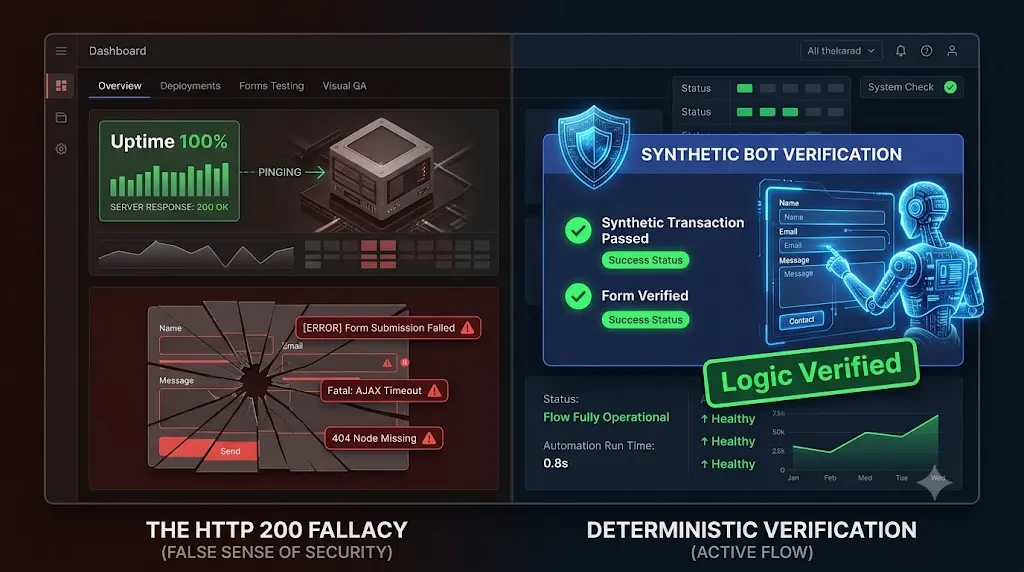
When you click “Bulk Update,” these tools push the code and perform a basic server ping. They ask the server, “Are you awake?” If the server responds with an HTTP 200 OK status code, the dashboard reports the update as successful.
This is the HTTP 200 Fallacy.
Basic WordPress uptime monitoring does not render the Document Object Model (DOM). It does not execute JavaScript. It does not check if an AJAX nonce is valid. Your client’s primary lead generation funnel can be completely dead, and a ping monitor will still give you a bright green checkmark.
Pinging is a server metric, not a business metric. If you rely on pings to test your forms, you are simply guessing.
Method 2: Manual Form Submissions (The Profit Killer)
When agency owners realize ping monitors are lying to them, they usually pivot to the safest alternative: manual Quality Assurance (QA) testing.
The manual system is a grueling, multi step protocol:
- Clone the live database to an isolated staging environment.
- Execute the plugin updates incrementally.
- Open a new Incognito browsing window.
- Navigate to the contact page on the staging site.
- Manually type in a fake name, test email, and message.
- Click submit and verify the frontend success message.
- Log into a shared inbox or CRM to verify the lead routed correctly.
- Replicate the exact update sequence on the live production server.
The Financial Drain
This method is foolproof, but it destroys agency profitability.
If executing this manual checklist takes 15 minutes per site, and you manage 40 clients on monthly retainers, your senior developers are burning 10 hours a week acting as human click testers.
If your agency bills at $150 an hour, you are wasting $1,500 in potential revenue every single Friday just to verify that a caching update did not break Gravity Forms. The hidden cost of broken WordPress updates includes the massive amount of unbillable labor you spend trying to prevent them. You cannot scale a digital agency profitably if every client requires manual data entry.
Method 3: The Foolproof Automated System (Synthetic Testing)
You cannot rely on guessing, and you cannot afford manual labor. To build a truly profitable WordPress maintenance retainer, you must decouple execution from human verification.
Top tier agencies have abandoned manual staging tests entirely. They automate WordPress maintenance for multiple sites by utilizing autonomous WebOps platforms equipped with Synthetic Transaction bots.
This is exactly why we engineered SiteOps. SiteOps replaces the human QA tester with an autonomous digital agent.
Here is how the SiteOps engine tests your forms flawlessly after every update.
Step 1: The Headless Bot Deployment
When you initiate a plugin update via the SiteOps dashboard, the platform spins up a headless Chromium browser in the cloud. This browser acts exactly like a human prospect visiting your client’s website.
Step 2: DOM Interaction and Data Injection
The synthetic bot navigates to the specific URL containing the client’s primary lead generation form. It analyzes the DOM to locate the HTML input fields.
It does not bypass the frontend or use a developer API. The bot physically types predefined test data into the Name, Email, and Message boxes. It interacts with the site exactly as a standard user would.
Step 3: Visual Success Verification
The bot clicks the submit button. It then waits and visually verifies the response.
It checks the DOM to ensure that the specific AJAX success message successfully rendered on the screen. It mathematically proves that a customer can contact the business, catching expired caching nonces and deferred JavaScript conflicts instantly.
Step 4: Instant Autonomous Auto Rollbacks
If SiteOps updates a caching plugin and the synthetic bot subsequently fails to submit the form, the platform halts the process immediately.
Within seconds, it triggers an autonomous auto rollback. The MySQL database and file system are restored to their exact stable pre update state. The client never experiences a broken lead funnel. You simply wake up to a dashboard notification explaining exactly which plugin broke the form logic, allowing you to investigate safely on a staging server.
Stop Paying for Blind Updates
When comparing a legacy ManageWP alternative or a self hosted MainWP alternative, your primary evaluation metric must be verification.
If a tool allows you to click “Update All” but requires you to manually check the forms afterward, you are paying for an incomplete product.
By upgrading to an autonomous platform equipped with synthetic transaction testing, visual regression, and proactive WordPress security monitoring, you completely eliminate the manual QA bottleneck. You protect your clients’ marketing budgets and secure your agency’s reputation permanently.
Stop acting as a manual QA tester. Stop guessing if your updates worked.
Test the synthetic transaction engine today. Claim your free sites, execute your first deterministic update, and guarantee your clients never miss another lead.
Frequently Asked Questions
Why did my WordPress contact form stop working after an update? Forms usually fail silently after updates due to aggressive caching plugins stripping required AJAX security nonces, optimization plugins deferring the JavaScript needed to process the submission, or page builder updates altering the CSS and hiding the input fields.
How do I test a WordPress contact form safely? You can manually fill out the form and check the destination inbox. However, for agencies managing multiple sites, this is highly inefficient. Top agencies use automated platforms like SiteOps to deploy synthetic bots that autonomously fill out and submit the form to verify functionality.
What is a synthetic transaction in WordPress testing? A synthetic transaction is an automated process where a headless browser acts like a real user. It navigates to a page, types data into a form, clicks submit, and visually verifies that the AJAX success message renders correctly after any plugin updates.
Why did my uptime monitor miss my broken contact form? Basic WordPress monitoring tools only check if your server responds with an HTTP 200 OK code. A server can be perfectly online and healthy while serving a broken JavaScript file that prevents a form from submitting. You need synthetic testing to verify frontend functionality.
What happens if a plugin update breaks a form on SiteOps? If a plugin update causes the synthetic form test to fail, the SiteOps AI detects the failure instantly. Before the client ever misses a real lead, the system autonomously triggers an auto rollback, restoring the site’s database and files to their stable pre update state in seconds.
Does automated form testing mess up my client’s CRM data? Professional testing tools allow you to configure specific test email addresses. You can set up simple filtering rules in your client’s inbox or CRM to automatically archive or delete leads coming from that specific test address, keeping their analytics clean.
Can WordPress automatically update plugins safely? Native WordPress auto updates execute blindly. They push the new code without verifying if it broke the frontend layout or the form submission script. Safe automation requires a dedicated third party tool with visual and functional verification capabilities.
How do agencies test forms at scale without losing money? Top tier agencies eliminate manual QA testing by using automated white-label WordPress maintenance platforms. These tools natively integrate synthetic transaction testing, automatically verifying that forms work across dozens of client sites every single day without unbillable human labor.
Why does my form button spin endlessly when I click submit? A continuously spinning submit button indicates a JavaScript conflict or an expired caching nonce. Clear all WordPress and server caches. If the issue persists, temporarily disable your optimization plugins to see if deferred JavaScript is breaking the AJAX submission.
How do you prove the value of form testing to a client? Use an automated reporting tool that translates technical data into business value. Your monthly executive summary should highlight exactly how many times the lead funnel was verified as healthy, proving to the client that you are actively protecting their sales pipeline.
Scale Your Agency Today
Join 500+ agencies automating their WordPress maintenance. Get started with 3 sites for free. No credit card required.