How to Safely Update 100+ WordPress Sites Without Breaking a Single One
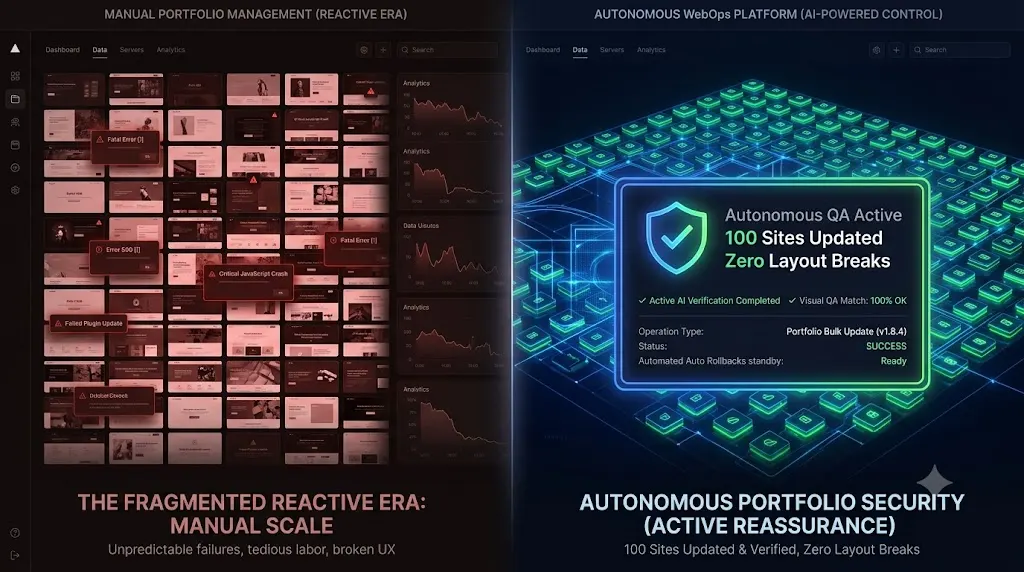
If you are using legacy management dashboards to push code blindly, you are automating the deployment of risk. This guide breaks down the mathematics of agency scalability, why manual Quality Assurance (QA) testing is destroying your growth potential, and exactly how elite agencies safely update multiple wordpress sites using autonomous WebOps platforms.
Managing five WordPress sites is a hobby. Managing 100+ WordPress sites on monthly retainers is a complex logistical operation.
At this scale, the laws of probability work against you. If a routine plugin update has a 1 percent chance of conflicting with a custom theme and shattering a CSS layout, managing a small portfolio means you might see a broken site once a year. If you manage 100 websites and run weekly updates, that exact same 1 percent failure rate mathematically guarantees you will break at least one client website every single Friday.
For high volume digital agencies, the “Update All” button is no longer a convenience feature. It is a loaded weapon aimed directly at your profit margins.
Quick Answer: How do you safely bulk update WordPress sites?
To safely update multiple WordPress sites, you must stop pushing code blindly using basic bulk updaters. Instead, you must use an autonomous platform like SiteOps. During a bulk update, the system visits all 100+ sites, takes pre update screenshots, executes the code, and takes post update screenshots. Artificial intelligence compares the images pixel by pixel. If a layout breaks on any individual site, the AI instantly triggers an auto rollback for that specific site, ensuring zero downtime across the entire portfolio.
The Scaling Trap: Why “Bulk Update” is a Lie
When an agency first decides to scale, they usually purchase a basic ManageWP alternative or a self hosted MainWP alternative.
These tools are incredibly efficient at executing code. You check a box to select all 100 clients, click update, and the software connects to the servers and replaces the plugin files simultaneously.
But execution is not maintenance. Verification is maintenance.
Legacy tools rely on the HTTP 200 Fallacy. After pushing the code, they send a ping to the 100 servers. If the servers respond with an HTTP 200 OK status code, the dashboard floods with green checkmarks.
An HTTP 200 code only verifies that the server is awake. It does absolutely nothing to verify the Document Object Model (DOM). Across your 100 sites, a caching update may have hidden the checkout fields on five WooCommerce stores. A page builder update may have deleted the mobile navigation menu on three B2B sites. The servers are healthy, but eight of your clients are actively losing money. Your legacy dashboard will falsely report a 100 percent success rate.
When you manage multiple WordPress sites using blind execution, the hidden cost of broken WordPress updates scales exponentially alongside your portfolio.
The Unbillable Nightmare of Manual QA
Agency owners who realize their bulk update tools are blind usually resort to the traditional safety net: manual QA testing.
To achieve truly safe WordPress updates, they force their team to verify every single update. Let us look at the financial reality of executing the ultimate WordPress maintenance checklist manually at scale.
If a junior developer spends a highly optimized 10 minutes per site cloning to staging, running updates, clicking through the homepage, submitting a test form, and pushing back to live:
- 10 minutes × 100 sites = 1,000 minutes (16.6 hours).
Your agency is burning 16.6 hours of unbillable labor every single week just to verify that updates did not break anything. If your agency bills at $100 an hour, you are setting $1,660 on fire every Friday. That is over $6,600 a month in lost productivity.
You cannot build a highly profitable WordPress maintenance retainer if your business model requires 60 hours of unbillable human intervention every month just to maintain the status quo. Manual testing places a hard mathematical ceiling on how large your agency can grow.
The Autonomous Agency: Scaling with SiteOps
To scale from 100 sites to 500 sites profitably, you must decouple the execution of updates from human verification. You must transition your agency from a legacy remote control to an autonomous WebOps platform.
This operational shift is exactly how AI WordPress maintenance is changing agencies.
We engineered SiteOps to completely eliminate the QA bottleneck. SiteOps does not just push code to 100 servers; it acts as an army of 100 autonomous QA engineers, visually verifying every single site simultaneously at machine speed.
Here is the exact 3 pillar framework top tier agencies use to automate WordPress maintenance for multiple sites flawlessly.
Pillar 1: AI Changelog Risk Assessment
Before SiteOps modifies a single file across your portfolio, it evaluates the risk.
The AI engine downloads the raw developer changelogs for the pending plugins. It reads the text, looking for keywords indicating major database schema migrations, massive structural rewrites, or critical API deprecations. It assigns a risk score to the update.
If a plugin update is flagged as extremely high risk, the system pauses the bulk update for that specific plugin and requests human approval, preventing you from blindly deploying a known volatile patch across 100 sites.
Pillar 2: Mass Visual Regression Testing
When you initiate the bulk update, SiteOps deploys headless Chromium browsers to all 100 sites simultaneously.
- The Baseline: The browsers capture pixel perfect, high resolution snapshots of the live DOM on every single site.
- The Execution: The platform applies the code updates and flushes 100 server caching layers autonomously.
- The Verification: The browsers return and capture a second set of screenshots.
- Machine Vision Analysis: Artificial intelligence overlays the before and after images for all 100 sites. It ignores dynamic content (like a rotating slider) but instantly flags fatal structural breaks, such as a shattered CSS grid or a missing header.
Pillar 3: Instant Portfolio Auto Rollbacks
The true power of automation is active remediation. If your tool just emails you a list of 8 broken sites out of 100, you still have to spend your weekend fixing them.
If the SiteOps AI detects a shattered visual layout on any of the 100 sites, it isolates that specific failure immediately. Within seconds, it triggers an autonomous auto rollback for the affected site. The MySQL database and file system are restored to their exact stable pre update state.
The other 92 sites update perfectly. The 8 failed sites are rolled back to safety instantly. The end users never experience downtime. You simply wake up to a dashboard notification explaining exactly which plugins failed the visual QA tests on which specific domains.
Protecting Your Gross Margins at Scale
When evaluating the best WordPress monitoring tools in 2026, you must look beyond features and examine the pricing model.
If you use modular legacy platforms, you are charged an a la carte fee per site for backups, another fee for safe updates, and another fee for reporting. When you scale to 100 or 500 sites, these per site fees cannibalize your gross profit margins.
A detailed MainWP vs ManageWP vs SiteOps teardown reveals the financial advantage of modern platforms.
SiteOps features an Agency Plan that operates on a flat monthly rate for unlimited sites. Whether you manage 100 sites or 1,000 sites, your software overhead remains exactly the same. You get full access to the AI visual regression engine, 5 minute native WordPress uptime monitoring, and proactive WordPress security monitoring across your entire portfolio for one fixed cost.
Every time you sign a new white-label WordPress maintenance client, you retain 100 percent of the profit margin.
Stop Deploying Risk at Scale
If your agency relies on the “Update All” button provided by legacy tools, you are mathematically guaranteed to experience catastrophic client downtime. You cannot run a high volume operation on blind faith.
By upgrading to an autonomous WordPress maintenance tool, you eliminate the unbillable manual QA bottleneck entirely.
You protect your clients’ revenue, secure your agency’s reputation, and scale your Monthly Recurring Revenue (MRR) without hiring a single additional support technician.
Stop acting as a manual QA tester.
Test the visual regression engine today. Connect your first 3 sites free and experience absolute operational control.
Frequently Asked Questions
How do you safely bulk update WordPress sites? You must decouple execution from human verification. Top agencies use automated platforms like SiteOps that utilize headless browsers to take screenshots of every site before and after a bulk update. AI compares the images to verify the visual layout autonomously and triggers instant rollbacks for any site that breaks.
Why do bulk updates break WordPress sites? At scale, you are dealing with hundreds of different themes, custom code snippets, and plugin combinations. A routine update that works perfectly on 99 sites might conflict with a custom CSS class on the 100th site, completely shattering its frontend layout.
What is the HTTP 200 Fallacy in website monitoring? The HTTP 200 Fallacy is the dangerous assumption that a server response equals a healthy website. Legacy monitoring tools only check if the server is awake. A site can return a 200 OK status while serving a completely broken layout or a missing checkout button, making basic ping bots useless for verifying updates.
How do I safely update WooCommerce sites at scale? WooCommerce sites are incredibly fragile. You must use a platform equipped with synthetic transaction testing. During a bulk update, the AI bot actually adds an item to the cart and navigates to the checkout page on every e commerce site to visually verify that the payment fields render correctly.
What is visual regression testing in WordPress? Visual regression testing uses a headless browser to take a screenshot of your site before an update, and another screenshot immediately after. AI compares the images pixel by pixel to automatically detect visual breaks, missing checkout buttons, or shattered CSS layouts that standard code scanners miss.
How much time does automated testing save an agency? Agencies manually managing 100 sites often spend 15 to 20 hours a week purely on staging tests, clicking through pages, and verifying updates. True automation platforms reduce this unbillable labor to near zero by autonomously verifying layouts and handling rollbacks.
What happens if an update breaks one site out of 100 on SiteOps? If a bulk update breaks a specific site, the SiteOps AI detects the visual variance instantly. It isolates that specific failure and autonomously triggers an auto rollback for that site only, restoring its database and files in seconds while the other 99 sites update successfully.
Does flat rate pricing matter for agency software? Absolutely. Legacy tools use modular a la carte pricing, meaning your software overhead scales up rapidly as you acquire more clients. To scale profitably, high volume agencies must use flat rate platforms that offer unlimited sites, ensuring profit margins actually increase as the portfolio grows.
How do you prove the value of maintenance to 100+ clients? You cannot manually type 100 emails every month. You must use an automated reporting tool that translates technical data into clear executive summaries. The report is branded with your agency logo and dispatched automatically, proving exactly how much downtime and how many threats you prevented.
Can WordPress automatically update plugins safely on its own? Native WordPress auto updates are highly risky for agency portfolios because they execute blindly. They push new code to the server without verifying if the update broke the frontend layout or CSS. Safe automation requires a dedicated third party platform with visual verification capabilities.
Scale Your Agency Today
Join 500+ agencies automating their WordPress maintenance. Get started with 3 sites for free. No credit card required.