Your WordPress Client’s Site Was Hacked 3 Weeks Ago. You Just Don’t Know Yet.
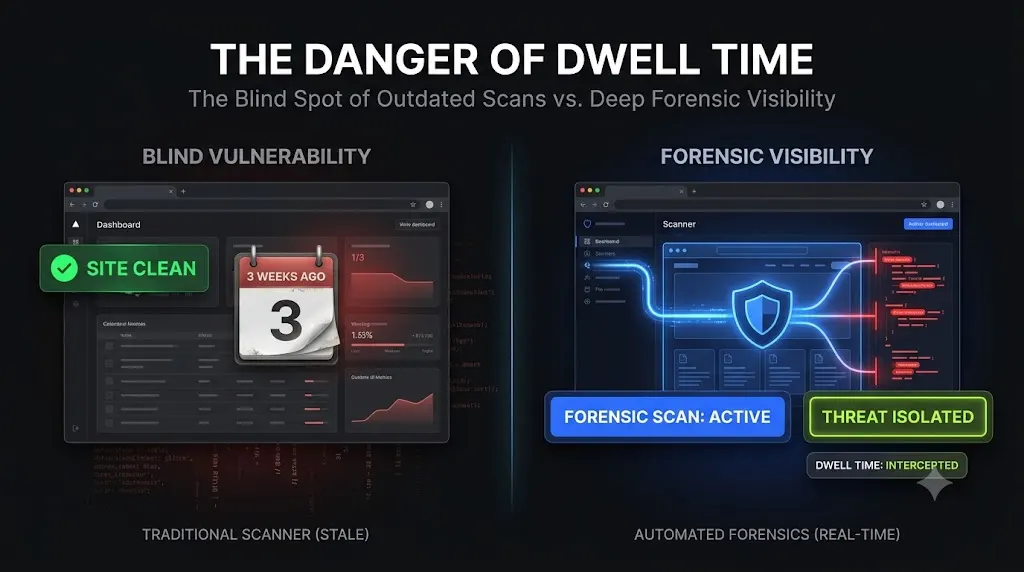
You just sent your monthly maintenance report to your highest-paying e-commerce client. The PDF looks fantastic. It proudly states that 24 plugins were updated, uptime was 100%, and your security scanner found zero threats.
You sleep soundly, believing your agency delivered exceptional value.
Meanwhile, an attacker is actively querying your client’s WooCommerce database. They established a persistent backdoor exactly 21 days ago using an automated botnet. They have been quietly exfiltrating customer billing details every night at 3:00 AM. The frontend of the website looks flawless. The server is lightning fast. Your security plugins are completely silent.
The most dangerous assumption an agency owner can make is believing that a hacked website looks broken. Modern cybercrime syndicates do not deface homepages with digital graffiti; they operate invisible, highly profitable extraction operations.
If you manage client retainers, you are legally and reputationally liable for the data passing through those servers. This guide breaks down the terrifying reality of malware dwell time, the exact mechanisms attackers use to hide from standard security tools, and how top-tier agencies hunt these invisible threats.
Quick Answer: What is the average WordPress malware detection time?
The average wordpress malware detection time—often referred to as “dwell time”—is estimated between 197 and 212 days across the broader cybersecurity industry. This massive delay occurs because attackers inject obfuscated payloads directly into the raw WordPress database or Must-Use (MU) plugin directories. These hidden backdoors actively manipulate the WordPress API, rendering standard security plugins blind to the infection and allowing attackers to silently steal data for months.
The 197-Day Dwell Time: Why You Are Blind to the Breach
To understand how an attacker can sit on your client’s server for three weeks unnoticed, you must look at the data governing modern cyberattacks.
IBM’s annual Cost of a Data Breach Report consistently highlights a chilling metric: the average time to identify a breach hovers around 200 days. While this metric covers enterprise networks, the reality for small-to-medium WordPress sites is often worse due to a severe lack of forensic auditing.
The Speed of Infection vs. The Speed of Detection
There is a massive asymmetry between how fast an attacker moves and how slowly an agency monitors.
When a zero-day vulnerability is announced for a popular WordPress plugin, automated botnets begin scanning the internet for targets within hours. As detailed in our breakdown of the 4-minute hack, a botnet can move from initial discovery to establishing a complete, invisible administrative backdoor in under 240 seconds.
The attacker secures their foothold in minutes. You run a basic security scan once a week. You are already losing the timeline battle.
The Illusion of the Green Checkmark
If the attacker breached the site three weeks ago, why didn’t your premium security plugin send you an email?
Standard security plugins are bound by the environment they operate within. They are, fundamentally, just WordPress plugins. They rely on the native WordPress API to read files, list users, and check directories. If an attacker gains administrative access, their first action is to compromise that exact API.
They inject code that actively lies to your security scanner. Your dashboard displays a green “100% Clean” checkmark because the compromised environment handed the scanner a manipulated, sanitized report. You cannot trust a compromised server to report its own health accurately.
3 Invisible Persistence Mechanisms Hiding in Plain Sight
A modern undetected wordpress breach does not rely on dropping obvious PHP webshells into the uploads folder. Attackers use deep persistence mechanisms that survive basic cleanups and hide from casual observation.
If you are trying to figure out how to know if wordpress is hacked, you must hunt for these three specific architectures.
1. The Ghost Admin Backdoor
The most effective way for an attacker to maintain access is to create their own administrator account.
If a client logs in and sees a user named system_backup_admin that they did not create, they will delete it. To prevent this, the attacker creates the user in the raw MySQL database and then injects a tiny PHP hook targeting the pre_user_query filter.
This hook intercepts any request made to view the user list. It actively filters out the attacker’s user ID before the list renders on the screen. The attacker exists in the database, but they are completely invisible in the dashboard. If you want to see exactly how this works at a code level, review our analysis of why security plugins miss the Ghost Admin.
2. Must-Use (MU) Plugin Exploitation
To ensure their hiding scripts (like the Ghost Admin hook) execute before your security plugins load, attackers place them in the wp-content/mu-plugins/ directory.
Must-Use plugins are designed to execute automatically. They do not appear in the standard WordPress plugins list, and they cannot be deactivated from the dashboard interface. Unless you manually log into the server via FTP or SSH and physically check this specific directory, the malware will remain active indefinitely.
Our incident response team recently documented a live example of this exact tactic in our 2:20 AM hidden backdoor investigation.
3. Obfuscated Database Injections
Malware no longer needs to live in the file system. Attackers frequently store heavily obfuscated JavaScript payloads directly inside the wp_options database table as serialized strings.
A tiny, seemingly innocent loader script hidden in your theme pulls that payload from the database and executes it on the frontend. The most prevalent example of this is the fake Cloudflare verification malware. Because the malicious payload is stored as data rather than an executable file, standard file-integrity scanners sweep right past it, leaving the payload active for months.
The Financial Liability of an Undetected Breach
A three-week dwell time is not just a technical failure; it is an impending financial disaster. When you sell a maintenance retainer, you assume responsibility for the operational integrity of the site.
The Exfiltration of WooCommerce Data
E-commerce sites are the primary targets for persistent backdoors. Attackers do not want to take a WooCommerce site offline; downtime stops the flow of credit cards.
Instead, they install silent payment skimmers. These scripts intercept the checkout flow, silently copying customer billing details and sending them to an external Command and Control (C2) server before passing the user back to the legitimate payment gateway. If this skimmer remains undetected for three weeks, your client is looking at a massive PCI compliance violation and severe legal liability.
SEO Blacklisting and the Deceptive Site Screen
Search engines run their own crawlers. Eventually, Google will detect the hidden payload serving spam links or malicious redirects to normal visitors.
When Google flags the domain, they drop a massive, red “Deceptive Site Ahead” warning screen over the website. All organic traffic instantly drops to zero. Removing a domain from a Google blacklist is a painstaking process that can take days. The resulting loss of organic momentum can impact the client’s lead generation for months, completely destroying the ROI of the website you built for them.
Shrinking the Dwell Time: How Agencies Automate Threat Hunting
You cannot reduce the average time to detect a hack from 197 days to 5 minutes by manually checking FTP directories every morning. You must upgrade your agency’s operational stack.
To build a highly secure, profitable WordPress maintenance retainer, top-tier agencies have abandoned basic file scanners in favor of deep forensic auditing.
Bypassing the WordPress API
You must stop asking WordPress if WordPress is healthy.
Modern forensic tools operate from the outside looking in. Instead of running a PHP script inside the wp-admin dashboard, they query the raw environment. They count the number of administrators in the raw MySQL database and compare it to the number reported by the WordPress API. If the numbers do not match, the system instantly flags a Ghost Admin anomaly.
Tracking CVE Vulnerabilities in Real-Time
The best way to shrink dwell time is to prevent the initial breach entirely.
If a zero-day vulnerability drops for a popular plugin, you cannot wait for the monthly security digest email to patch it. You must utilize a platform that cross-references your entire active plugin portfolio against global Common Vulnerabilities and Exposures (CVE) databases in real-time. This allows your team to apply patches before the automated botnets can exploit the flaw.
Comparison: Reactive Scanning vs Deep Forensic Auditing
To truly protect your clients, you must evaluate the limitations of your current security posture.
| Security Capability | Standard Security Plugins (Reactive) | Deep Forensic Platforms (Proactive) | Impact on Dwell Time |
|---|---|---|---|
| Database Auditing | Scans basic tables | Analyzes raw serialized data | Spots hidden JavaScript payloads instantly |
| User Verification | Relies on WP API | Bypasses API to read raw DB | Exposes Ghost Admins immediately |
| Vulnerability Tracking | Relies on outdated blacklists | Real-time CVE database matching | Prevents initial exploitation |
| Remediation Speed | Fails on MU-plugins | 1-Click direct database cleanup | Shrinks recovery from hours to seconds |
Eliminating the 197-Day Blind Spot with SiteOps
If you are an agency owner, reading a report stating a client was hacked three weeks ago is a gut-wrenching experience. It invalidates the trust you worked so hard to build.
You cannot fight automated, invisible botnets with basic HTTP server pings and reactive file scanners. You need a platform that actively hunts for anomalies.
We engineered SiteOps specifically to operate as an autonomous forensic security analyst for your agency. It completely eliminates the massive dwell time blind spot.
When you connect a client site, the platform executes a 4-level deep scanning architecture entirely outside the WordPress illusion. It reads the raw database options directly, verifying core file cryptographic checksums against official WordPress.org records. It recursively scans for hidden PHP in your uploads directory, and tracks active CVE vulnerabilities continuously.
If it detects a Ghost Admin hiding in your database, you do not have to open phpMyAdmin to execute a manual WordPress malware removal process. You simply click a single “Clean” button in your dashboard. The engine reaches in, safely deletes the malicious user, and drops the persistent file from the server in seconds.
Stop trusting the green checkmark on your legacy dashboard. Find out what is actually sitting in your client’s database right now.
Automate your threat hunting today. SiteOps is free for 3 sites, no credit card required.
Frequently Asked Questions
What is the average wordpress malware detection time? The average dwell time for malware to remain undetected on a server is estimated between 197 and 212 days. This massive delay occurs because attackers inject obfuscated payloads that hide from basic security plugins, allowing them to quietly extract data for months.
How do I know if a WordPress site is hacked but looks normal? You cannot rely on the frontend visual layout. You must perform a deep forensic audit. Access your raw database via phpMyAdmin and review the wp_users table for unauthorized accounts. Check the wp-content/mu-plugins folder via FTP for unfamiliar PHP scripts that execute silently in the background.
Why did my security plugin say the site was clean? Standard security plugins run inside the WordPress environment. Sophisticated attackers use hooks (like pre_user_query) to intercept the native API functions your security plugin uses to scan the site. The scanner receives manipulated data and falsely reports a clean status.
What is a Ghost Admin in WordPress? A Ghost Admin is a malicious administrator account created by a hacker. The attacker uses a hidden PHP script (often an MU-plugin) to intercept WordPress API queries, essentially erasing their username from the standard dashboard user list so the site owner never sees them.
How do attackers hide malware in the WordPress database? Attackers frequently inject heavily obfuscated JavaScript directly into the wp_options or wp_posts tables as serialized strings. A tiny, seemingly innocent loader script in your theme pulls that payload and executes it, completely bypassing file-integrity monitors.
What is an MU-plugin and why is it dangerous? Must-Use (MU) plugins are PHP files placed in the wp-content/mu-plugins/ directory. WordPress executes these files automatically before standard plugins load. They cannot be deactivated from the dashboard. Attackers abuse this folder to establish deep persistence that survives normal cleanups.
How can agencies shrink malware dwell time? Agencies must move away from reactive weekly scans and implement continuous, deep forensic auditing. By using WebOps platforms that bypass the WordPress API to read raw database tables and actively track CVE vulnerabilities, agencies can detect anomalies instantly.
Does deleting a malicious plugin remove the hacker? Usually, no. Sophisticated attackers establish deep persistence. Even if you delete a visible malicious plugin via FTP, they likely left a Ghost Admin in your database or a hidden script in your mu-plugins folder that will simply reinstall the malware on the next page load.
How does SiteOps detect hidden backdoors? SiteOps operates from the outside looking in. It bypasses the easily manipulated WordPress API to read raw database tables, verifies core file cryptographic checksums against official WordPress.org records, and hunts for obfuscated code using advanced Regex, catching lies that trick standard plugins.
How do I safely remove database malware? Safe removal requires directly accessing the MySQL database to delete the malicious user or drop the injected payload from the wp_options table. Advanced agencies automate this entire cleanup using forensic platforms with 1-click remediation tools to avoid manually editing raw SQL tables.
The Bottom Line
A hacked client site is an emergency. But a hacked client site that has been exfiltrating data for three weeks unnoticed is a catastrophic agency failure.
If you rely on legacy security plugins that run inside the very environment they are supposed to protect, you are actively maintaining a 200-day blind spot. You cannot fix what your tools cannot see.
To protect your retainers and shield your clients from liability, you must upgrade your operational stack to include raw database forensics, proactive CVE tracking, and instantaneous remediation.
Stop guessing if your sites are clean. SiteOps automates the entire forensic workflow.
Scale Your Agency Today
Join 500+ agencies automating their WordPress maintenance. Get started with 3 sites for free. No credit card required.